
Mercury · One public app free
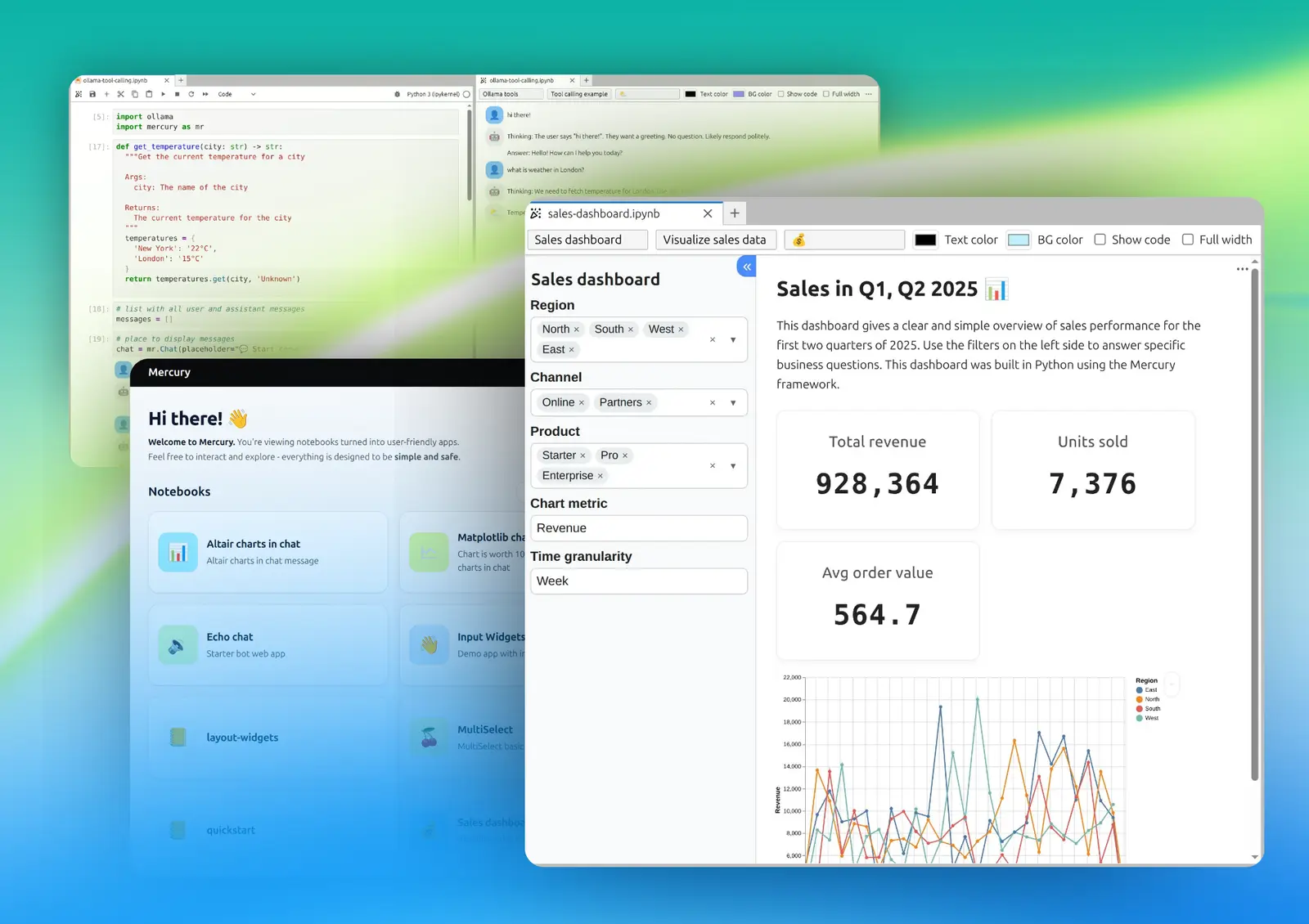
Turn your Python notebook into a web app
Build dashboards, calculators, and tools with Mercury. Share them with a link so anyone can use them in a browser. Publish one public Mercury app for free on MLJAR Cloud.
Free hosting for one public app. Your published app is publicly accessible.
See what you can publish
One notebook. A useful app anyone can open.
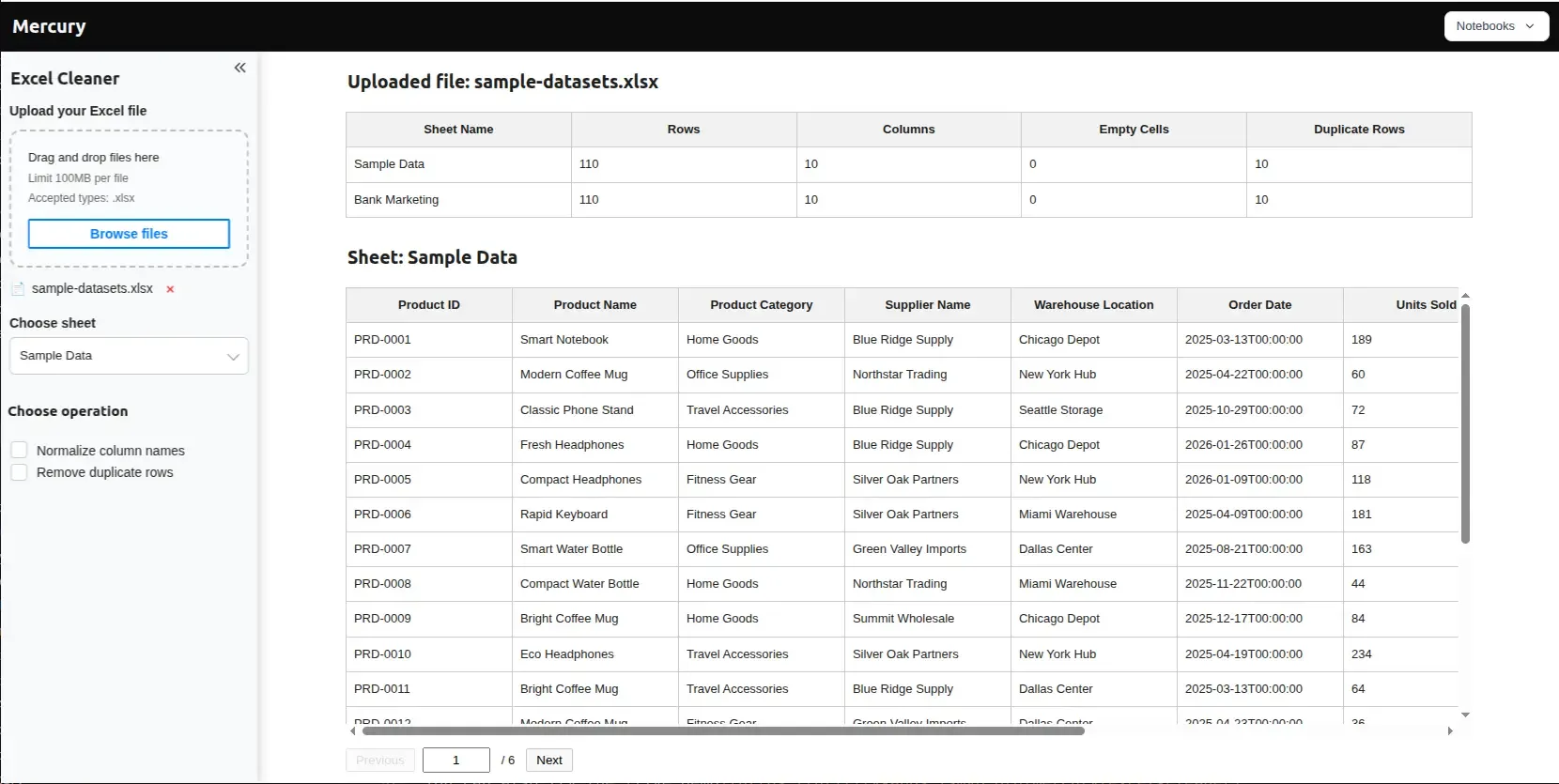
Excel Cleaner turns a spreadsheet cleanup notebook into a browser tool. Upload a workbook, choose a sheet, remove duplicate rows, and download the cleaned CSV.
The notebook behind the app
excel-cleaner.ipynb
An excerpt from the actual notebook: a Mercury upload widget accepts the workbook, and Python defines how duplicate rows are removed.
import mercury as mr

file = mr.UploadFile(
    label="Upload your Excel file",
    accept=".xlsx"
)

def remove_duplicate_rows(df):
    # Make a copy
    df_clean = df.copy()

    # Remove duplicate rows
    df_clean = df_clean.drop_duplicates()

    return df_clean
The full notebook includes sheet selection, cleaning controls, and CSV export. Install its dependencies: mercury, pandas, and openpyxl.
Your first public app
Publish your notebook in four steps
- 01
Create your free account
Register on MLJAR Platform. The free plan includes one public Mercury web app.
- 02
Open your notebook
Open the example or your own notebook in MLJAR Studio. Install its dependencies and preview the app.
- 03
Publish from Studio
Click Publish, choose your Mercury page, and select the notebook, requirements.txt, and any data files.
- 04
Share the app link
Open the address Studio provides and try the app. Share it with anyone who needs to use it in a browser.
Apps for real data work
What can you build?
Start with the notebook you already have and shape it into the interface your users need.
AI & Chat Apps
Build chatbots, RAG tools, and AI agents with a UI — straight from your notebook.
Explore AI appsDashboards
Turn your analysis into interactive dashboards your team can actually use.
Explore dashboardsWeb Apps & Tools
Ship internal tools, calculators, and forms without touching HTML or JavaScript.
Explore web toolsFlexible deployment
Start with one public app, hosted free
The free MLJAR plan includes one public Mercury web app. You can also run Mercury on your own infrastructure.
| Deployment | Self-hosted | MLJAR Cloud |
|---|---|---|
| Setup | Your Docker host or server | Managed for you |
| Cost | Free, open-source software | 1 public app free; paid plans for higher limits |
| Control | Full infrastructure and data control | MLJAR handles infrastructure |
| Best for | Private, internal, or custom deployments | The fastest path to a shareable link |
Free hosted apps are public. For private apps and higher publishing limits, see the pricing plans.
Simple by design
Why build with Mercury
No frontend code
Mercury handles layout, navigation, and styling automatically.
No callbacks
Changing a widget automatically recomputes the notebook cells below it.
Live preview
Preview the app inside JupyterLab or MLJAR Studio before deploying it.
Clean layout by default
Get a responsive interface without designing a separate frontend.
Runs from a notebook
Keep the analysis and application together in one familiar Python workflow.
Open source
Mercury is Apache-2.0 licensed and free to self-host.
Framework choices
Coming from another framework?
Here is the short version of how Mercury’s notebook-native workflow differs.
| Framework | The one-line difference |
|---|---|
| Streamlit | Streamlit reruns the app script by default and can scope work with fragments. Mercury works from a notebook and recomputes cells below the changed widget. |
| Gradio | Gradio is focused on wrapping models and functions. Mercury publishes complete notebooks as dashboards, reports, private tools, and chat interfaces. |
| Dash | Dash uses a callback-driven application structure. Mercury keeps the workflow in a notebook without callback wiring or HTML layout code. |
| Voilà | Voilà renders Jupyter widget notebooks. Mercury adds reactive widgets, ready-made styles, access protection, and a managed publishing path. |
See it in action
From notebook to app
Browse real Mercury apps, including chatbots, dashboards, data utilities, and custom interface examples.
FAQ
Common questions
What is a Python web app framework?+
A Python web app framework lets you build a browser-based interface — including forms, charts, dashboards, and tools — using Python. Mercury is built specifically to turn Jupyter notebooks into apps without rewriting them as a separate frontend application.
Do I need HTML, CSS, or JavaScript to build a web app in Python?+
No. Mercury generates the layout, navigation, and styling from your notebook and widgets, so you can build the application interface using Python.
Can I deploy a Mercury app for free?+
Yes. The free MLJAR plan includes hosting for one public Mercury web app. Register and publish your notebook to share it with a link. Mercury is also open source under Apache-2.0 and free to self-host; you provide the infrastructure.
What is the difference between self-hosting and MLJAR Cloud?+
Self-hosting with Docker gives you control over the infrastructure and data. MLJAR Cloud manages the application infrastructure so you can publish without configuring your own server.
Does Mercury work with JupyterLab, or only MLJAR Studio?+
It works with both. Mercury provides live app preview in JupyterLab through its extension and in MLJAR Studio. The live preview is not currently available in Google Colab or VS Code.
Is Mercury open source?+
Yes. Mercury is licensed under Apache-2.0 and developed openly on GitHub, where contributions are welcome.
Publish your first app free
Turn your notebook into a link you can share. Your free account includes hosting for one public Mercury app.
Prefer to run it locally? Follow the Mercury quickstart.