MLJAR Studio vs DataRobot

When choosing an AI tool for data analysis, MLJAR Studio and DataRobot support very different workflows.

DataRobot is an enterprise AI and AutoML platform designed to help organizations build, deploy, and manage machine learning models at scale. It focuses on automated model development, governance, and MLOps workflows for data science teams and large enterprises. This guide compares the two tools across privacy, notebook workflows, machine learning capabilities, and flexibility so you can decide which one fits your work better.

Fast Answer

Best for: MLJAR Studio vs DataRobot

Use this quick summary before reading the detailed feature tables and workflow notes.

QuestionMLJAR StudioDataRobot
Best for MLJAR Studioyou work with sensitive data and want notebooks, code, and datasets to stay local by defaultChoose DataRobot if you are buying an enterprise AI platform and need governance, observability, and shared platform operations.
Best for DataRobotChoose MLJAR Studio when you need local control, visible Python code, and a reproducible notebook artifact.you need SaaS, VPC, or on-prem deployment options to fit IT and compliance requirements
Migration difficultyLow if your current work can be exported to Python, CSV, or .ipynb; review package dependencies and data paths.Usually easiest to keep using DataRobot when your team already depends on its collaboration, hosting, or platform workflow.

TL;DR

Quick verdict

Choose MLJAR Studio if...

You need a real data science environment

You want to run notebooks and analysis locally and keep full control over where code and data live by default. You care about portable .ipynb notebooks, transparent Python code, and a workflow where AI generates code you can inspect and rerun. You want autonomous ML experimentation through AutoLab with results preserved as auditable notebook artifacts. You want to publish notebook results as a web app through Mercury without rebuilding the project as a separate application.

Choose DataRobot if...

You prefer DataRobot for its core workflow

You are buying an enterprise AI platform for organization-wide model development, deployment, monitoring, and governance. You want platform-style AutoML, model ranking, model registry, and MLOps workflows across SaaS, VPC, or on-prem deployments.

Feature Comparison

Side by side

A practical look at how MLJAR Studio and DataRobot differ across privacy, notebooks, AI assistance, and machine learning work.

FeatureMLJAR StudioDataRobot
Runs locally (on your computer)YesNo (SaaS, VPC, or on-prem platform)
Private data workflowsStrong (local by default)Strong (VPC or on-prem options)
Real Python notebooks (.ipynb)Yes (local files)Yes (Jupyter-compatible, import/export)
Conversational talk-to-dataYes (AI Data Analyst)Yes (Talk to My Data Agent template)
AutoML and autonomous ML experimentsYes (AutoLab Experiments)Yes (Autopilot + experiments)
Feature engineering automationYes (feature research in AutoLab outputs)Strong (Feature Discovery)
AI code generation in notebooksYes (context-aware assistant)Yes (Code Assistant in Notebooks)
Bring your own LLM or providerYes (BYO keys, Local LLM workflows, or hosted plan)Yes (provider APIs, gateway, or custom deployments depending on setup)
MLOps deployment and monitoringLimited (Mercury publishing, not a full MLOps suite)Strong (deployments, prediction environments, monitoring)
Pricing modelFree, $20/month Pro, $60/month Business, plus $199 perpetual licenseEnterprise contract + free trial

Where MLJAR Leads

What MLJAR Studio does better

MLJAR Studio is strongest when the work needs local execution, transparent Python code, and repeatable notebook-based machine learning.

Private by design

MLJAR Studio runs locally on your computer, so datasets, notebooks, and experiments stay under your control. You can also work with Local LLMs or connect your own AI provider.

Autonomous ML experiments

AutoLab can run machine learning experiments autonomously, exploring feature transformations, testing pipelines, and searching for stronger predictive performance.

Real Python environment

MLJAR Studio uses real Python notebooks, so you can work directly with pandas, scikit-learn, visualization libraries, and reproducible notebook workflows.

AI assistance with transparent code

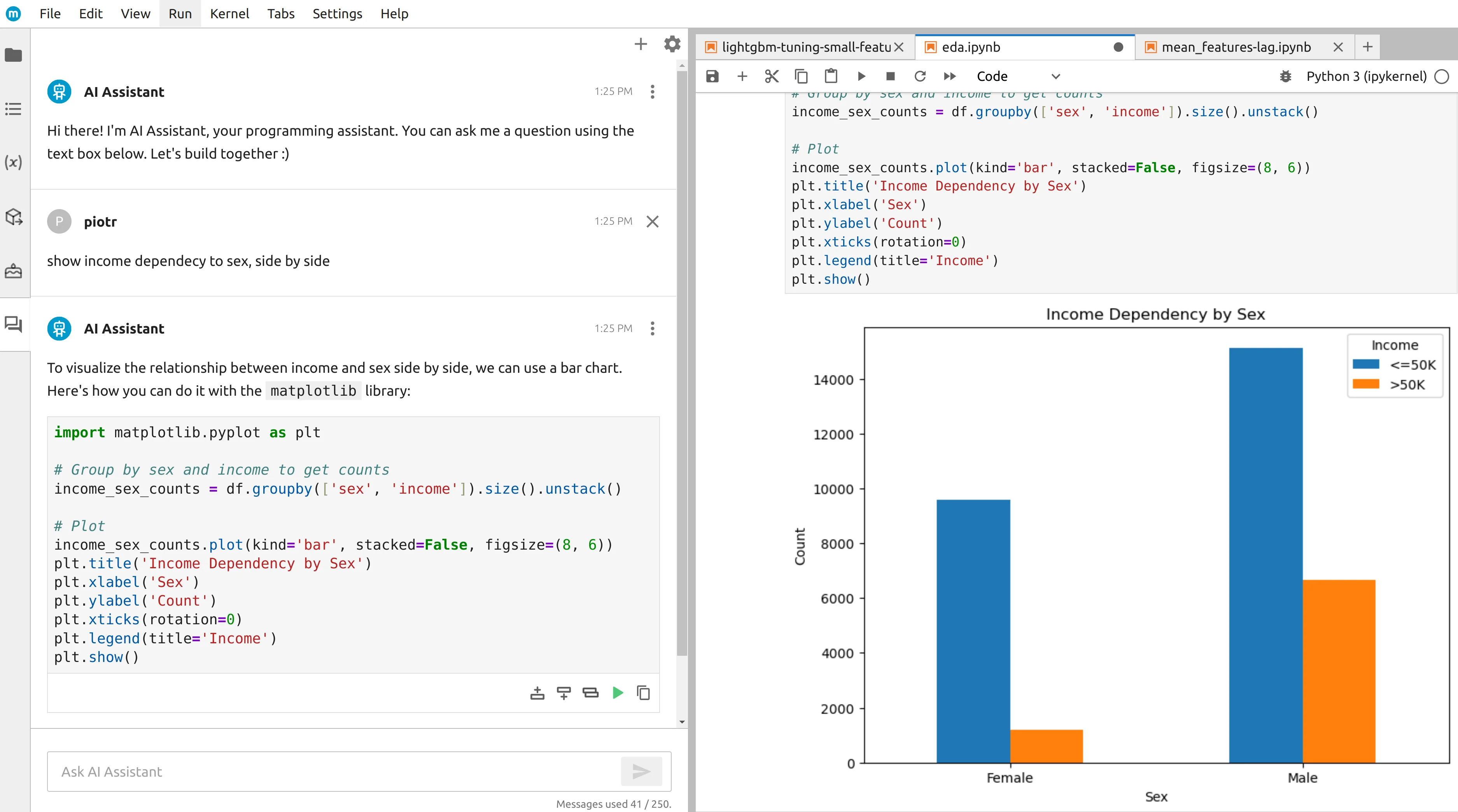
The built-in AI assistant helps with data exploration, code generation, and charting while keeping the generated Python visible, inspectable, and editable.

From notebooks to apps

You can convert notebook-based analysis into interactive web apps with Mercury, which makes sharing tools and dashboards much easier.

Flexible AI setup

Use the hosted Free, Pro, or Business plans in MLJAR Studio, or buy the perpetual license to run Local LLMs and connect your own AI provider keys.

Fair Assessment

What DataRobot does well

There are still good reasons to choose DataRobot, especially when its core workflow matches the job.

Enterprise platform with infrastructure choice

DataRobot explicitly supports multiple infrastructure models, including SaaS, VPC, and on-premise deployments, which makes it easier to fit enterprise IT and compliance requirements.

Mature AutoML with Autopilot and Leaderboard

DataRobot is built around platform-style AutoML, including Autopilot workflows and Leaderboard-based model ranking for fast comparison and selection.

MLOps deployment and monitoring

The platform includes deployment, prediction environments, monitoring, and management workflows for both DataRobot-built and external models.

Notebook support and code generation inside the platform

DataRobot Notebooks are Jupyter-compatible and support import/export of .ipynb files, while Code Assistant can generate code directly inside notebook cells.

Decision Guide

When to choose each tool

Use this section as a buyer guide: the right tool depends on where the work runs, who reviews it, and how often it must be repeated.

Choose MLJAR Studio when...

  • you work with sensitive data and want notebooks, code, and datasets to stay local by default
  • you want notebook-first workflows with portable .ipynb files as the main artifact of work
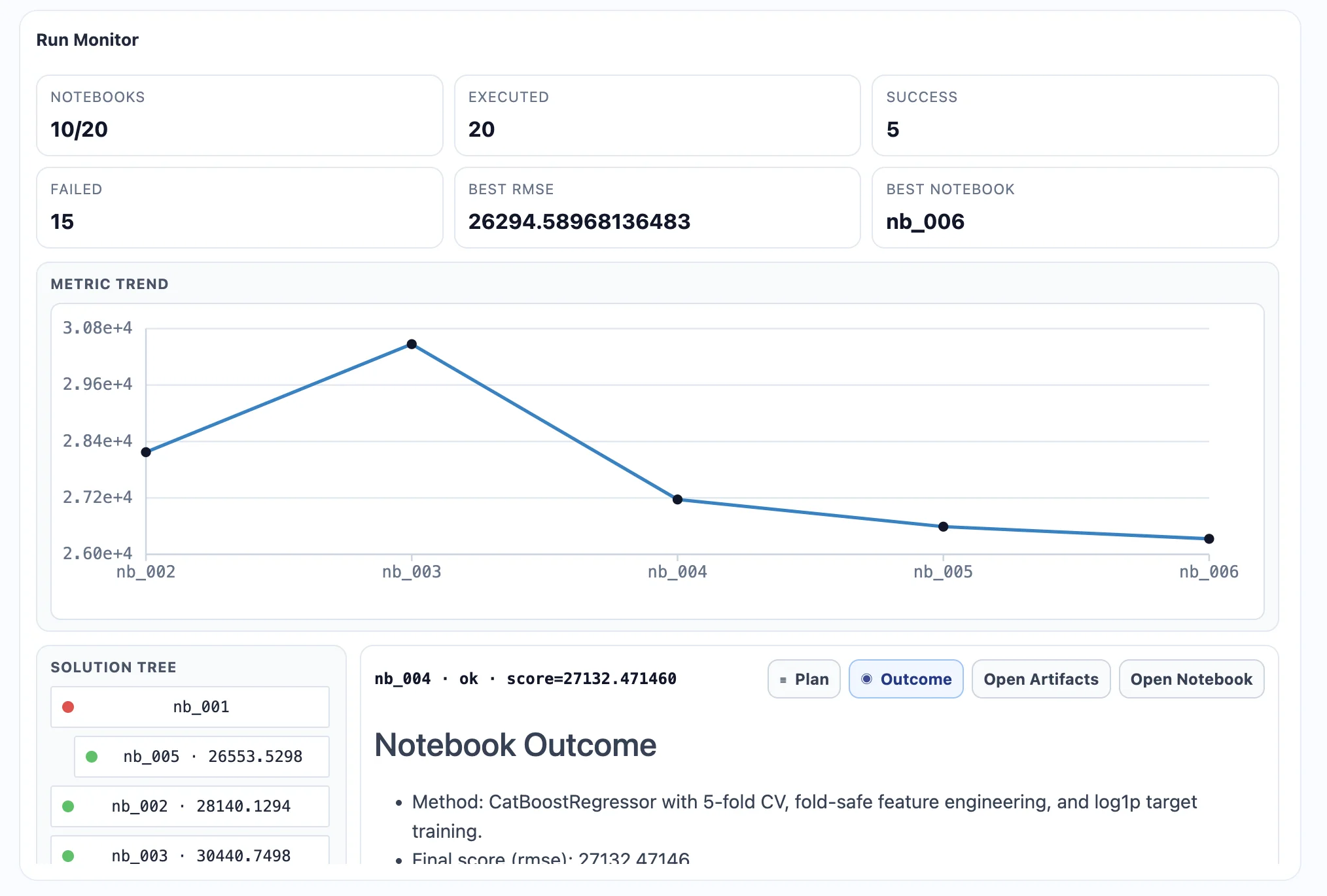
  • you want autonomous ML experiments where each trial is saved as a notebook through AutoLab
  • you prefer AI that generates readable Python code directly in the notebook
  • you want Local LLM workflows or your own provider keys instead of a platform-centered AI setup
  • you want to share outcomes as a web app without rewriting the analysis into a separate application

Choose DataRobot when...

  • you are buying an enterprise AI platform and need governance, observability, and shared platform operations
  • you need SaaS, VPC, or on-prem deployment options to fit IT and compliance requirements
  • you want platform AutoML through Autopilot plus model ranking, registry, and deployment workflows
  • you need MLOps deployment, prediction environments, and monitoring for many models
  • you want configurable LLM backends, provider APIs, or custom deployment options inside a larger enterprise AI platform

Detailed Comparison

Workflow differences in practice

A second table helps cover nuances around environment control, experimentation, and reproducibility.

FeatureMLJAR StudioDataRobot
Primary workflowDesktop and notebook-first: analysis, code generation, ML experiments, and outputs preserved in .ipynb notebooks.Enterprise platform workflow: AutoML and experiments lead into leaderboard ranking, model registration, deployment, monitoring, and governance.
Execution environmentLocal desktop application with a Python environment running on the user machine.Platform infrastructure delivered as SaaS, VPC, or on-premise rather than a desktop app.
Privacy modelData, notebooks, and code stay on the local machine by default; external AI calls depend on your chosen setup.Privacy and data residency depend on the selected deployment model and platform configuration.
Notebook transparencyAI works directly in notebooks and leaves behind editable Python code that can be rerun and maintained.Notebook transparency is strong inside DataRobot Notebooks, but part of the modeling and MLOps workflow is handled as a platform process rather than a notebook artifact.
AI assistance and code generationContext-aware AI Assistant understands the current notebook session and generates Python for analysis and ML tasks.Code Assistant generates code inside Notebooks, and agentic templates such as Talk to My Data Agent provide chat-based access to data workflows.
ML experimentationAutoLab runs autonomous trials and saves each experiment as a notebook, which supports review, reuse, and reproducibility.Autopilot can run broad model searches and place results on a Leaderboard, with platform workflows that can mark models as recommended for deployment.
Feature engineeringFeature research happens inside AutoLab outputs and can be extended directly in notebooks.Feature Discovery is a stronger built-in platform capability for automated feature engineering across datasets.
Deployment and monitoringResults are mainly shared through notebooks and Mercury apps rather than a full enterprise MLOps suite.DataRobot MLOps supports deployments, prediction environments, monitoring, and management of models in production.
Best fit userAnalysts, data scientists, and researchers who want local control, notebooks, AI assistance, and reproducible experiments.Organizations and teams that need an enterprise AI platform spanning experimentation, deployment, monitoring, and governance.
Pricing modelFree, Pro, and Business hosted plans, plus a separate $199 perpetual license with one year of updates for Local LLMs and your own provider keys.Enterprise contract pricing with a free trial available; official sources mention different trial lengths, so it is safest to treat trial duration as path-dependent.

Buyer Guide

How to think about DataRobot vs MLJAR Studio

The most useful comparison is not which product is universally better, but which workflow is better for the job in front of you.

Enterprise AI platform vs local notebook lab

DataRobot is built for organization-wide model development, deployment, monitoring, and governance. MLJAR Studio is built for analysts and data scientists who want a lighter local notebook lab with transparent code.

When DataRobot is the better enterprise choice

DataRobot is better when a team needs central model governance, deployment workflows, monitoring, and a platform procurement model across many users and production models.

When MLJAR Studio is lighter and faster

MLJAR Studio is better when the goal is to explore private data locally, generate notebook code with AI, run autonomous experiments, and share a result without adopting a full enterprise MLOps platform.

Migration

Move from DataRobot to MLJAR Studio

If you are moving from DataRobot, the usual shift is from a narrower workflow into a local notebook environment with more control over data, code, and AI setup.

Bring work into notebooks

Move recurring analysis into visible Python notebooks instead of keeping it inside a constrained interface.

Keep AI flexible

Use Local LLMs, your own API keys, or MLJAR AI depending on privacy, cost, and convenience requirements.

Ship results more cleanly

Keep the notebook reproducible or publish a Mercury app when the analysis needs a more polished interface.

Example Workflow

Local notebook to AI assistant to AutoLab to web app

In MLJAR Studio, you can start from a local notebook, explore the data with AI Assistant, run AutoLab experiments that save each trial as a separate notebook artifact, and then publish the final workflow as a Mercury web app for non-technical users.

1

Load your dataset

Open a CSV, Excel file, or any Python-accessible data source while keeping the work close to your own environment.

2

Explore with AI assistance

Ask questions in natural language and inspect the generated Python code directly inside the notebook workflow.

3

Run autonomous ML experiments

Use AutoLab to test features, compare models, and search for stronger performance instead of stopping at lightweight conversational outputs.

4

Review reproducible outputs

Keep the notebook, outputs, and code in a form that can be inspected, extended, and reused later.

5

Share as an app when needed

Turn a finished notebook into a Mercury app if you need a more polished interface for colleagues or stakeholders.

Product Proof

See the workflow

Screenshots from existing MLJAR Studio materials show the notebook, AutoLab, and app publishing workflow behind the claims.

MLJAR Studio AI assistant generating Python code in a notebook
AI-assisted notebook workflow
AutoLab dashboard with autonomous machine learning experiment runs
AutoLab experiment dashboard
Mercury web app generated from a Python notebook
Notebook to Mercury app

FAQ

Frequently asked questions

Is MLJAR Studio an alternative to DataRobot?+

Yes, in some workflows. MLJAR Studio is a strong alternative when you want local execution, notebook-first experimentation, transparent Python code, and simpler sharing through Mercury. DataRobot is usually the better fit when you need a broader enterprise AI platform with deployment, monitoring, and governance.

What is the main difference between MLJAR Studio and DataRobot?+

MLJAR Studio is built around a local, notebook-first workflow with AI assistance, AutoLab experiments, and portable .ipynb artifacts. DataRobot is built around an enterprise AI platform model with AutoML, model ranking, registry, deployment, monitoring, and governance across larger teams.

Which tool is better for private or sensitive data?+

If the priority is a simple local-first workflow where notebooks, code, and data stay on your machine, MLJAR Studio is usually the easier fit. DataRobot can also support private environments through VPC or on-prem deployments, but that is a platform infrastructure choice rather than a desktop default.

Which tool is better for data scientists?+

For individual data scientists and small teams who want notebook-first experimentation, portable .ipynb files, and direct control over Python workflows, MLJAR Studio often feels more natural. For organizations that need standard deployment, monitoring, and governance around many models, DataRobot is often a stronger purchasing fit.

Can both tools generate Python code?+

Yes. MLJAR Studio has an AI Assistant that generates Python in the context of the current notebook session. DataRobot also supports code generation through Code Assistant inside its Jupyter-compatible Notebooks.

Can DataRobot do machine learning experimentation?+

Yes. DataRobot supports AutoML experimentation through Autopilot and uses Leaderboard-based ranking to compare models, review build information, and identify candidates for deployment.

Do I need programming experience to use MLJAR Studio?+

Not necessarily for basic workflows, because MLJAR Studio includes AI Data Analyst and code assistance. Still, users who know Python usually get more value because they can review, adapt, and extend the generated notebook code.

How does pricing compare?+

MLJAR Studio has straightforward public pricing: a $199 perpetual license with one year of updates, plus hosted plans available as Free, Pro ($20/month), and Business ($60/month). DataRobot follows an enterprise pricing model, and while a free trial is available, official sources mention different trial lengths, so it is best described as trial availability that depends on the entry path.

Can DataRobot run locally?+

Not in the same sense as MLJAR Studio. DataRobot is not a desktop app that runs on your laptop; it is offered as platform infrastructure through SaaS, VPC, or on-premise deployment models.

Resources

Learn more

Review related MLJAR pages and official DataRobot resources before choosing a tool.

Last reviewed: May 6, 2026. Product features and pricing can change, so verify current details on official product pages before making a purchase decision.

Try MLJAR Studio

If you want a private AI data lab that supports real Python workflows, autonomous machine learning experiments, and full local control, MLJAR Studio is built for you.

No cloud account required. Runs on your machine.