
💬
Conversational AI Data Analyst
Ask questions about your data in plain English. MLJAR Studio generates and runs Python analysis locally, with full notebook visibility.
Learn about AI Data Analyst →MLJAR Studio is a desktop AI data science application that runs fully offline. It combines a conversational AI data analyst, automated machine learning, reproducible notebooks, and internal dashboard publishing in one tool, on your machine.
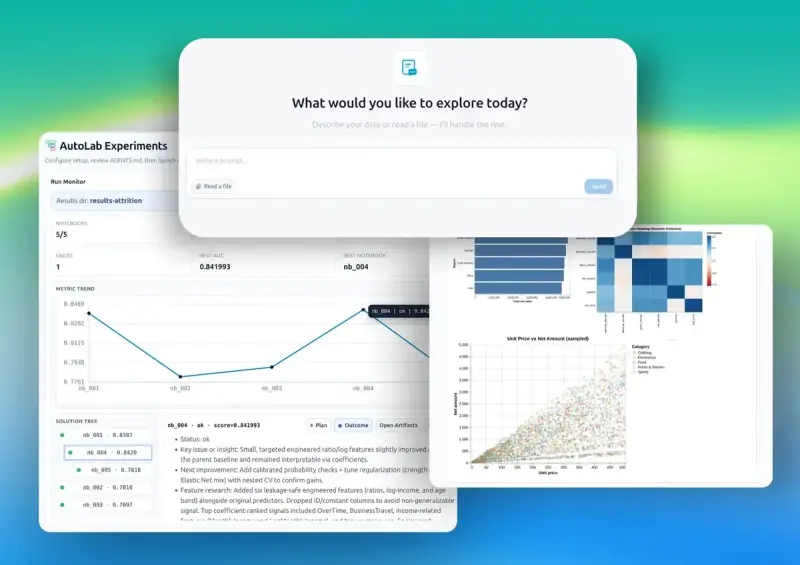
Five core tools, one desktop app
MLJAR Studio ships five integrated tools. No cloud subscriptions. No mandatory data upload. Each feature is built for private and reproducible workflows.
Ask questions about your data in plain English. MLJAR Studio generates and runs Python analysis locally, with full notebook visibility.
Learn about AI Data Analyst →Train, compare, and explain machine learning models automatically with local-first workflows and reproducible reports.
Learn about AutoML →Run iterative ML experiments automatically. Test features, models, and strategies, then review ranked outcomes in notebooks.
Learn about AutoLab →Use notebook-first workflows with AI support and full reproducibility. Keep outputs editable, versionable, and shareable.
Learn about Notebooks →Turn notebooks into internal dashboards and web apps without rebuilding analysis logic in another stack.
Explore Python apps →Use OpenAI, Anthropic, Ollama, or compatible APIs. In local mode, your data stays on your machine.
Configure your AI provider →Why offline-first matters
Local AI data analysis software processes your datasets on your own machine without mandatory external upload. This matters for healthcare, finance, pharma, government, and research teams working under strict privacy and governance constraints.
MLJAR Studio is designed for these environments. It runs offline, supports local LLMs with Ollama, and stores notebooks and outputs locally so your workflow stays controlled and reproducible.
Sensitive healthcare workflows can run locally without mandatory cloud upload.
Local execution helps teams keep tighter control over personal and regulated data.
Analysis, AutoML training, and notebook execution work in offline environments.
Run open-source models with Ollama and keep AI traffic inside your environment.
How MLJAR Studio compares
Cloud tools require data upload by design. MLJAR Studio combines local conversational analysis, AutoML, notebooks, and dashboard publishing in one desktop workflow.
| Feature | MLJAR Studio | Julius.ai | Hex | Deepnote |
|---|---|---|---|---|
| Runs fully offline | Yes | Cloud only | Cloud only | Cloud only |
| Data stays on your machine | Always | Uploaded | Uploaded | Uploaded |
| Conversational AI data analyst | Yes | Yes | Partial | Partial |
| Built-in AutoML | Full AutoML | No | No | No |
| Local LLM support (Ollama) | Yes | No | No | No |
| Jupyter notebook compatible | Yes | No | Partial | Yes |
| Dashboard publishing | Via Mercury | No | Yes | Partial |
| Pricing model | $199 one-time | Subscription | Subscription | Subscription |
Detailed comparisons: vs Julius · vs Jupyter · vs ChatGPT · vs DataRobot
By industry
Each solution page maps industry-specific challenges to practical local AI workflows in MLJAR Studio.
Private, offline-first AI data analysis software for healthcare teams. Explore patient data, run AutoML, and keep sensitive records on your machine.
MLJAR Studio is offline-first data analysis software for pharmaceutical research. AI data analyst, AutoML, and reproducible notebooks — patient data never leaves your machine.
Offline-first AI data analysis software for government teams. Analyze sensitive public-sector data locally with notebooks, AutoML, and configurable AI providers.
Offline-first AI data analysis software for finance teams. Analyze sensitive financial data, build models, and keep workflows local and reproducible.
AI-powered retail analytics software for customer data analysis, sales trends, segmentation, and forecasting — all in a local notebook-first workflow.
AI-powered business analytics software with local notebooks, AutoML, conversational analysis, and internal dashboard publishing.
Notebook-first AI data analysis software for academic research. Reproducible workflows, AutoML, AI assistance, and internal app publishing in one workspace.
Notebook-first AI data analysis software for education teams. Explore student and institutional data with AutoML, AI assistance, and local workflows.
Private AI workbench for machine learning teams. Local notebooks, AutoML, autonomous experiments, and reproducible ML workflows in one desktop app.
Notebook-first AI data science platform with local analysis, AutoML, AI assistance, and autonomous experiments in one desktop app.
Offline-first AI data analysis software for manufacturing teams. Explore production data, quality metrics, and machine signals with notebooks and AutoML.
Private AI data analysis software with local notebooks, AutoML, configurable LLM providers, and reproducible workflows for privacy-sensitive teams.
Common questions
Key answers about features, pricing, and privacy model.
MLJAR Studio is a desktop AI data analysis application that runs fully offline. It combines conversational analysis, AutoML, notebooks, autonomous experiments, and dashboard publishing in one local workflow.
Yes. MLJAR Studio is offline-first. You can run analysis and machine learning locally, and optionally connect cloud providers only when needed.
The architecture is designed for HIPAA and GDPR-friendly workflows. Because core processing is local, teams can reduce external data transfer risk.
The key difference is local execution. Cloud tools require uploading data to external servers, while MLJAR Studio keeps notebooks, datasets, and experiments on your machine.
MLJAR Studio has a $199 perpetual license (one-time payment) and a free account available through platform.mljar.com.
You can use OpenAI, Anthropic, Azure/OpenAI-compatible APIs, or local models via Ollama.
MLJAR Studio gives you a powerful environment for exploring data, running machine learning experiments, and building interactive analysis tools - all on your own computer.
No cloud services. No external APIs. Just real Python and local AI.
Runs locally • Supports local LLMs