MLJAR Studio vs ChatGPT Advanced Data Analysis

When choosing an AI tool for data analysis, MLJAR Studio and ChatGPT Advanced Data Analysis support very different workflows.

ChatGPT Advanced Data Analysis is a ChatGPT feature for uploading files and analyzing them through natural-language prompts. It generates and executes Python code in a secure cloud sandbox and returns charts, summaries, and statistical outputs directly in the chat interface, which makes it strong for ad-hoc exploratory analysis rather than persistent notebook-based workflows. This guide compares the two tools across privacy, notebook workflows, machine learning capabilities, and flexibility so you can decide which one fits your work better.

Fast Answer

Best for: MLJAR Studio vs ChatGPT ADA

Use this quick summary before reading the detailed feature tables and workflow notes.

QuestionMLJAR StudioChatGPT Advanced Data Analysis
Best for MLJAR Studioyou need persistent, reproducible notebooks that survive across sessions and daysChoose ChatGPT ADA if you need fast ad-hoc analysis on a dataset without any local setup.
Best for ChatGPT ADAChoose MLJAR Studio when you need local control, visible Python code, and a reproducible notebook artifact.you want fully automated code execution within a conversational interface
Migration difficultyLow if your current work can be exported to Python, CSV, or .ipynb; review package dependencies and data paths.Usually easiest to keep using ChatGPT ADA when your team already depends on its collaboration, hosting, or platform workflow.

TL;DR

Quick verdict

Choose MLJAR Studio if...

You need a real data science environment

Choose MLJAR Studio if you need reproducible notebooks where data, code, and results stay on your machine across sessions. It is the stronger fit when you want to inspect, modify, and reuse AI-generated Python code directly inside a persistent workflow. MLJAR Studio is also the better choice when you need autonomous ML experiments through AutoLab or want to publish analysis as interactive Mercury apps.

Choose ChatGPT ADA if...

You prefer ChatGPT ADA for its core workflow

Choose ChatGPT Advanced Data Analysis if you want to explore a dataset quickly through natural-language questions without setting up a local environment. It is usually the better fit for one-off, chat-driven analysis where convenience matters more than persistent notebooks, local execution, or long-term reproducibility.

Feature Comparison

Side by side

A practical look at how MLJAR Studio and ChatGPT ADA differ across privacy, notebooks, AI assistance, and machine learning work.

FeatureMLJAR StudioChatGPT Advanced Data Analysis
Runs locallyYes — desktop app, local-firstNo — cloud-based, runs in the browser
Data stays on your machineYes by defaultNo — files are uploaded for processing
Persistent notebooks (.ipynb)Yes — notebooks saved locally and reusableNo — analysis is session-based and the execution environment is temporary
Editable AI-generated codeYes — code appears in notebook cells and is fully editableView-only in chat; code can be copied out but not edited in place
Autonomous ML experimentsYes — AutoLabNot built in; ML code can be generated on request
Feature engineering searchYes — AutoLab explores transformationsNot built in; depends on prompts
Local LLM supportYesNo — tied to OpenAI models
Bring your own AI providerYesNo — OpenAI only
Convert notebooks to web appsYes — Mercury framework integratedNo built-in equivalent
ReproducibilityHigh — persistent local notebooks with code historyLimited — session-based and chat-oriented
Pricing modelFree/Pro/Business hosted plans + $199 perpetual licenseFree tier (limited); Plus, Pro, and business plans

Where MLJAR Leads

What MLJAR Studio does better

MLJAR Studio is strongest when the work needs local execution, transparent Python code, and repeatable notebook-based machine learning.

Private by design

MLJAR Studio runs locally on your computer, so datasets, notebooks, and experiments stay under your control. You can also work with Local LLMs or connect your own AI provider.

Autonomous ML experiments

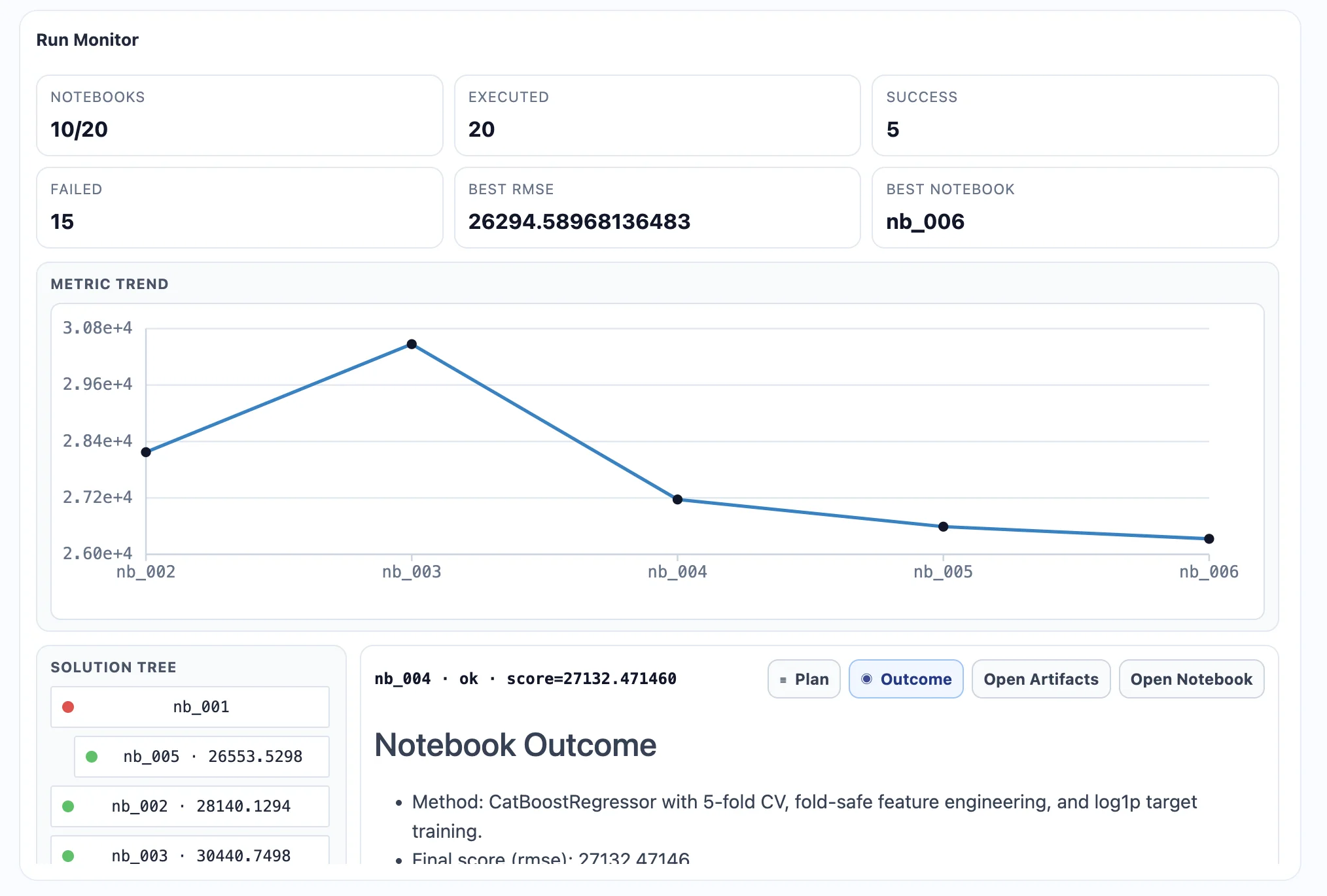
AutoLab can run machine learning experiments autonomously, exploring feature transformations, testing pipelines, and searching for stronger predictive performance.

Real Python environment

MLJAR Studio uses real Python notebooks, so you can work directly with pandas, scikit-learn, visualization libraries, and reproducible notebook workflows.

AI assistance with transparent code

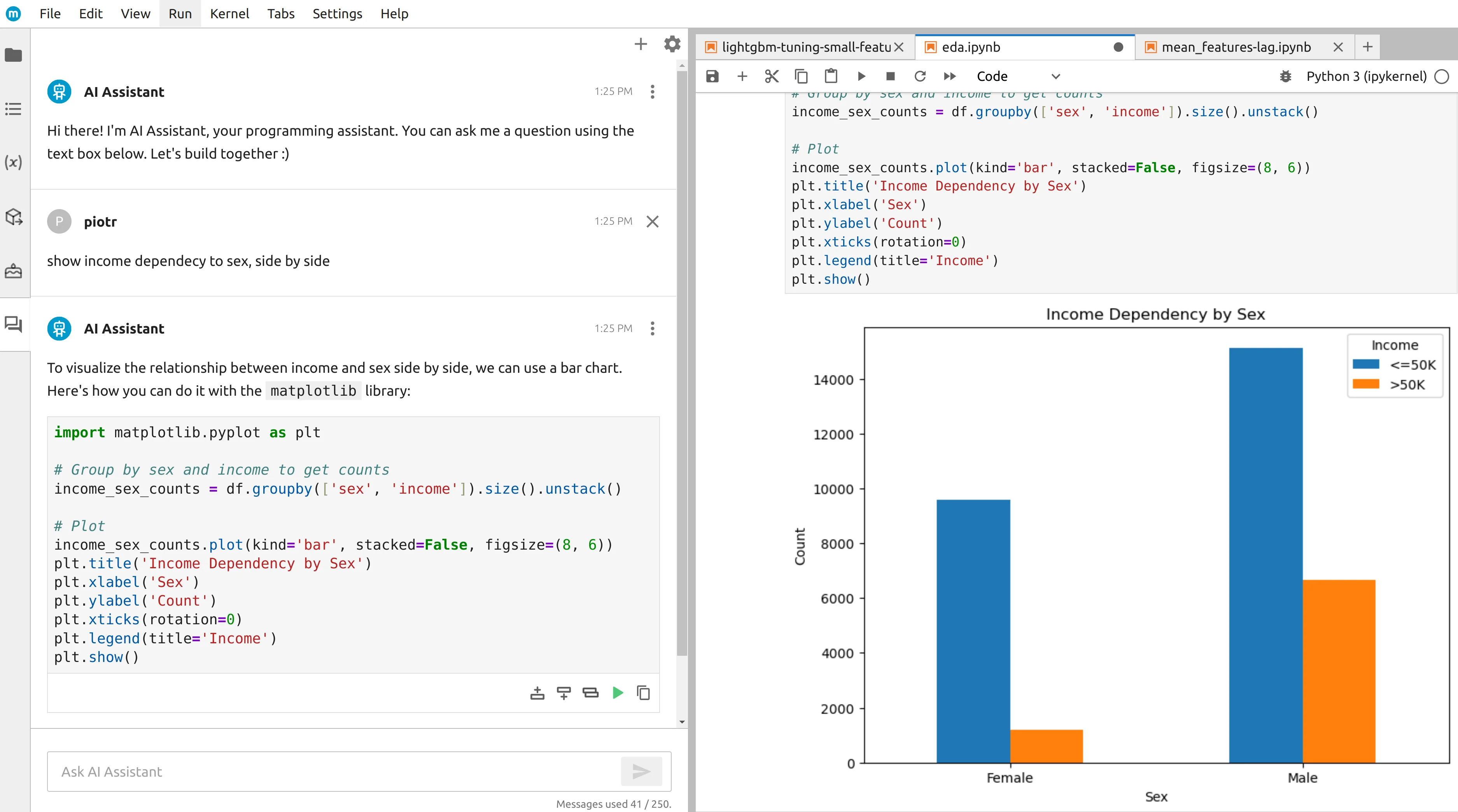
The built-in AI assistant helps with data exploration, code generation, and charting while keeping the generated Python visible, inspectable, and editable.

From notebooks to apps

You can convert notebook-based analysis into interactive web apps with Mercury, which makes sharing tools and dashboards much easier.

Flexible AI setup

Use the hosted Free, Pro, or Business plans in MLJAR Studio, or buy the perpetual license to run Local LLMs and connect your own AI provider keys.

Fair Assessment

What ChatGPT Advanced Data Analysis does well

There are still good reasons to choose ChatGPT ADA, especially when its core workflow matches the job.

Zero setup for quick exploration

ChatGPT ADA requires no installation, no environment configuration, and no notebook management. Upload a file, ask a question, and get a result, which makes it especially attractive for one-off analysis and fast exploratory work.

Conversational analysis flow

The chat interface makes follow-up questions, clarifications, and iterative exploration feel natural, especially for users who prefer asking for analysis in plain language instead of organizing notebook cells manually.

Automatic code generation and execution in one place

ChatGPT ADA both writes and runs Python code inside the same interface, which lowers the barrier for users who want results but do not want to manage a separate execution environment.

Broad file-format convenience

Because users can work with common data and document formats inside the same interface, ChatGPT ADA is convenient for mixed ad-hoc workflows involving spreadsheets, tabular data, and documents.

Part of the broader ChatGPT product

For users already paying for ChatGPT or using it for writing, coding, and research tasks, ADA fits naturally into a broader AI workflow without requiring a separate tool.

Decision Guide

When to choose each tool

Use this section as a buyer guide: the right tool depends on where the work runs, who reviews it, and how often it must be repeated.

Choose MLJAR Studio when...

  • you need persistent, reproducible notebooks that survive across sessions and days
  • you want to inspect, edit, and reuse all AI-generated Python code
  • you work with sensitive data that cannot be uploaded to a cloud service
  • you need AutoLab to run autonomous ML experiments and feature engineering
  • you want to publish analysis as interactive web apps via Mercury
  • you need flexible AI provider options including Local LLMs
  • you want a predictable one-time license rather than monthly subscription usage

Choose ChatGPT ADA when...

  • you need fast ad-hoc analysis on a dataset without any local setup
  • you want fully automated code execution within a conversational interface
  • you are already using ChatGPT and want data analysis within the same tool
  • you are not comfortable with Python notebooks and prefer a chat-driven experience
  • you need quick insights from mixed file types in a single interface

Detailed Comparison

Workflow differences in practice

A second table helps cover nuances around environment control, experimentation, and reproducibility.

FeatureMLJAR StudioChatGPT Advanced Data Analysis
Primary workflowLocal Python notebook IDE: AI-assisted analysis, autonomous ML experiments, persistent notebooks, and Mercury app publishing.Conversational AI workflow where users upload files, ask questions in natural language, and receive results inside a chat session.
Execution environmentRuns entirely on your local machine, so data and code stay in your own environment by default.Runs in a cloud sandbox where code is executed temporarily as part of a chat workflow rather than a persistent notebook environment.
Privacy modelLocal-first by default; no data upload is required unless you choose an external AI provider.Files are uploaded for processing, and privacy behavior depends on plan type, workspace context, and settings.
Code transparencyAll AI-generated code appears directly in notebook cells and stays fully visible, editable, and rerunnable.Generated code can be viewed and copied, but the interface is not designed as an editable notebook workflow.
ReproducibilityHigh: .ipynb notebooks and code history remain available locally, so analyses can be revisited and rerun at any time.More limited: analysis is tied to chat sessions and temporary execution environments rather than a persistent local notebook artifact.
ML experimentationAutoLab runs autonomous experiments with feature search, pipeline comparison, and performance optimization.ML code can be generated on request, but experimentation remains prompt-driven and there is no built-in autonomous pipeline search.
Sharing resultsMercury publishes notebooks as interactive web apps, and .ipynb files remain portable.Results can be reviewed and shared through the chat experience, but there is no built-in notebook-to-app publishing workflow.
AI provider flexibilitySupports your own API keys, Local LLMs, third-party providers, or the hosted Free, Pro, or Business plans.Tied to OpenAI models and infrastructure rather than a bring-your-own-provider model.
Best fit userData scientists and analysts who need persistent, private Python workflows with AI assistance and autonomous experimentation.Business users, analysts, and non-programmers who need fast exploratory analysis without setting up a local environment.
Pricing modelFree, Pro, and Business hosted plans, plus a separate $199 perpetual license with one year of updates for Local LLMs and your own provider keys.Free tier with limited usage plus paid consumer and business plans depending on access level and privacy needs.

Buyer Guide

How to think about ChatGPT ADA vs MLJAR Studio

The most useful comparison is not which product is universally better, but which workflow is better for the job in front of you.

When ChatGPT Advanced Data Analysis is enough

ChatGPT ADA is a good fit when you need a fast answer from a small file, want to stay in a chat interface, and do not need to keep a reusable notebook artifact. It is especially convenient for early exploration, quick charting, and non-recurring questions.

When to move from ChatGPT ADA to MLJAR Studio

Move the work into MLJAR Studio when the analysis becomes part of a repeatable workflow: code needs review, data should stay local, experiments need to be rerun, or stakeholders need a notebook or Mercury app instead of a chat transcript.

Example: quick CSV chat vs reproducible notebook

A quick revenue CSV question can start in ChatGPT. A monthly churn analysis should live in MLJAR Studio, where AI-generated Python stays in notebook cells, AutoLab can compare models, and the final analysis can be shared as an app.

Migration

Move from ChatGPT Advanced Data Analysis to MLJAR Studio

If you are moving from ChatGPT Advanced Data Analysis, the usual shift is from a narrower workflow into a local notebook environment with more control over data, code, and AI setup.

Bring work into notebooks

Move recurring analysis into visible Python notebooks instead of keeping it inside a constrained interface.

Keep AI flexible

Use Local LLMs, your own API keys, or MLJAR AI depending on privacy, cost, and convenience requirements.

Ship results more cleanly

Keep the notebook reproducible or publish a Mercury app when the analysis needs a more polished interface.

Example Workflow

From chat-style exploration to a reproducible, shareable analysis

A data analyst who has been exploring a customer dataset in ChatGPT ADA can move the workflow into MLJAR Studio when the analysis needs to become persistent and reusable. In MLJAR Studio, AI-generated Python code lands directly in notebook cells, AutoLab can run autonomous ML experiments on churn prediction, and the final result can be published as a Mercury app instead of remaining trapped inside a past chat session.

1

Load your dataset

Open a CSV, Excel file, or any Python-accessible data source while keeping the work close to your own environment.

2

Explore with AI assistance

Ask questions in natural language and inspect the generated Python code directly inside the notebook workflow.

3

Run autonomous ML experiments

Use AutoLab to test features, compare models, and search for stronger performance instead of stopping at lightweight conversational outputs.

4

Review reproducible outputs

Keep the notebook, outputs, and code in a form that can be inspected, extended, and reused later.

5

Share as an app when needed

Turn a finished notebook into a Mercury app if you need a more polished interface for colleagues or stakeholders.

Product Proof

See the workflow

Screenshots from existing MLJAR Studio materials show the notebook, AutoLab, and app publishing workflow behind the claims.

MLJAR Studio AI assistant generating Python code in a notebook
AI-assisted notebook workflow
AutoLab dashboard with autonomous machine learning experiment runs
AutoLab experiment dashboard
Mercury web app generated from a Python notebook
Notebook to Mercury app

FAQ

Frequently asked questions

Is MLJAR Studio an alternative to ChatGPT Advanced Data Analysis?+

Yes, especially for ongoing data science work. ChatGPT ADA is excellent for fast conversational exploration, but MLJAR Studio is stronger when analysis needs to become persistent, reproducible, editable, and shareable outside a single chat session.

What is the main difference between MLJAR Studio and ChatGPT Advanced Data Analysis?+

The main difference is persistence and workflow shape. ChatGPT ADA is chat-based and session-oriented, with code executed in a temporary cloud environment. MLJAR Studio is a local notebook IDE where generated code becomes part of a persistent .ipynb workflow that you can inspect, edit, and rerun whenever needed.

Which tool is better for private or sensitive data?+

MLJAR Studio is usually the better fit because it runs locally and keeps datasets on your machine by default. ChatGPT ADA requires file upload for processing, which can be acceptable in some contexts but is often a blocker for regulated, client-confidential, or proprietary data workflows.

Can I edit the Python code that ChatGPT Advanced Data Analysis generates?+

You can view and copy the generated code, but ChatGPT ADA is not a full editable notebook environment. In MLJAR Studio, generated Python code appears directly in standard notebook cells, so you can modify it, rerun it, and turn it into part of a larger documented workflow.

Does ChatGPT ADA support autonomous ML experimentation like AutoLab?+

Not in the same way. ChatGPT ADA can generate ML code when prompted, but the process remains step-by-step and user-driven. AutoLab in MLJAR Studio is built specifically for autonomous experimentation, feature search, and pipeline optimization without needing a fresh prompt for every iteration.

Which tool is better for data scientists?+

MLJAR Studio is usually the better fit for data scientists who need reproducible notebooks, code transparency, ML experimentation, and local control. ChatGPT ADA is often better for quick exploration, business users, or early-stage question answering before work moves into a more persistent environment.

Do I need programming experience to use MLJAR Studio?+

Not necessarily to start. MLJAR Studio’s AI assistant can generate Python code from natural-language prompts, and AutoLab can reduce manual setup for ML work. The main difference from chat-only tools is that MLJAR Studio expects the analysis to grow into a reusable notebook workflow rather than remain a temporary conversation.

How does pricing compare?+

ChatGPT ADA is available through ChatGPT plans, including a limited free tier and paid plans such as Plus and Pro. MLJAR Studio uses a $199 perpetual license with one year of updates included, plus hosted plans available as Free, Pro ($20/month), and Business ($60/month). If you mainly need occasional ad-hoc exploration, ChatGPT pricing may be enough. If you need a persistent data science workspace, MLJAR Studio’s one-time license usually makes more sense.

Resources

Learn more

Review related MLJAR pages and official ChatGPT ADA resources before choosing a tool.

Last reviewed: May 6, 2026. Product features and pricing can change, so verify current details on official product pages before making a purchase decision.

Try MLJAR Studio

If you want a private AI data lab that supports real Python workflows, autonomous machine learning experiments, and full local control, MLJAR Studio is built for you.

No cloud account required. Runs on your machine.