What Is an AI App in Python?

Chatbots, RAG tools, and agents all combine language-model calls with an interface people can use. See what separates them and how to build one from a notebook you are already writing.

4.3k GitHub starsOpen sourceApache-2.0
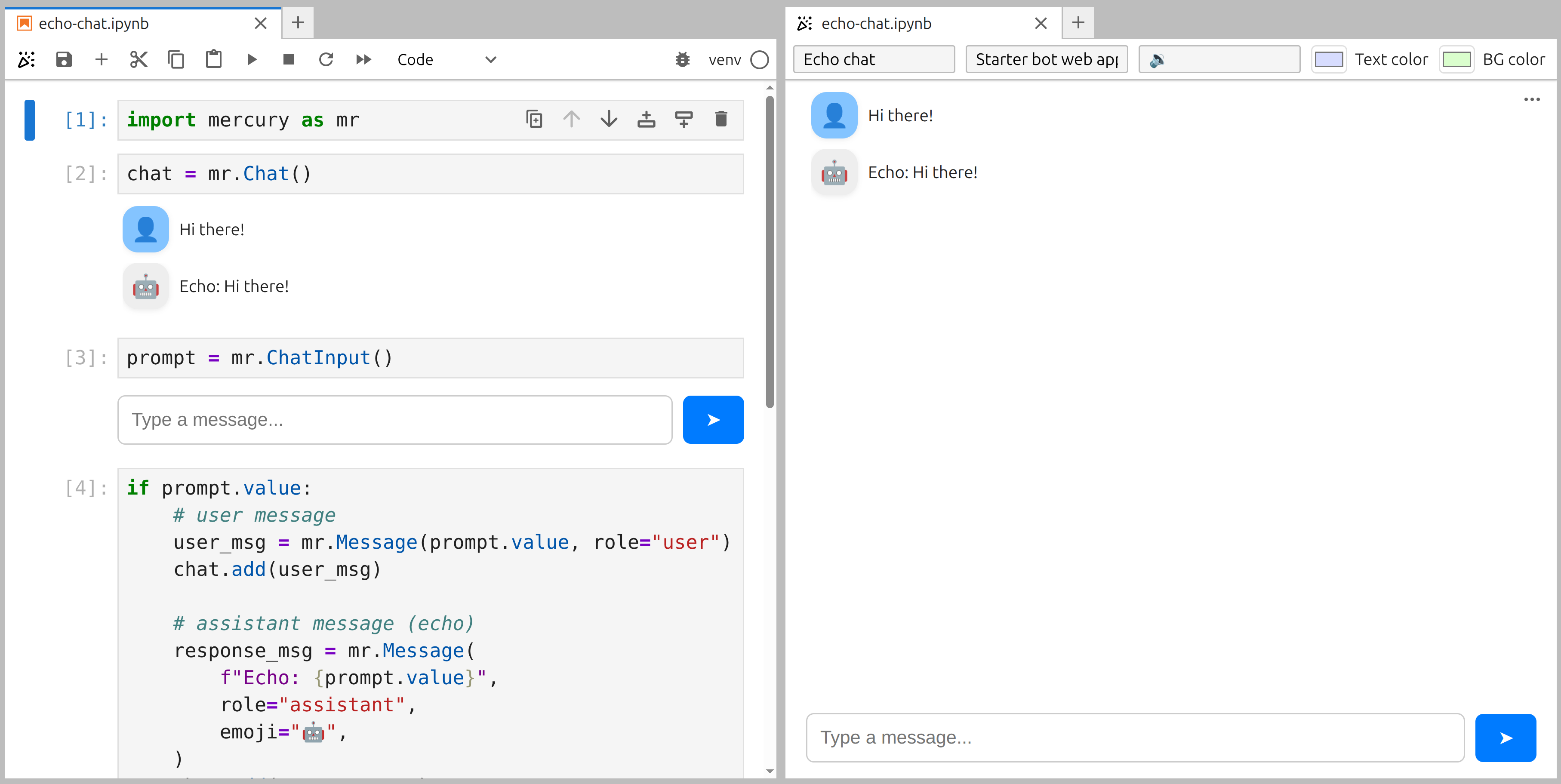
A Jupyter notebook and its live Mercury chat app preview side by side

What is an AI app in Python?

In practical terms, an AI app is an application whose central interaction includes a call to a language model. The interface lets someone use that model without opening a notebook, running a cell, or reading the Python code behind it.

The application might answer a question directly, search documents before answering, or take several actions with external tools. These experiences share the same basic shape: accept input, send useful context to a model, and present the result. That shape stays the same whether the model is hosted by a cloud provider or runs on infrastructure you control.

Three common categories

Chatbot, RAG, or agent?

The difference is in what your Python code does after receiving the prompt. The browser interface can stay the same.

Chatbot

A conversational interface around direct language-model calls. The user sends a message, the model produces a response, and the conversation history provides context for the next turn.

Support assistants, research helpers, and question-answering tools

RAG

Retrieval-Augmented Generation

A chat experience that retrieves relevant passages from documents or a knowledge base before asking the model to answer. The retrieved context helps ground the response in information you control.

Document search, internal knowledge tools, and chat with your data

Agent

A language model paired with tools or function calling. Instead of only returning text, it can choose an action, call an API, run a calculation, inspect the result, and continue through several steps.

Workflow assistants, database tools, and multi-step automation

Mercury does not have a separate mode for each category. The same Chat, ChatInput, and Message widgets display the conversation while your Python code handles retrieval, model calls, tools, and business logic.

The interface

Start with the same three chat widgets

First build the smallest working conversation. Then replace the echo response with your model, retrieval pipeline, or agent logic.

simple-chat.ipynb
[1]
import mercury as mr
[2]
chat = mr.Chat()
[3]
prompt = mr.ChatInput()
[4]
if prompt.value: user_msg = mr.Message(prompt.value, role="user") chat.add(user_msg) response_msg = mr.Message( f"Echo: {prompt.value}", role="assistant", emoji="🤖", ) chat.add(response_msg)

Chat displays messages, ChatInput receives the prompt, and Message renders each side of the conversation.

A real chat experience

Stream the model response as it arrives

The provider call belongs to your Python code. Mercury updates the assistant message one chunk at a time.

streaming-ai-chat.ipynb
[1]
import mercury as mr # This cell stays above the input widget, so the list # remains available when cells below the widget run again. messages = []
[2]
chat = mr.Chat()
[3]
prompt = mr.ChatInput()
[4]
if prompt.value: user_msg = mr.Message(prompt.value, role="user") chat.add(user_msg) messages.append({"role": "user", "content": prompt.value}) # Use the streaming client you already have: # OpenAI, Anthropic, Ollama, or another provider. stream = llm_client.chat(messages=messages, stream=True) ai_msg = mr.Message(role="assistant", emoji="🤖") chat.add(ai_msg) content = "" for chunk in stream: ai_msg.append_markdown(chunk.text) content += chunk.text messages.append({"role": "assistant", "content": content})

append_markdown() updates the assistant message as chunks arrive. Replace llm_client and chunk.text with the API used by your chosen provider.

The conversation list is created above ChatInput. When the input changes, Mercury runs the cells below that widget, so the earlier conversation state remains available for the next model call.

Your model, your infrastructure

Local models work with the same interface

Mercury does not choose the language model for you. Your notebook can call OpenAI, Anthropic, another hosted provider, or a model running on your own machine through Ollama. The Chat, ChatInput, Message, and streaming pattern do not change.

For an English walkthrough, follow the local streaming chatbot tutorial. You can also read the complete Bielik and Ollama example on the MLJAR blog (in Polish).

FAQ

Questions about building AI apps in Python

Does Mercury support streaming responses?+

Yes. Create the assistant message without initial content, add it to the chat, and call append_markdown() as chunks arrive. The message updates on screen during generation.

Does this work with LangChain, LlamaIndex, or CrewAI?+

Yes. These libraries run as ordinary Python in your notebook cells. Mercury provides the browser interface and does not require a framework-specific integration.

Can I use a local model instead of a cloud API?+

Yes. The same Chat, ChatInput, and Message widgets work whether your Python code calls a hosted model or a model running locally through a client such as Ollama.

Do I need a GPU or special hosting to run a local model?+

Mercury does not require or restrict particular model hardware. CPU, GPU, memory, and hosting requirements depend on the model and inference software you choose.

Is this secure enough for an internal AI tool?+

Mercury includes shared-password protection for self-hosted apps. User-based, multi-account authentication is available separately when individual access control is needed. Read about authentication.

Build an AI app from your notebook

Add a chat interface to the Python code you already have, preview it in the browser, and share it with the people who need it.

pip install mercury