
10 ways to make predictions with Machine Learning model
You trained a model. It performs well on test data, the metrics look good, and you're ready to put it to work. But training is only half the job — getting predictions out of a model and into the hands of people or systems that need them is where machine learning meets the real world.
The good news: there is no single right way to do it. A fraud detection system needs predictions in milliseconds. A weekly churn report can wait overnight. A doctor using a diagnostic tool needs a simple form, not a Python script. The method you choose depends on who needs the predictions, when they need them, and how often.
This article walks through 10 practical ways to deploy a trained model for predictions — from simple file-based scripts to real-time APIs and user-facing apps. Each method suits a different situation, and knowing the options helps you pick the right one for your use case.
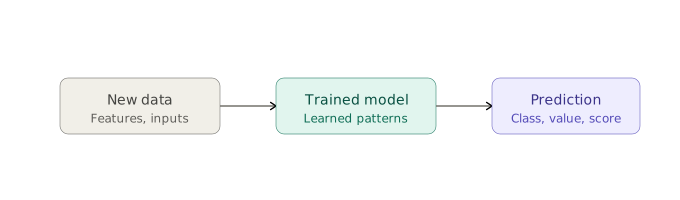
What does it mean to apply a trained ML model?
Every method in this article follows the same underlying pattern: you feed new data in, and the model returns a prediction. That's it.
During training, the model learned patterns from historical data — relationships between input features and the target outcome. Once training is done, the model is fixed. Applying it means passing new, unseen data through those learned patterns to get a prediction: a class label, a probability, a numerical value, or a score.
This step is called inference. It is separate from training. You train a model once (or periodically retrain it), but you can run inference thousands of times — in a script, an API, a web app, or anywhere else. The 10 methods below are all different answers to the same question: where and how does that inference step happen?
1. Batch predictions on a CSV file
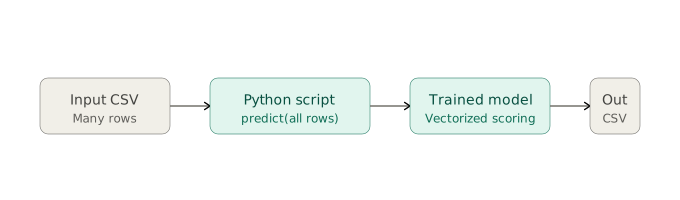
The simplest way to get predictions out of a model is to load a CSV file, score every row, and save the results. You write a short Python script, run it once, and end up with a new file where each row has a prediction column added.
This approach requires no infrastructure — no server, no database, no API. It is a good fit for one-off analysis jobs, for sharing results with colleagues who work in spreadsheets, or for prototyping before committing to a more complex deployment.
The main limitation is that it is manual. Someone has to run the script, and the predictions are only as fresh as the last time it was run. For exploratory work or periodic reporting where timeliness is not critical, that is usually fine.
When to use it: Ad-hoc scoring, sharing predictions with non-technical teammates, early-stage projects where simplicity matters more than automation.
2. Save predictions to a database
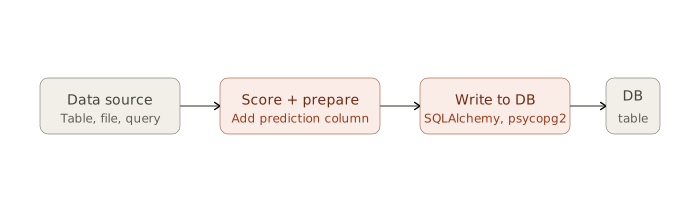
A natural next step from the CSV approach is to write predictions directly into a database table instead of a file. The model runs the same way — it scores a batch of records — but the results land somewhere that other systems and people can query.
This makes predictions shareable across teams without passing files around. A dashboard can read from the predictions table. Another application can join it with other data. An analyst can query it with SQL. The predictions become a persistent, queryable artifact rather than a one-time export.
The tradeoff is a small amount of additional setup: a database connection, a table schema, and logic to handle updates or avoid duplicates on subsequent runs.
When to use it: When predictions need to feed dashboards, be queried by multiple teams, or integrate with other applications that already read from a database.
3. Scheduled job
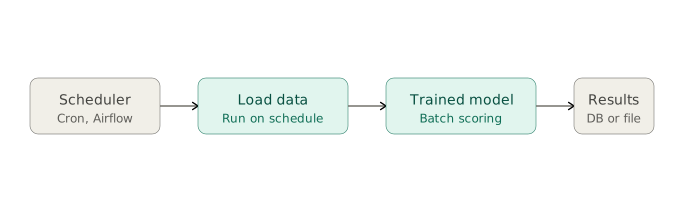
Instead of running a scoring script manually, you schedule it. A cron job or workflow scheduler triggers the script automatically — every night, every hour, or on whatever cadence makes sense. The script pulls fresh data, scores it, and stores the results. Nobody has to press a button.
This is batch scoring made automatic. The model is not running continuously — it wakes up, does its work, and goes back to sleep. Between runs, the predictions sitting in storage may be hours or days old, which is fine for many use cases.
Tools like cron (Linux), Windows Task Scheduler, or orchestration platforms like Airflow and Prefect all serve this purpose at different levels of complexity.
When to use it: Nightly risk scoring, weekly customer segmentation, regular reporting pipelines — any situation where fresh-enough predictions on a fixed schedule are sufficient.
4. REST API
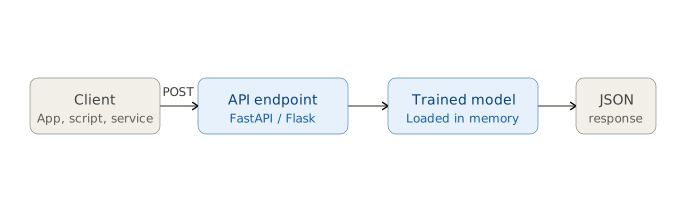
A REST API turns your model into a service. You wrap the model in a web server that exposes an endpoint — any application sends an HTTP request with input data, and gets a prediction back in the response. The model stays loaded in memory, ready to score requests as they arrive.
This is the standard integration pattern when other software needs predictions. A mobile app, a website, an internal business tool — they all speak HTTP, so they can all call your model without knowing anything about Python or machine learning.
Frameworks like FastAPI and Flask make it straightforward to build. The server runs continuously, and each request is handled independently, which also means the API can scale horizontally to handle high traffic.
When to use it: When predictions need to be available to other applications in real time, especially across different languages, teams, or systems.
5. Embedded in another Python app
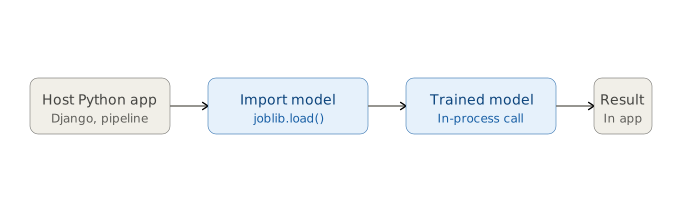
If the application that needs predictions is already written in Python, you do not necessarily need a separate API server. You can load the model directly inside the application and call it as a function — no HTTP request, no network overhead, just an in-process function call.
The model is loaded once when the application starts and reused for every prediction. This is simpler to set up than a REST API and faster at runtime, because there is no serialization or network round-trip involved.
The limitation is tight coupling: the model and the application share the same process and the same Python environment. Updating the model means redeploying the whole application.
When to use it: Internal Python services, data pipelines, backend applications where the model is one component among many and a separate API would add unnecessary complexity.
6. Streaming predictions
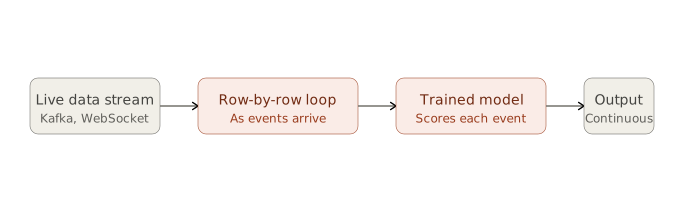
Batch scoring waits for data to accumulate, then processes it all at once. Streaming does the opposite — each record is scored the moment it arrives, as part of a continuous flow of data.
In a streaming setup, data comes from a source like Kafka, a WebSocket, or an event queue. The model sits in the processing pipeline and scores each event individually, emitting a prediction downstream in near real time. There is no waiting, no batching, no scheduled run — prediction happens continuously.
This approach requires more infrastructure than the batch methods, but it is the only option when the value of a prediction depends on acting immediately — stopping a fraudulent transaction before it clears, flagging an anomaly before it escalates, or serving a recommendation before the user clicks away.
When to use it: Fraud detection, real-time anomaly monitoring, live recommendation systems — anywhere latency is critical and data arrives as a continuous stream.
7. Embedded device
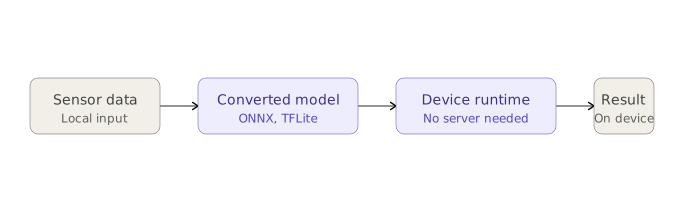
All the previous methods assume the model runs on a server or a developer's machine. Edge deployment flips that: the model runs directly on the device where the data is generated — a smartphone, a security camera, an industrial sensor, a medical instrument.
To run on constrained hardware, the model is typically converted to a lightweight format like ONNX or TensorFlow Lite. This strips away the training infrastructure and optimizes the model for fast, low-memory inference. Once deployed, it runs locally with no network connection required.
The benefits are significant: no latency from a round-trip to a server, no dependency on connectivity, and no raw data leaving the device — which matters for privacy-sensitive applications. The tradeoff is that updating the model means pushing an update to potentially many devices.
When to use it: IoT sensors, mobile apps, offline environments, privacy-sensitive use cases, or anywhere sending data to a remote server is too slow, too expensive, or not permitted.
8. Web app for domain experts
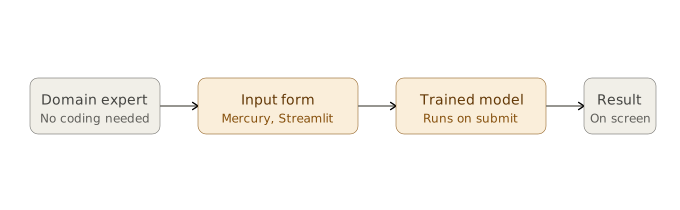
A web app puts a simple interface in front of the model. The user fills in a form — no Python, no CSV, no command line — and sees the prediction displayed on screen. The model runs behind the scenes, invisible to the person using it.
This is the most accessible delivery method. A doctor, financial analyst, or HR manager can use it without any technical knowledge. They understand the inputs and the outputs; they do not need to understand the model.
Tools like Mercury and Streamlit make it possible to build these interfaces directly from a Jupyter notebook, without writing frontend code. The result is a functional web app in a fraction of the time it would take to build one from scratch.
When to use it: When the end user is a domain expert rather than a developer — anyone who understands the business problem but should not need to touch code to get a prediction.
9. Spreadsheet plugin
For many professionals, the spreadsheet is the primary working environment. A spreadsheet plugin brings predictions into that environment rather than asking users to adopt a new tool.
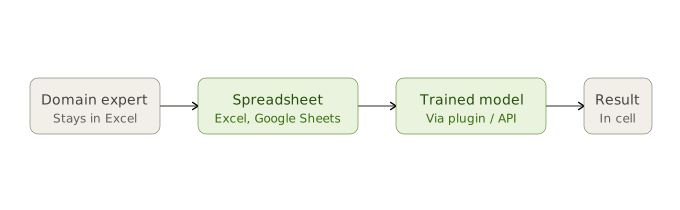
The user enters values in their normal spreadsheet workflow. A plugin or add-in calls the model in the background and writes the prediction back into a cell. From the user's perspective, it behaves like a formula — input goes in, result comes out.
This approach has essentially zero learning curve for users who already work in Excel or Google Sheets. The technical work lives in the plugin, which typically calls a REST API under the hood.
When to use it: Finance, operations, and HR teams who live in spreadsheets and need predictions as part of their existing workflow — without switching to a new tool.
10. Email or Slack bot
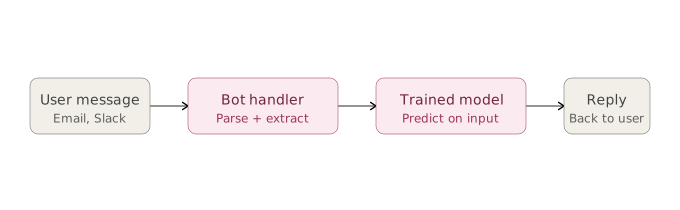
A bot lets users request predictions through a messaging tool they already use. The user sends a message — structured or conversational — and the bot parses the input, calls the model, and replies with the prediction.
This works well for teams that operate primarily in Slack or email, where building a full web app would be more effort than the use case warrants. It is also a natural fit for quick, occasional lookups — checking a single prediction without opening a separate tool.
The main challenge is input parsing: the bot needs to reliably extract the right features from a message, which requires either a structured format ("predict: age=45, income=60000") or a more sophisticated natural language layer on top.
When to use it: Internal teams working in Slack or email, lightweight prediction lookups, situations where the audience is small and a full UI would be over-engineered.
Which method should you choose?
The decision comes down to two questions: who needs the prediction, and when do they need it.
If the consumer is another piece of software, a REST API or embedded model is usually the right fit. If it is a person with domain expertise but no coding background, a web app, spreadsheet plugin, or bot keeps the barrier to entry low. If timing is the constraint — immediate response versus nightly batch — that narrows the field quickly.
Three natural groups emerge from the 10 methods:
- Offline / batch (CSV, database, scheduled job) — predictions are generated in bulk, stored, and consumed later. Simple to build, fine when freshness is not critical.
- Real-time / on-demand (REST API, embedded app, streaming, edge) — predictions happen at the moment of need, often with strict latency requirements.
- Human-facing interfaces (web app, spreadsheet, bot) — predictions are surfaced to people rather than systems, with the technical complexity hidden behind a familiar interface.
Most ML projects will eventually use more than one of these. A model might be served via REST API for production traffic, a scheduled job for nightly reporting, and a web app for manual review by domain experts — all from the same trained model file.
Summary
Ten ways to get predictions out of a trained machine learning model:
- Batch CSV — score a file, get a file back. Simple and manual.
- Database — score a batch and persist results for others to query.
- Scheduled job — automate batch scoring on a fixed cadence.
- REST API — serve predictions to any application over HTTP.
- Embedded Python app — load the model directly inside your application.
- Streaming — score each event as it arrives, continuously.
- Edge device — run the model locally on hardware, no server needed.
- Web app — give domain experts a form-based interface.
- Spreadsheet plugin — bring predictions into Excel or Google Sheets.
- Email / Slack bot — let users request predictions via messaging.
The model is the same in every case. What changes is where inference happens and who or what receives the result. Choosing the right method is not a technical decision so much as a product one — it depends on your users, your infrastructure, and how the predictions will actually be used.
About the Author

Piotr Płoński
Piotr Płoński is a software engineer and data scientist with a PhD in computer science. He has experience in both academia—working on neutrino experiments at leading research labs and collaborating on interdisciplinary projects—and in industry, supporting major clients at Netezza, IBM, and iQor. In 2016, he founded MLJAR to make data science easier and more accessible, creating tools like AutoML, Mercury, and MLJAR Studio.
Related Articles
- AI gave me a perfect report. I still didn’t trust it.
- AI Generated Code Looked Right, but the Data Was Wrong
- Open-source AutoML projects in 2026
- Best AI Courses for Data Analysis in 2026
- Why ipynb is a perfect format for saving AI data analysis conversations
- Build a Web App for your Machine Learning model
- How to Run a Local LLM in 2026
- XGBoost Vector Leaf: Multi-Output Regression Explained
- GitHub Outages, Day by Day: A GitHub-Style Activity Calendar
- 3 New Mercury Widgets for Interactive Python Data Apps
Private AI data analysis
AI Data Analyst on Your Computer
Use MLJAR Studio to explore data, discover insights, and create reports with AI.
Runs locally · Your data stays private