
Why ipynb is a perfect format for saving AI data analysis conversations
Five years ago, having a computer program where you could simply load your data and ask questions about it was only a dream. And honestly, not many people even dreamed about it. In 2026, this is a reality. The AI data analyst exists. Today, there are many implementations of AI data analysts. Some are open source, some are proprietary, and some are built in-house by companies for their own needs.
In this article, I want to share my experience from building an AI data analyst. More specifically, I want to explain why I chose the ipynb format — the Jupyter Notebook file format — to store conversations with an AI data analyst. I want to show how traceability and replication of conversation are achieved with this format.
What is AI data analyst?
Let's start by looking closer at what an AI data analyst is. We are familiar with chat interfaces. We send a prompt and get a response. In the classic chat approach, we get a response based on chat's internal knowledge. When we ask chat about specific questions, for example about our business, chat probably will not provide a correct answer, because it doesn't have knowledge about it. It will respond with something, a hallucination.
The next step towards AI data analyst is to provide the AI with knowledge. It can be done in many ways. There are Retrieval Augmented Generation (RAG) systems that index and search documents for LLMs, enabling them to provide correct answers. In this approach, the interesting parts of documents are included as context for LLM. The other approach is to allow for AI to use programming skills - basically, write a short script, execute it, and read the output. Using such a skill, AI can, for example, generate code to read our Excel file, execute it, and print the spreadsheet header so the data structure is known. The code generated by the LLM can also be used to query the database. LLM has an available environment where it can send SQL queries, execute them, and check results. The last approach is AI with internet access, which can connect to APIs or scrape web pages directly to get the required information.
When the proper context is provided or constructed for AI, it can analyze data to provide insights. Sometimes, when the relationships between data are obvious, the LLM can provide insights directly just by looking into the context. For example, it can easily spot maximum or minimum values in the list of numbers. When the data is complex, AI can use code to provide insights or create data presentations with dashboards, visualizations, or reports.
Basically, the AI data analyst is a chat with access to data and the skill to create, execute, and output the code. For storing basic chat messages, we can use a simple list of strings and save it as a text file. For an AI data analyst, we have prompts, text responses, code responses, and code execution results.
What is *.ipynb format?
The ipynb format is for storing Jupyter notebooks. A Jupyter notebook is a document with a list of cells. Each cell is a Markdown text or code. Markdown cells are displayed to the user. Code cells are executed, and the results are displayed below the cell. The result can be almost anything: text, HTML, JavaScript, images. The ipynb stores information about the cell list, and for each cell, it saves its source (markdown or code) and output (for code cells). The ipynb is basically a JSON format. The saved values in ipynb can be reloaded in Jupyter and displayed.
Why simple chat history is not enough
A conversation with an AI data analyst is different from a normal chat. In a normal chat, we usually only care about the question and the answer. In data analysis, this is not enough.
We need to know what data was used, what code was generated, what the execution result was, and how the final answer was created. Without this information, it is very hard to verify the analysis later. It is also hard to repeat the same steps or debug the result when something looks wrong.
This is why saving only text messages is not enough. The full conversation should include prompts, explanations, code, outputs, charts, tables. The ipynb format already supports all of these elements.
Traceability: every step is saved
One of the biggest benefits of the ipynb format is traceability. In data analysis, the final answer is usually not enough. We also want to know how this answer was created. What was the original question? What code was generated? What data was loaded? What was printed as output?
With the ipynb format, all those steps can be saved in one file. The user prompt can be stored as a Markdown cell. The code generated by AI can be stored as a code cell. The result of code execution can be stored as output under the cell. The final explanation can again be stored as a Markdown cell. This creates a clear history of the whole analysis process.
Replication: analysis can be executed again
Another important benefit of the ipynb format is replication. In data analysis, we often want to run the same analysis again. Maybe the data was updated. Maybe we want to check if the result is correct. Maybe another person wants to review our work.
When the conversation is saved as a notebook, the code is not only stored as text. It can also be executed again. This is a big difference compared to a normal chat history. In a chat history, we can read what happened, but we cannot easily rerun the analysis. In a notebook, we can open the file, inspect the code, and execute the cells again.
This makes the AI data analyst more transparent. The answer is not a magic response from the model. The answer is connected with code, data, and execution results. Anyone with access to the same data and environment can repeat the steps and verify the result.
What is more, the ipynb notebook can be easily converted to Python script. The conversation might be a good starting point for script creation. What is more, the ipynb can be easily converted into HTML and served as static web page.
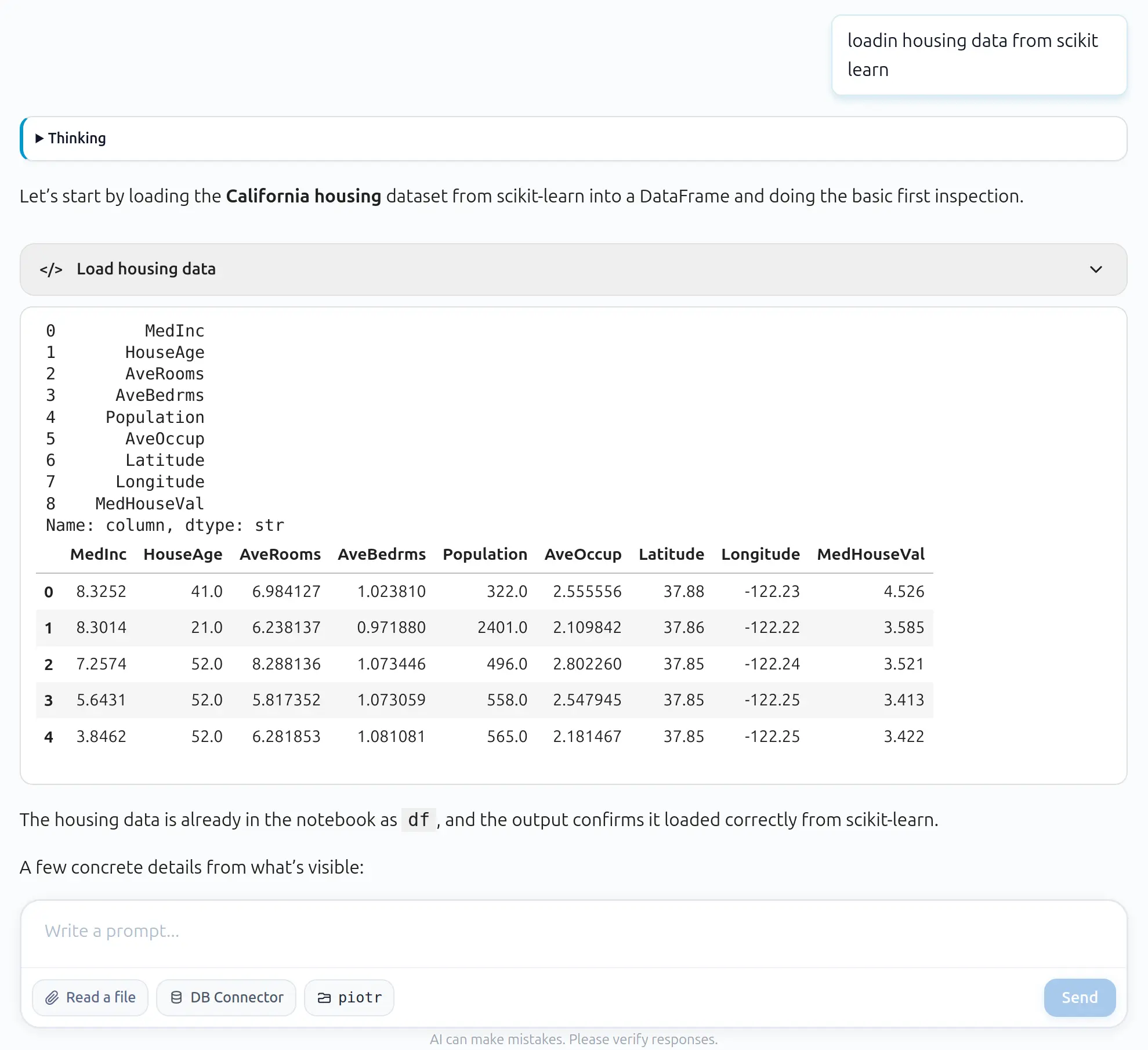
The conversation with AI data analyst:
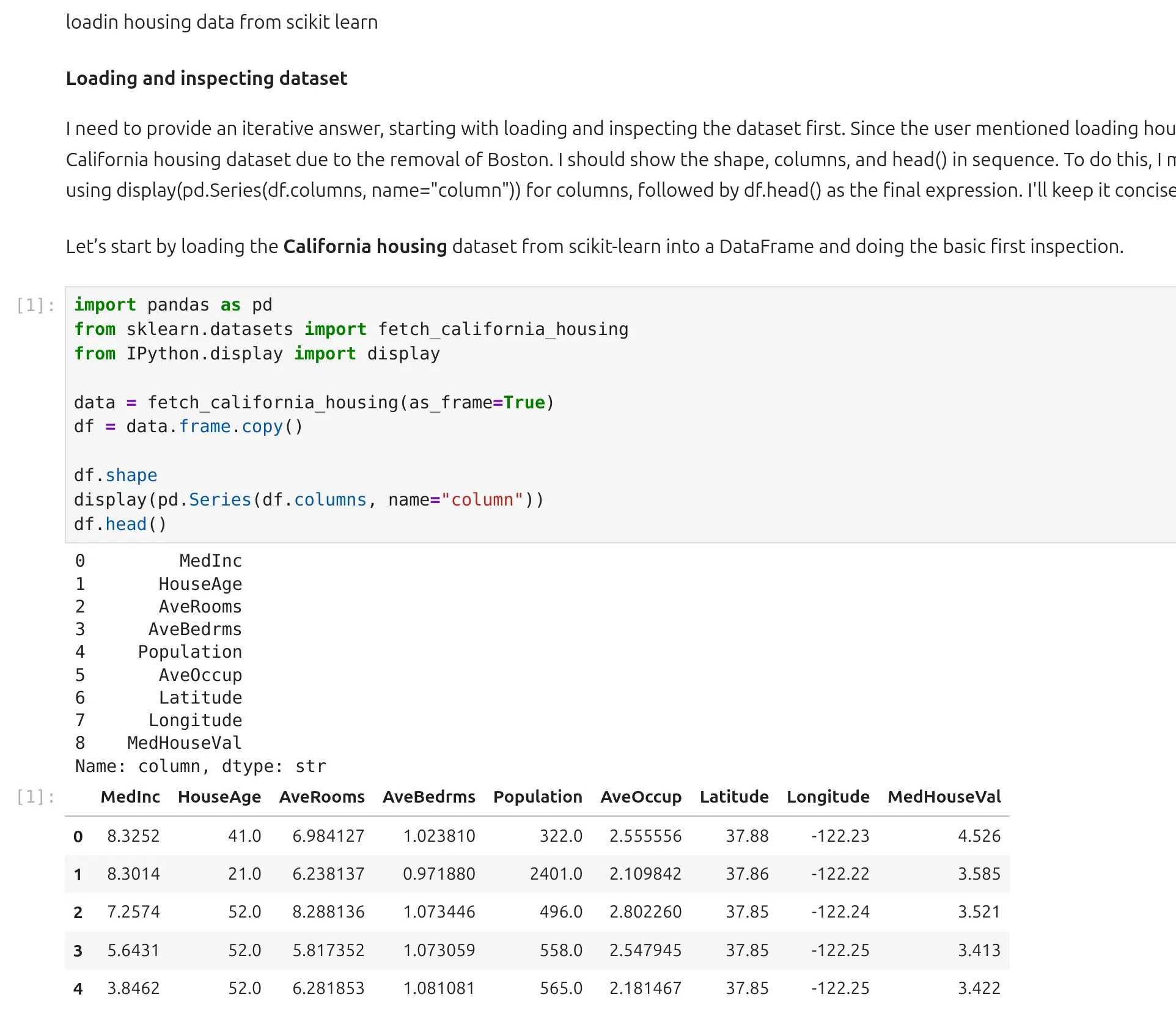
The same conversation displayed as Python notebook:
Summary
The ipynb format is a very good fit for saving AI data analysis conversations. It can store user prompts, AI explanations, generated code, execution results, charts, tables, errors, corrections, and metadata in one file.
This is exactly what we need for an AI data analyst. The conversation is not only text. It is a full analytical process. We need to know what was asked, what code was created, what was executed, what output was returned, and how the final answer was produced.
The notebook format gives us traceability, replication, and easy publishing. We can review the analysis step by step, rerun the code, share the notebook with others, or convert it to HTML and publish it as a web page. This makes ipynb a natural choice for me to store conversations with an AI data analyst.
About the Author

Piotr Płoński
Piotr Płoński is a software engineer and data scientist with a PhD in computer science. He has experience in both academia—working on neutrino experiments at leading research labs and collaborating on interdisciplinary projects—and in industry, supporting major clients at Netezza, IBM, and iQor. In 2016, he founded MLJAR to make data science easier and more accessible, creating tools like AutoML, Mercury, and MLJAR Studio.
Related Articles
- Reimagine Python Notebooks in the AI Era
- AI gave me a perfect report. I still didn’t trust it.
- AI Generated Code Looked Right, but the Data Was Wrong
- Open-source AutoML projects in 2026
- Best AI Courses for Data Analysis in 2026
- 10 ways to make predictions with Machine Learning model
- Build a Web App for your Machine Learning model
- How to Run a Local LLM in 2026
- XGBoost Vector Leaf: Multi-Output Regression Explained
- GitHub Outages, Day by Day: A GitHub-Style Activity Calendar
Private AI data analysis
AI Data Analyst on Your Computer
Use MLJAR Studio to explore data, discover insights, and create reports with AI.
Runs locally · Your data stays private