
AI Generated Code Looked Right, but the Data Was Wrong
I'm working on an AI Data Analyst in MLJAR Studio. The idea is simple. You ask a question in natural language, and AI writes Python code, executes it, and shows the result. It should make data analysis faster and easier.
But while testing this feature, I found a very interesting example. It reminded me that AI data analysis can't be only about generating code. The code is just one part. The output also needs to be checked.
A simple medical data analysis use case
I was testing a medical use case. The first step was very simple. I wanted to load a diabetes dataset from a CSV file. So I wrote a short prompt with the URL to the file.
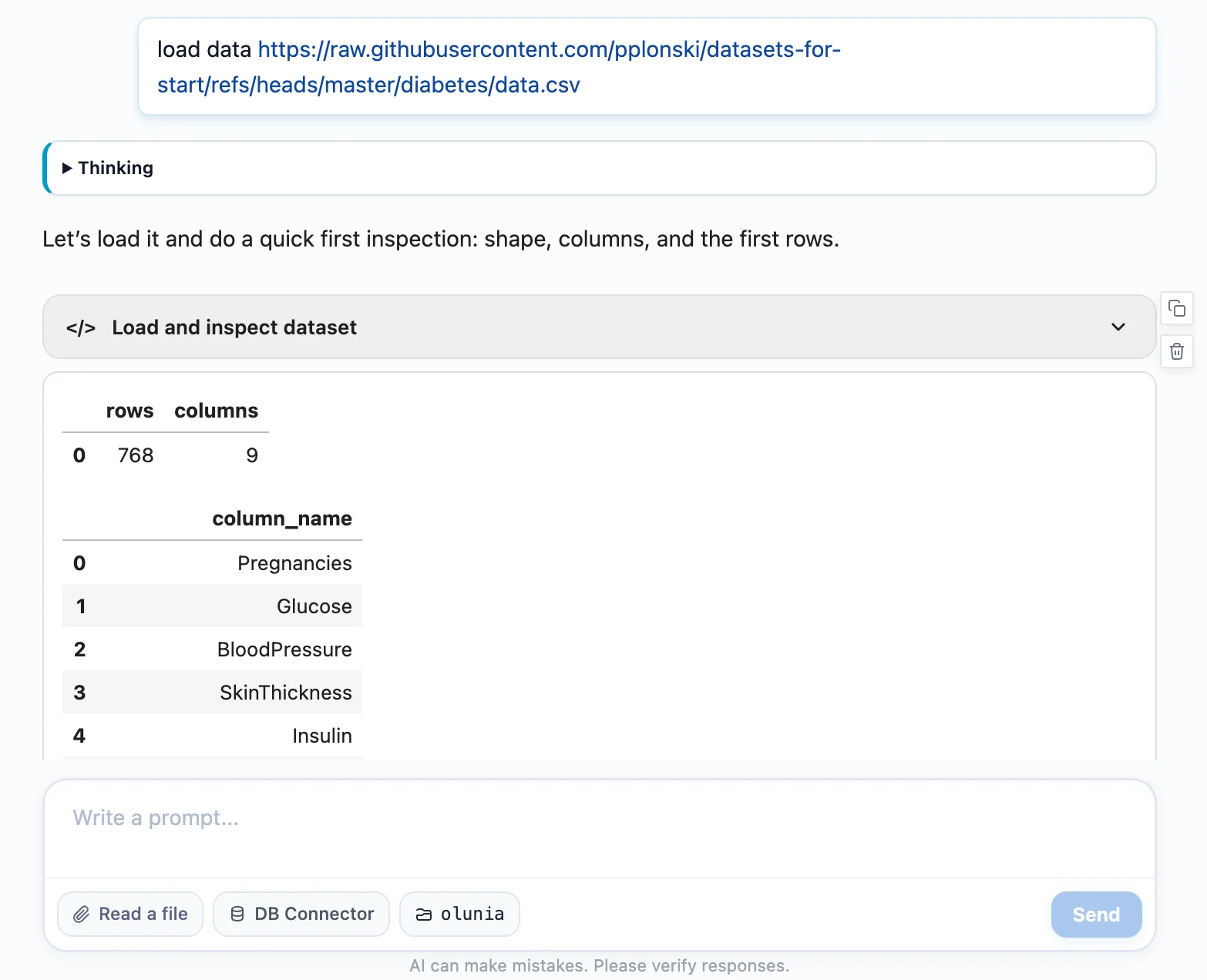
The AI generated Python code with Pandas. Nothing special. Just a regular read_csv() call. I would probably to the same.
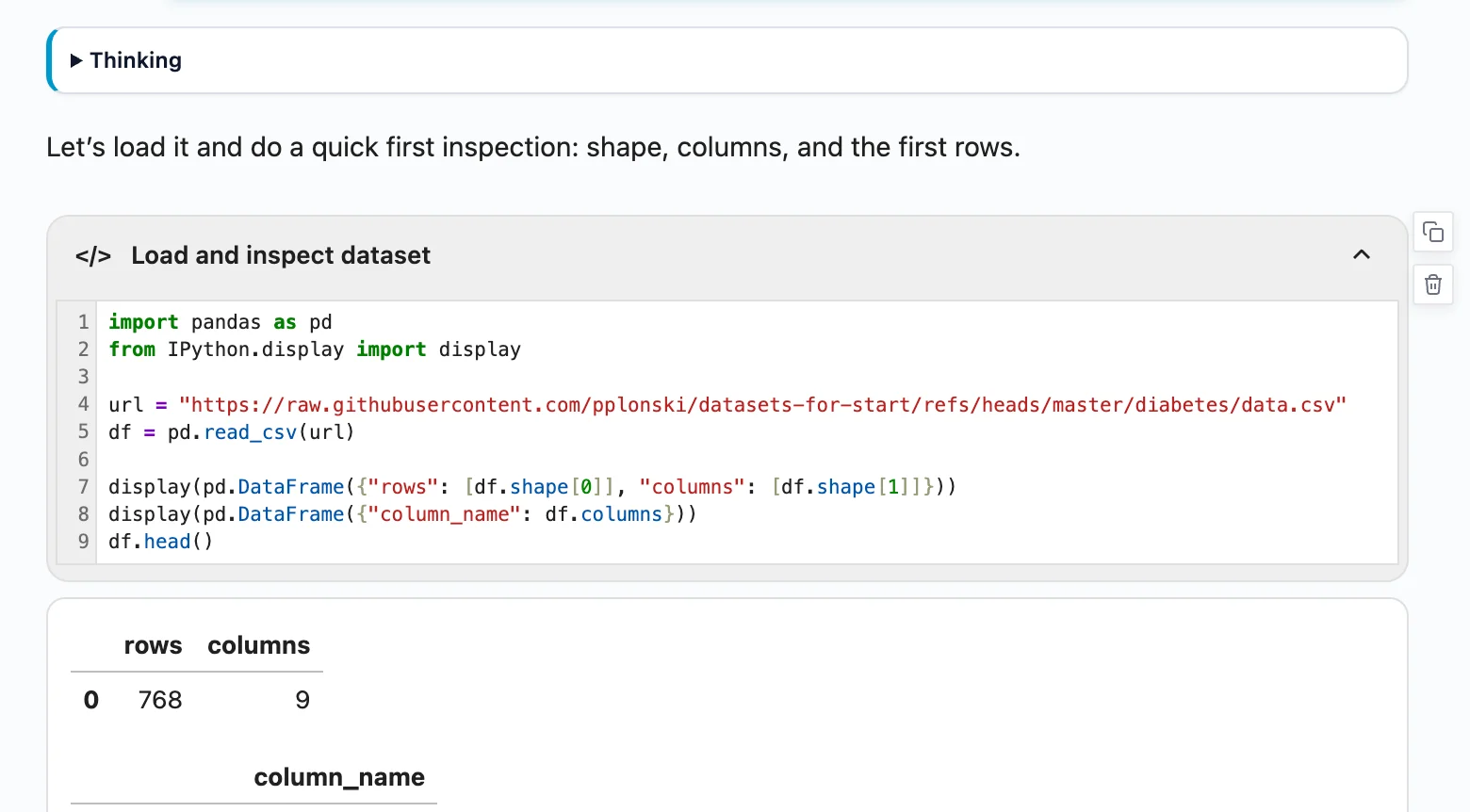
The code was executed. There was no error. The dataframe was displayed. At first, everything looked fine. And this is the dangerous part. Because when code runs without an error, we often assume that everything is OK. But it wasn't.
The code looked right
The generated code looked correct. It loaded the CSV file. It showed the number of rows and columns. It displayed the column names. It displayed the first rows of the dataframe.
This is exactly what I would expect from an AI Data Analyst in the first step. The dataset had 768 rows and 9 columns. So far, so good. But then I looked at the dataframe preview.
And I saw something strange.
148 pregnancies?
In the first row, I saw something strange. The Pregnancies column had value 148.
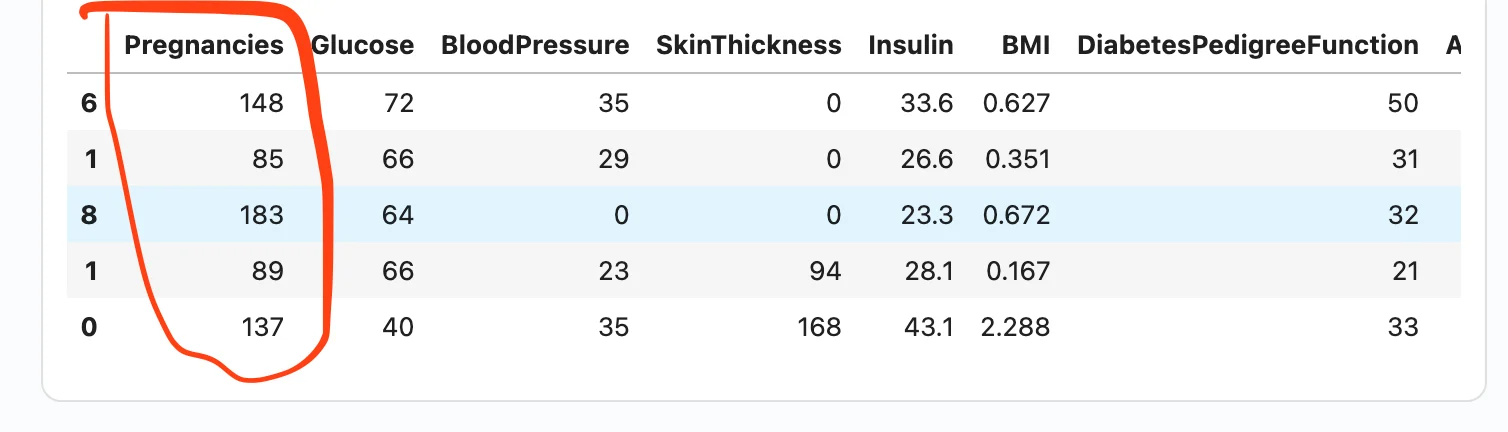
This immediately caught my attention. The dataset is about diabetes, and Pregnancies should mean the number of pregnancies. Values like 0, 1, 2, 6, or 8 make sense. But 148 pregnancies?
No. That was clearly wrong.
Then I checked more rows and more columns. The problem was not only in the first row. The Pregnancies column had values like 148, 85, and 183. The Age column had values like 0 and 1. The Outcome column was empty.
It looked like the whole dataframe was shifted.
And this is the important part: the code worked. There was no error. The dataframe was displayed.
But the data was wrong.
AI spotted that something was wrong
After the dataframe was displayed, my AI Data Analyst didn’t stop there.
It analyzed the output and found that something was suspicious.
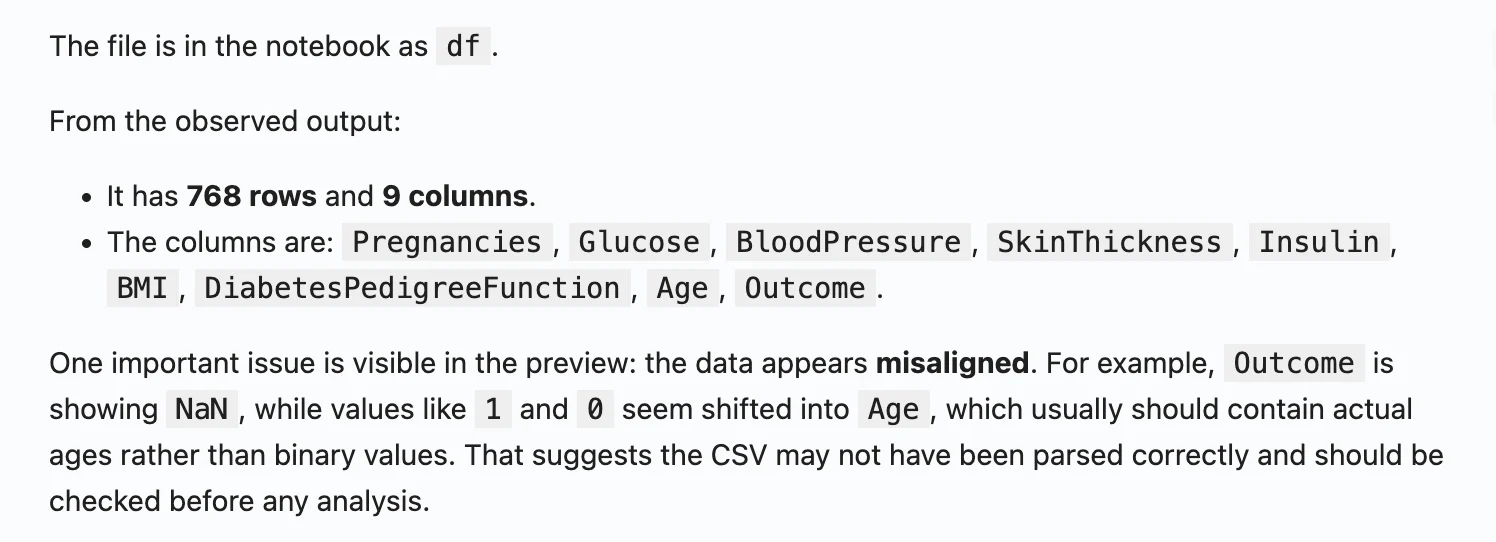
It noticed that the data looked misaligned. The values in some columns didn’t make sense.
For example, the mean value for Pregnancies was very high. That should not happen in this dataset. It also noticed that the last column had missing values.
This was a very good warning. The Python code didn’t fail. Pandas didn’t raise an error. The dataframe was created and displayed. But the output was wrong. And the AI detected it because it analyzed the displayed result, not only the generated code.
My AI Data Analyst is not a one-step workflow
This is the important part.
In many AI coding tools, the workflow is simple:
- send prompt
- get AI response
- execute code
- show result
For many tasks, this is useful. But for data analysis, I don’t think this is enough.
In MLJAR Studio, I want the AI Data Analyst to go one step further. After the code is executed, there is another prompt for the LLM. This prompt asks the AI to analyze the generated output.
So the AI doesn’t only check:
Did the code run?
It also checks:
Does the output make sense?
This small extra step makes a big difference. The code can look correct. It can run without errors. It can display a dataframe. But the values inside the dataframe can still be wrong.
In this example, the output analysis helped catch the problem very early. The AI noticed suspicious statistics and missing values, and I also saw the impossible value of 148 pregnancies in the displayed dataframe. This is exactly the workflow I want: AI generates the code, AI checks the output, and the human still reviews the result.
I asked: what is wrong?
After seeing the strange dataframe, I asked the AI: what is wrong?
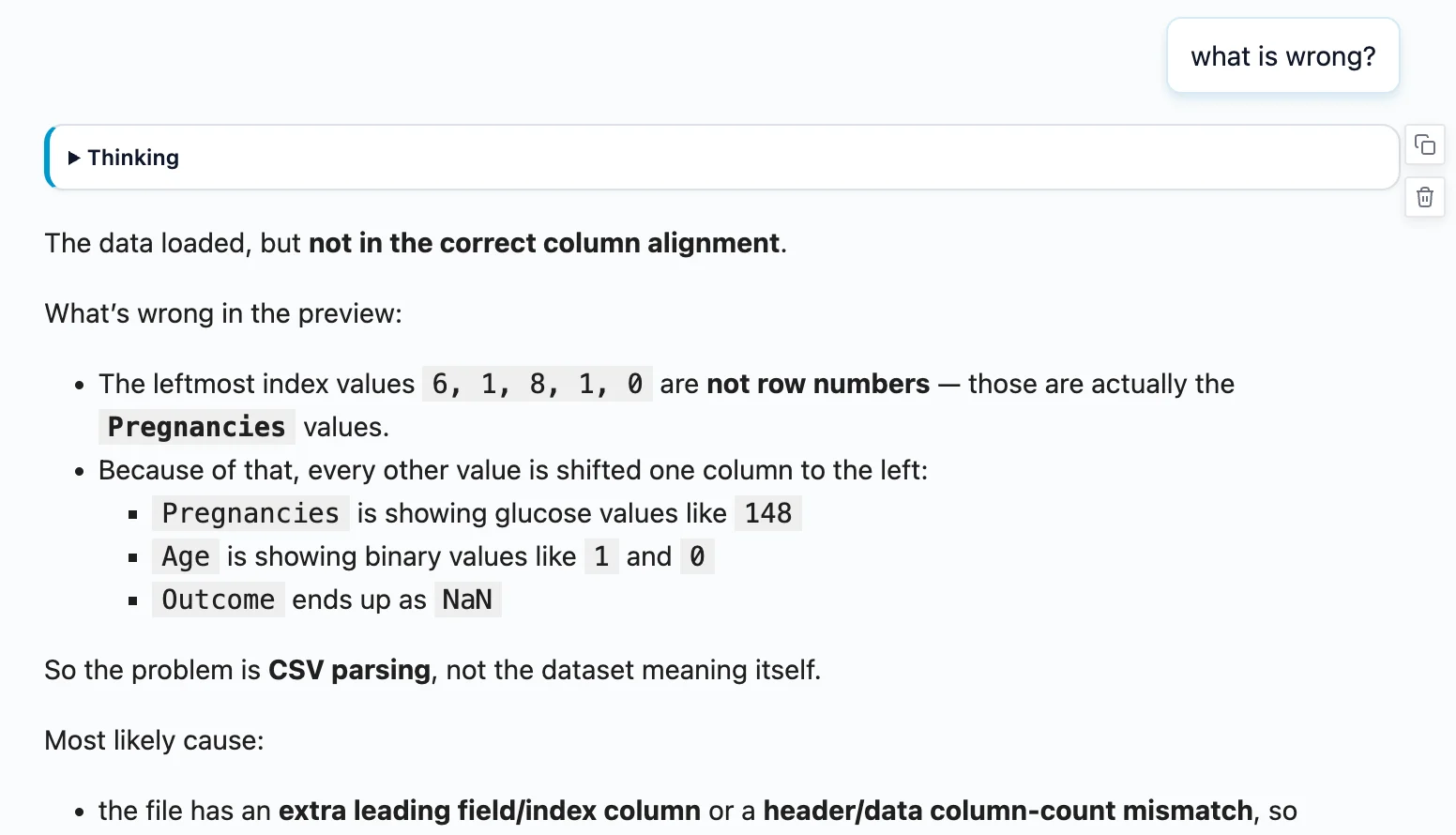
The explanation was clear. The data was shifted. The first value from each row was not loaded as a normal column value. It was treated like an index. Because of that, all other values were moved to wrong columns.
So what should be Glucose appeared as Pregnancies. That is why the first patient had 148 pregnancies. The value 148 was not the number of pregnancies. It was glucose.
The Age column showed values like 0 and 1, because those values were actually from the Outcome column. The real Outcome column was empty. Everything was shifted.
The problem was in the CSV file
The root cause was a small issue in the CSV file. There was an extra comma.
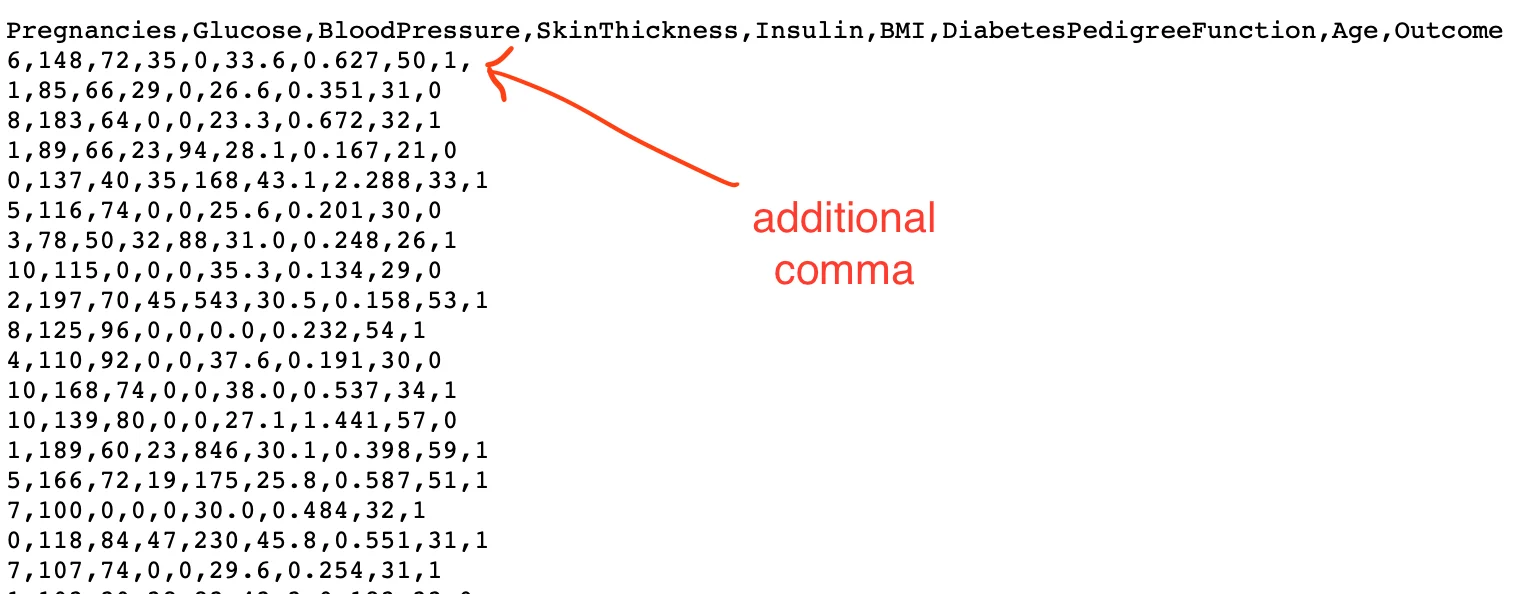
It was a tiny problem. But it created a big issue in the loaded dataframe. And this is very realistic. Real-world data is not always clean. AI can generate correct-looking code, but it doesn't mean the loaded data is correct. This is why the first data preview is so important. You need to look at the data, not only at the code.
Loading the data correctly
After finding the problem, I asked AI to load the data correctly.
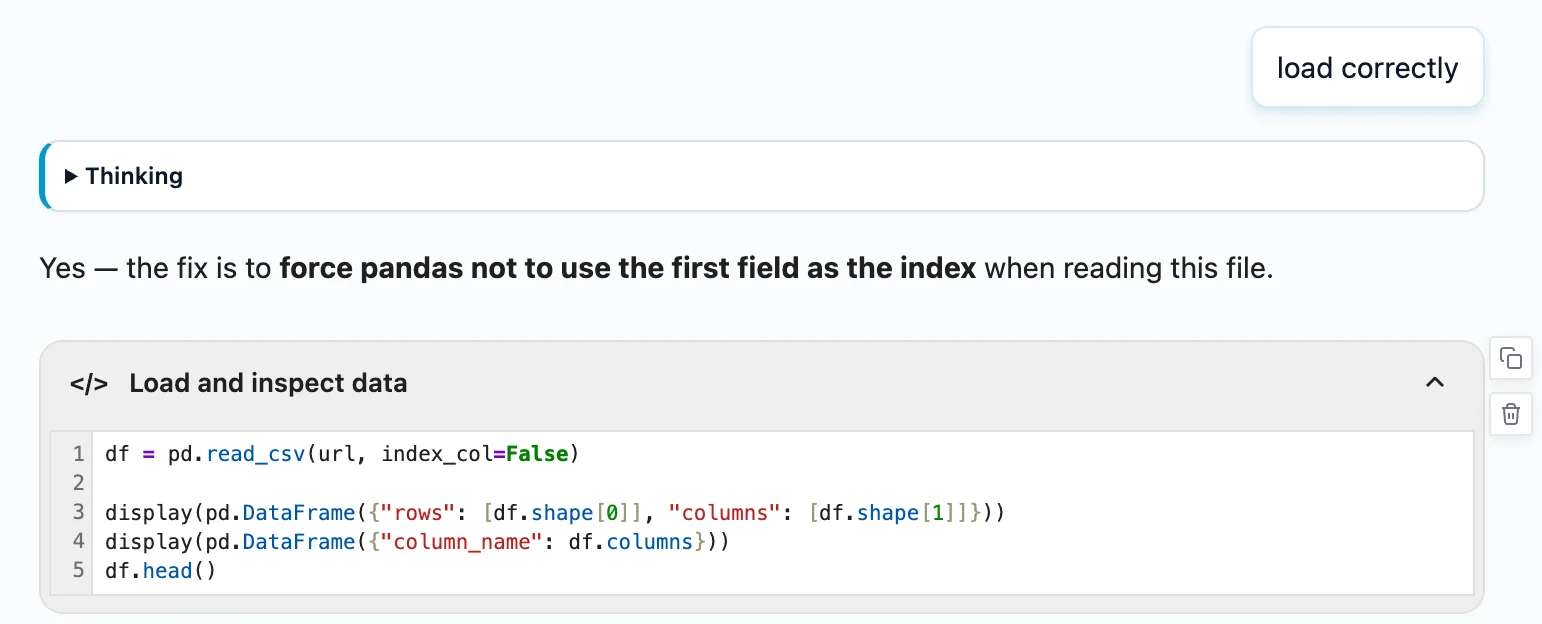
The fix was simple. The data needed to be loaded in a way that didn't treat the first value as the dataframe index. After loading it correctly, the dataframe looked much better.
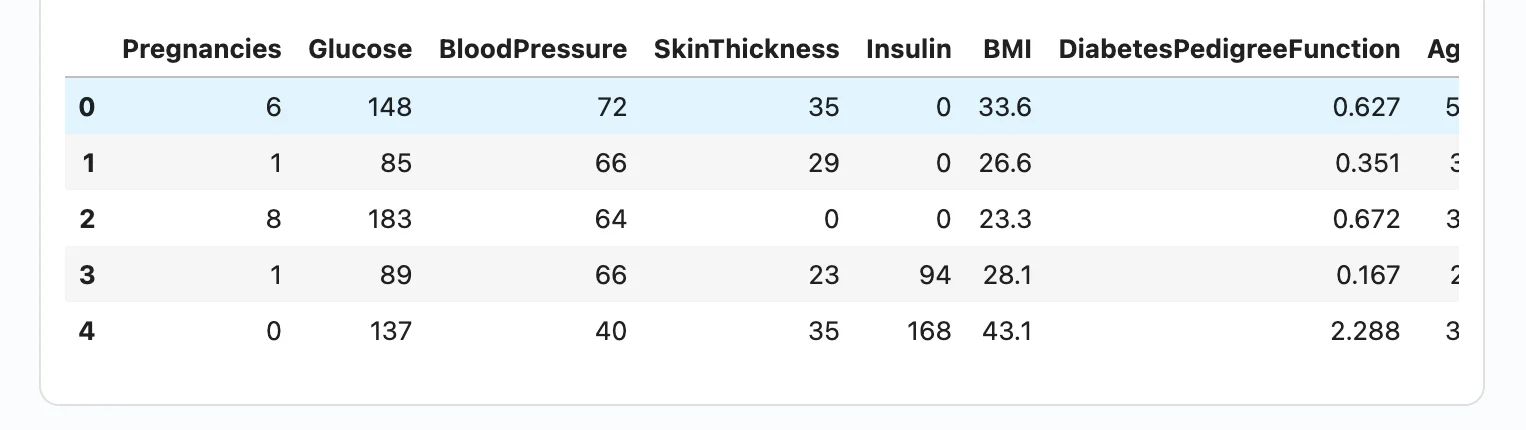
Now the first rows made sense:
Pregnancieshad values like6,1,8Glucosehad values like148,85,183Agehad values like50,31,32Outcomehad values0and1
This was the correct data.
Why this matters
This example looks small. It was only a CSV loading problem. But I think it shows a very important thing about AI data analysis. The problem was not that AI generated some complex wrong algorithm. The problem was more subtle. The code looked fine. The code executed. The output appeared. The dataframe had the expected number of rows and columns. But the data inside was wrong.
If we didn't check the output, we could continue with the analysis. We could create statistics. We could create charts. We could train a model. We could write conclusions.
And everything would be based on wrong data. This is dangerous, especially in medical data analysis.
AI should check its own output
For me, the lesson is clear. AI Data Analyst should not only generate code. It should also inspect the output. It should ask questions like:
- Do the values make sense?
- Are there missing columns?
- Are the columns shifted?
- Are there impossible values?
- Does the target column look correct?
- Is the data type correct?
- Are there suspicious statistics?
This is what a human analyst does naturally. When we load data, we don't only check if read_csv() worked. We look at df.head(). We look at column names. We look at basic statistics. We check if the data makes sense. AI should help with this process.
Human in the loop is still needed
I like AI tools. I build AI tools. But I don't believe that we should blindly trust AI-generated analysis.
There should be a human in the loop. In this example, two things helped: First, I looked at the dataframe and saw 148 pregnancies. Second, the AI analyzed the output and also warned that something was wrong. This combination is powerful.
The human has domain intuition. The AI can quickly scan the output and find suspicious patterns. Together, they can catch problems early.
Final thoughts
This small CSV example stuck with me. AI can make data analysis much faster. But speed without verification is risky. The code can look perfect. The notebook can run without a single error. The dataframe can appear on screen. And the data can still be completely wrong.
In my case, the warning sign was hard to miss: 148 pregnancies for the first patient. One number. That was enough to stop everything and investigate.
This is why checking the output matters, not only running the code. We need a human in the loop, because a human can look at the data and use common sense. In this case, 148 pregnancies was clearly impossible. But AI in the loop is helpful as well. AI can analyze the output, check basic statistics, find suspicious values, and warn us that something may be wrong. This combination is powerful.
AI helps us move faster. But the human still makes the final decision.
About the Author

Piotr Płoński
Piotr Płoński is a software engineer and data scientist with a PhD in computer science. He has experience in both academia—working on neutrino experiments at leading research labs and collaborating on interdisciplinary projects—and in industry, supporting major clients at Netezza, IBM, and iQor. In 2016, he founded MLJAR to make data science easier and more accessible, creating tools like AutoML, Mercury, and MLJAR Studio.
Related Articles
- AI Coding Assistants for Data Science: Complete 2026 Comparison
- Machine Learning for Humans and LLMs: Structured AutoML Reports in Python
- AI in Healthcare without breaking HIPAA (MLJAR Studio guide)
- Reimagine Python Notebooks in the AI Era
- AI gave me a perfect report. I still didn’t trust it.
- Open-source AutoML projects in 2026
- Best AI Courses for Data Analysis in 2026
- Why ipynb is a perfect format for saving AI data analysis conversations
- 10 ways to make predictions with Machine Learning model
- Build a Web App for your Machine Learning model
Private AI data analysis
AI Data Analyst on Your Computer
Use MLJAR Studio to explore data, discover insights, and create reports with AI.
Runs locally · Your data stays private