Exact duplicates + fuzzy matches

Find Duplicate Rows in Excel with AI + Python

Start with identical rows. Then find customer or company records that differ by spelling, punctuation, spacing, or abbreviations. MLJAR Studio writes real Python, runs it locally, and lets you review every match before changing the workbook.

Human-reviewed matches Python you can inspect Local and offline option
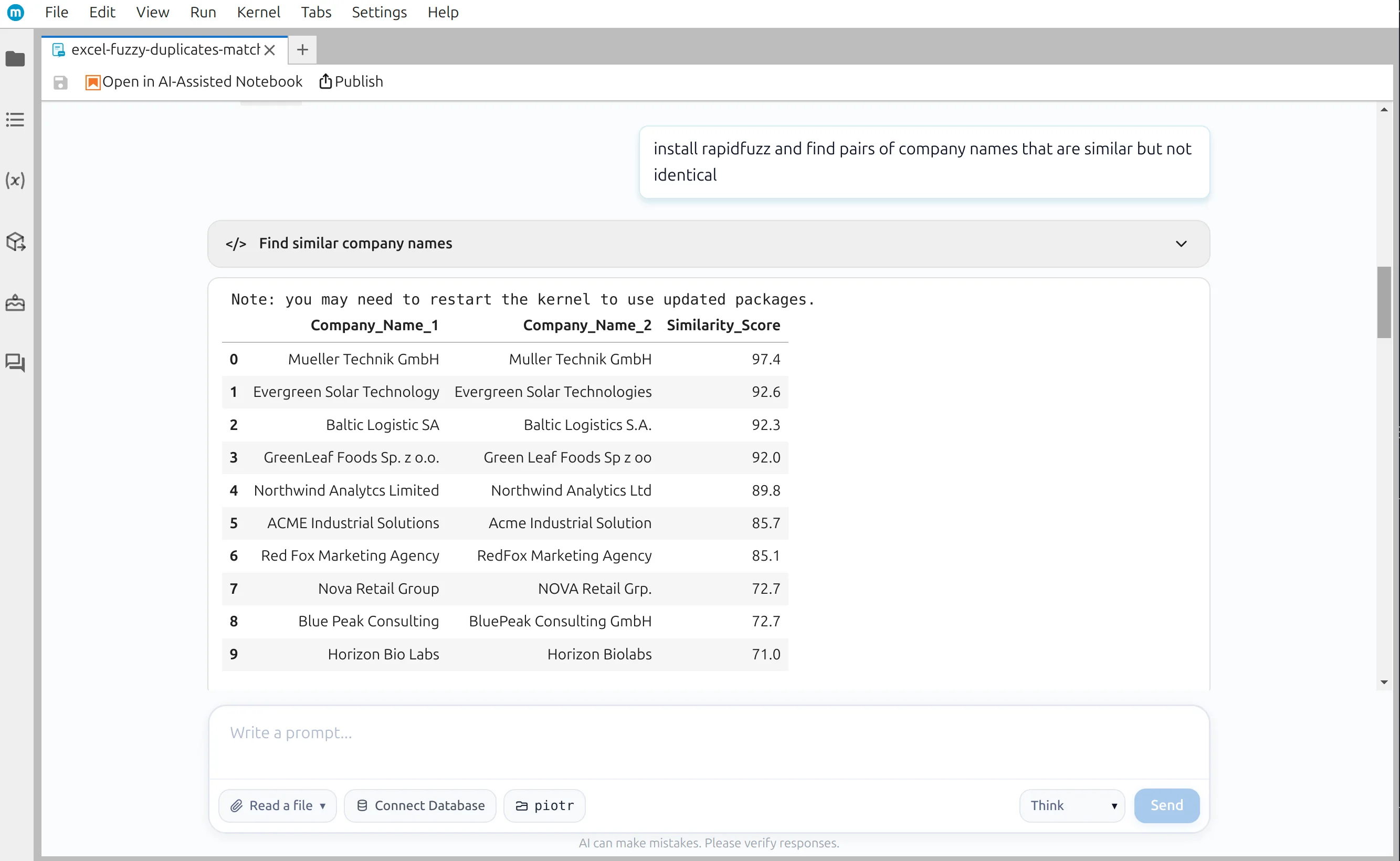
Ten similar company name pairs found with RapidFuzz in MLJAR Studio
Similarity scores create a shortlist for review—they do not remove rows automatically

Choose the right check

Two kinds of duplicate records

Run the exact check first. Use fuzzy matching only when records can describe the same customer without containing identical text.

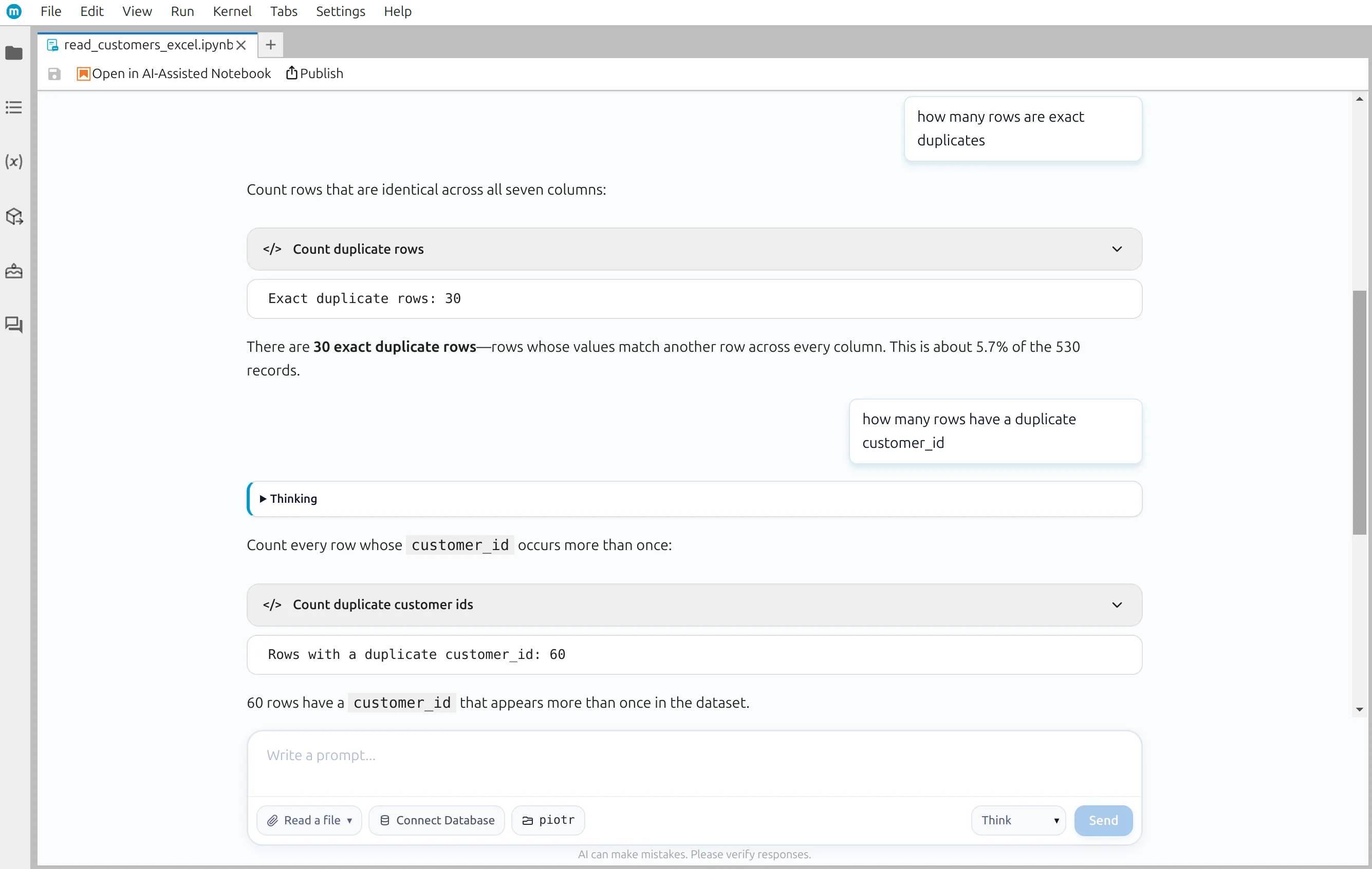
Exact duplicates

Every compared value matches

Use pandas to count complete copies, check repeated customer IDs, and remove only the duplicates that contain no conflicting information.

  • Deterministic equality check
  • 530 → 500 rows in the demo
  • Original workbook remains unchanged
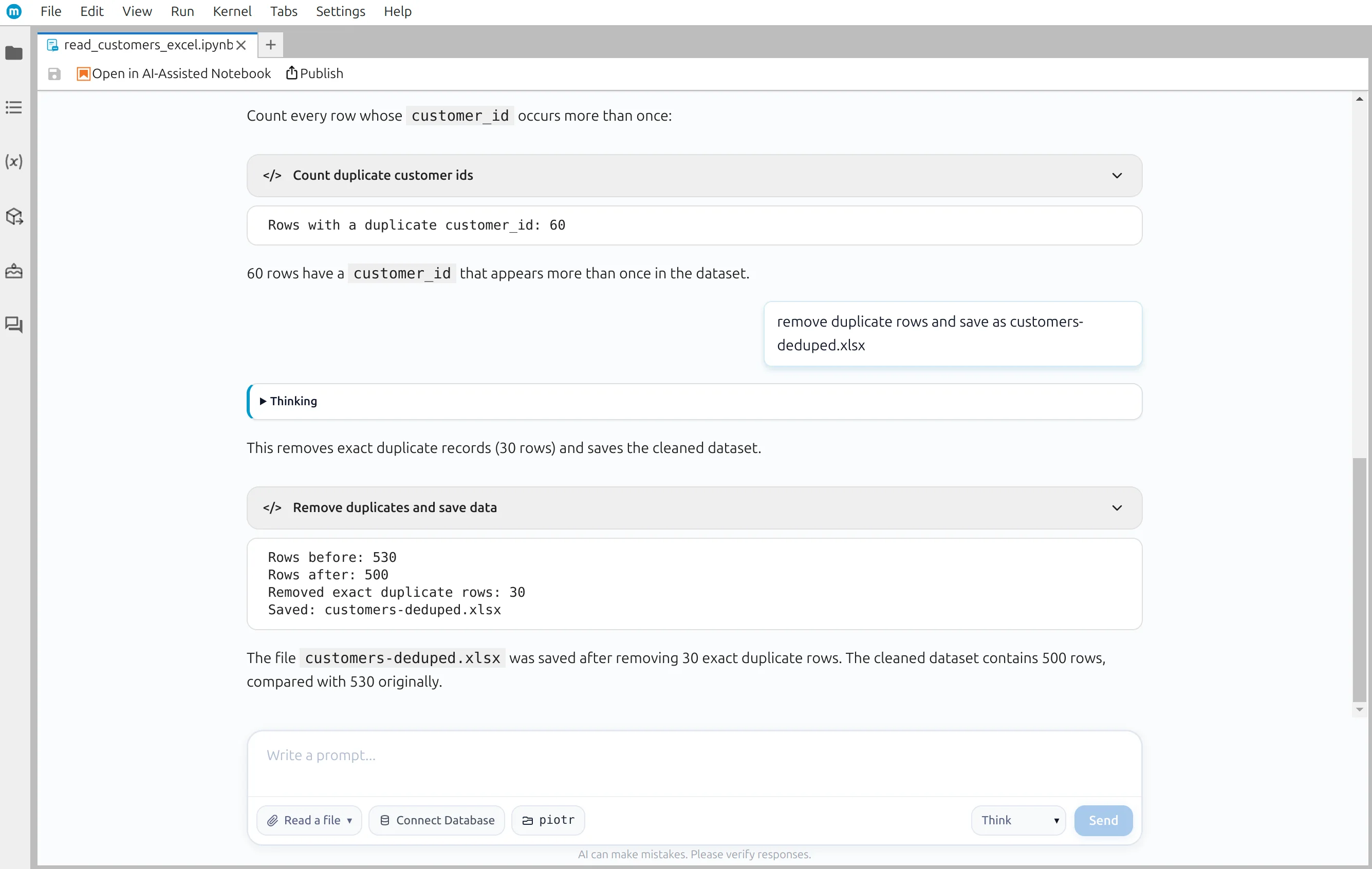
Remove exact duplicate rows
Exact duplicate row count in an Excel customer workbook

Near-duplicates

The text differs, but the customer may be the same

Use RapidFuzz to shortlist similar names, then compare supporting fields and approve each match with an explicit survivor rule.

  • Similarity score plus human review
  • 10 candidate pairs accepted in the demo
  • Threshold tested before rows are changed
Find near-duplicate records
Near-duplicate company names and their RapidFuzz similarity scores

Demo outcomes

Small duplicate differences can change the report

The exact and fuzzy examples use separate demo workbooks. Each result is checked against its own source before anything is saved.

30

exact duplicate rows removed

Demo: customers.xlsx

10

near-duplicate pairs reviewed

Demo: companies-with-duplicates.xlsx

$683,350

annual spend overstatement found

Demo: companies-with-duplicates.xlsx

Four checkpoints

A duplicate-cleaning workflow you can audit

AI handles repetitive code generation. You inspect the candidates, decide what the records mean, and approve the final workbook.

  1. Checkpoint 1

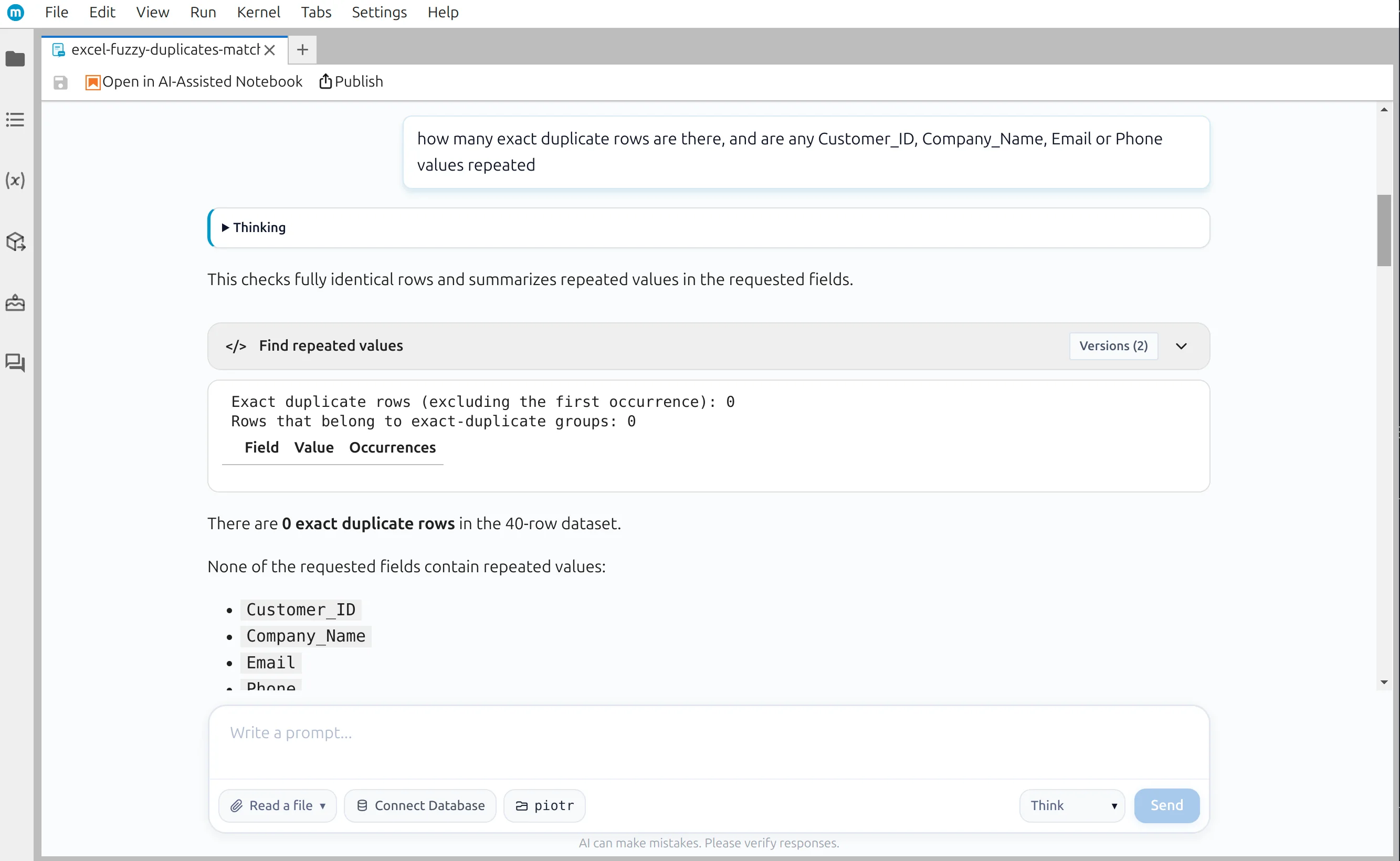
    Check exact duplicates first

    Count identical rows and repeated identifiers before applying a more subjective matching rule.

    MLJAR Studio showing exact duplicate and repeated value checks for an Excel customer list
  2. Checkpoint 2

    Shortlist similar names

    Use RapidFuzz to score company names that differ by spelling, punctuation, spacing, or abbreviations.

    Ten near-duplicate company name pairs found with RapidFuzz in MLJAR Studio
  3. Checkpoint 3

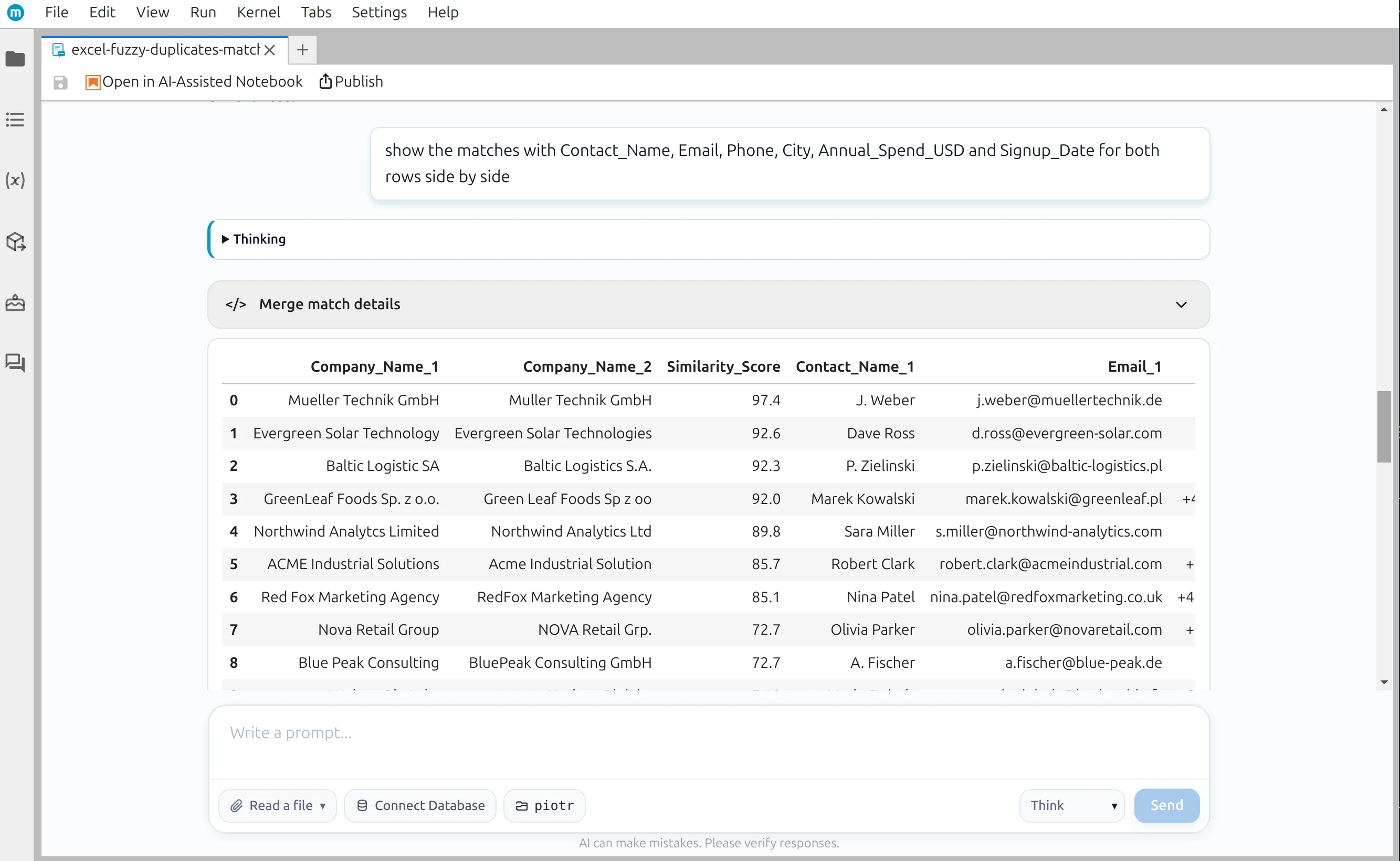
    Review supporting fields

    Compare contacts, email addresses, phone numbers, cities, dates, and values before accepting a pair.

    Candidate duplicate company records shown side by side with supporting customer fields
  4. Checkpoint 4

    Apply your rule and save

    Choose which record survives, verify the totals, and write a new workbook without changing the source file.

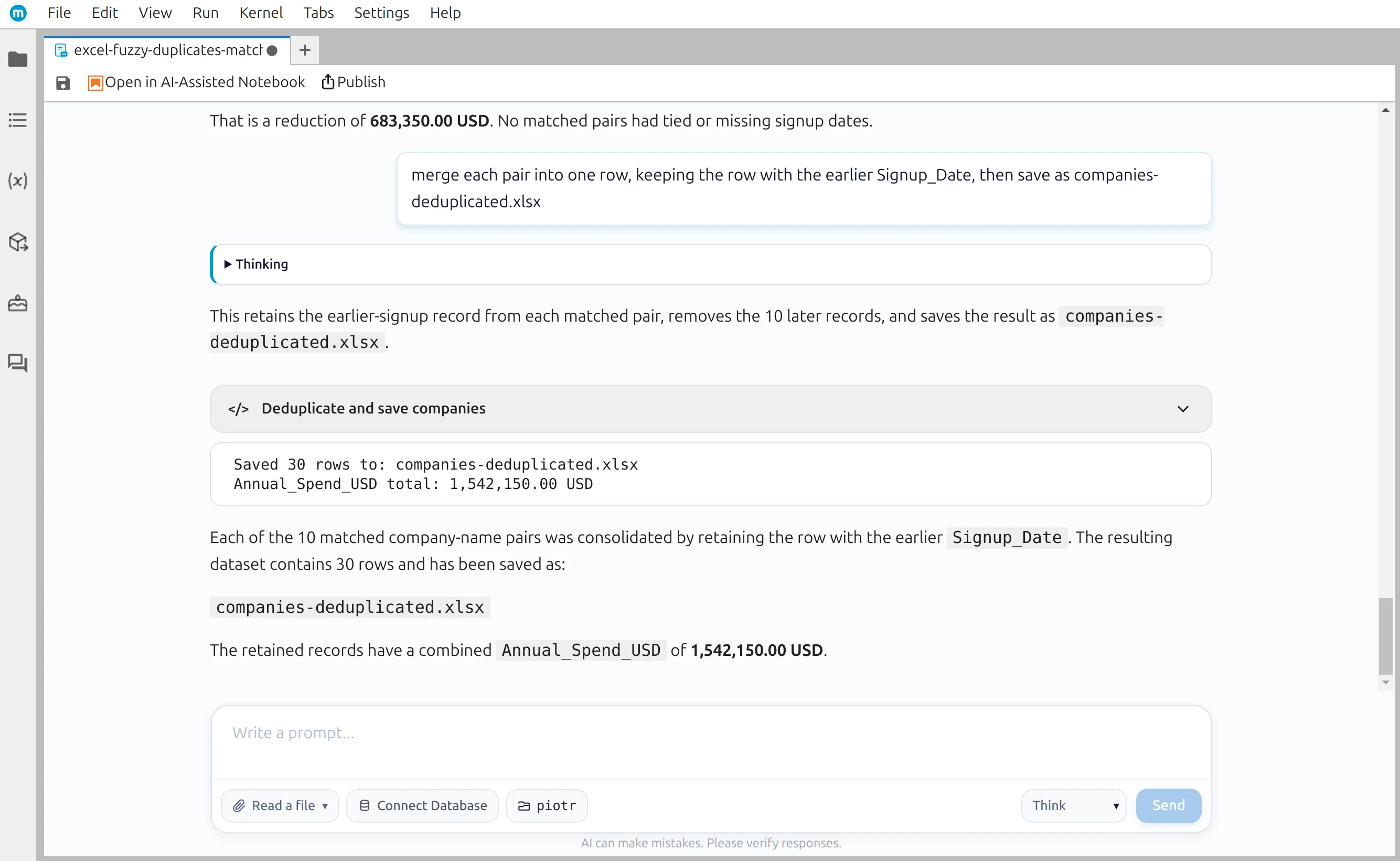
    Reviewed duplicate pairs merged and saved as a new Excel workbook

Visible Python

The conversation becomes a reusable notebook

Prompts, generated code, review tables, and outputs remain together. Change the input file and rerun the checks when the next export arrives.

find-duplicates-excel.ipynb
[1]
# Exact copies — safe to count before any fuzzy matching exact_duplicate_rows = df.duplicated().sum() print(f"Exact duplicate rows: {exact_duplicate_rows}")
[2]
# Similar text — a candidate score, not a deletion decision from rapidfuzz.fuzz import token_sort_ratio score = round(token_sort_ratio( "Mueller Technik GmbH", "Muller Technik GmbH", ), 1) print(score) # 97.4
[3]
# Save only after the candidate pairs and survivor rule are reviewed deduplicated_df.to_excel( "companies-deduplicated.xlsx", index=False, )

Exact equality is deterministic. A fuzzy score creates a candidate; a person still decides whether the records should be merged.

Human judgment

A similarity score is not a duplicate decision

A parent company and subsidiary can share most of a name. Two branches may need separate records. Similar names only tell you where to look next.

  • Compare email domains, phone numbers, addresses, cities, and dates
  • Test how a stricter or looser threshold changes the candidate list
  • State whether the earliest, latest, or most complete record should survive
  • Verify row counts and business totals before saving the output
Never delete every row above a fuzzy threshold without reviewing the candidate pairs and the rule used to choose a survivor.
Duplicate candidate records shown with contact and business fields for review
Supporting fields turn a name score into a reviewable business decision

Your workbook stays on your computer

The MLJAR Studio desktop app reads Excel files and runs Python locally. A cloud AI model may receive prompts, schema, and preview context. Connect a local model through Ollama, vLLM, LM Studio, Jan, or llama.cpp when that context must remain on your own hardware too.

Compare local and cloud LLMs
A deduplicated Excel workbook saved from MLJAR Studio

Reusable output

Save a clean workbook and keep the reasoning

Write the reviewed rows to a new Excel file while preserving the original. The notebook records the prompts, generated Python, thresholds, matching evidence, and survivor rule used to create it.

  • Save the cleaned data without a pandas index column
  • Inspect or edit every generated Python cell
  • Reuse the same reviewed workflow on the next export

Need to clean other fields first? Follow the category-standardization tutorial. When colleagues need to run the reviewed workflow without editing notebook cells, turn it into a Python internal tool.

FAQ

Common duplicate-matching questions

What is the difference between exact and fuzzy duplicates?+

Exact duplicates contain the same compared values. Fuzzy duplicates differ in some way — for example, a shortened company name, different punctuation, a typo, or another phone-number format — but may still represent the same real record.

Can Excel Remove Duplicates find spelling variations?+

No. Excel Remove Duplicates and pandas drop_duplicates compare values for equality. They do not infer that “GreenLeaf Foods” and “Green Leaf Foods” may refer to the same company. A fuzzy-matching step is needed to shortlist those records.

What RapidFuzz threshold should I use?+

There is no universal threshold. In the demo, 70 finds all ten reviewed pairs, while 75 misses three real matches. Start with a candidate threshold, inspect false positives and missed matches, and adjust it for your names and business rules.

Can I automatically remove every high-scoring match?+

That is risky. Two subsidiaries, branches, or unrelated companies can have similar names. Treat a high score as a review candidate and compare other fields such as email domain, phone, address, city, and signup date before merging records.

Which duplicate record should I keep?+

Make the rule explicit. You might keep the earliest record, the latest verified record, the row with the most complete fields, or create a new row that combines useful information from both. MLJAR Studio writes the Python, but you approve the business rule.

Does MLJAR Studio upload my Excel file?+

No. The desktop app reads the workbook from your disk and runs Python locally. A cloud AI provider may receive prompts, column names, dataframe shape, and preview context. Connect Studio to a local LLM when that context must remain on your hardware too.

Can I reuse the duplicate checks next month?+

Yes. The conversation becomes a normal Jupyter notebook containing prompts, Python, and outputs. Change the input path and rerun the same exact checks, fuzzy scoring, review tables, totals, and export.

Find the duplicates. Review the evidence. Keep the Python.

Use MLJAR Studio on your own Excel workbook and keep a person in control of every fuzzy match.