
Machine Learning for Humans and LLMs: Structured AutoML Reports in Python
AutoML tools can train very good machine learning models with just a few lines of code. But for me, the goal was always something more.
When I created MLJAR AutoML, I wanted to build a tool for humans. Something simple, practical, and easy to use. I liked to think about it as Machine Learning for Humans, similar to what the requests library did for HTTP.
Over time, I’ve been very happy to see how people use MLJAR AutoML. I’m especially happy when I see it used in research and healthcare, automated machine learning helps in areas like medical diagnosis or cancer detection. This was always the goal: make machine learning easier and more accessible.
But the world is changing.
Today, more and more people use LLMs, like ChatGPT or AI Data Analyst, to analyze data and understand models. This creates a new challenge. The tools we built for humans are not always easy to use for machines.
Standard AutoML reports are designed for people. They contain HTML pages, many plots, and multiple files. This works well when human explore results manually. But it becomes difficult when LLM want to use them.
To make AutoML easier not only for humans, but also for AI systems, we introduced a new feature:
report_md = automl.report_structured()
print(report_md)
This method creates a clean, structured summary of your AutoML run. It is text-first and easy to parse. In a way, this is a step from Machine Learning for Humans to something new: machine learning that is also easy for machines.
The problem with current AutoML reports
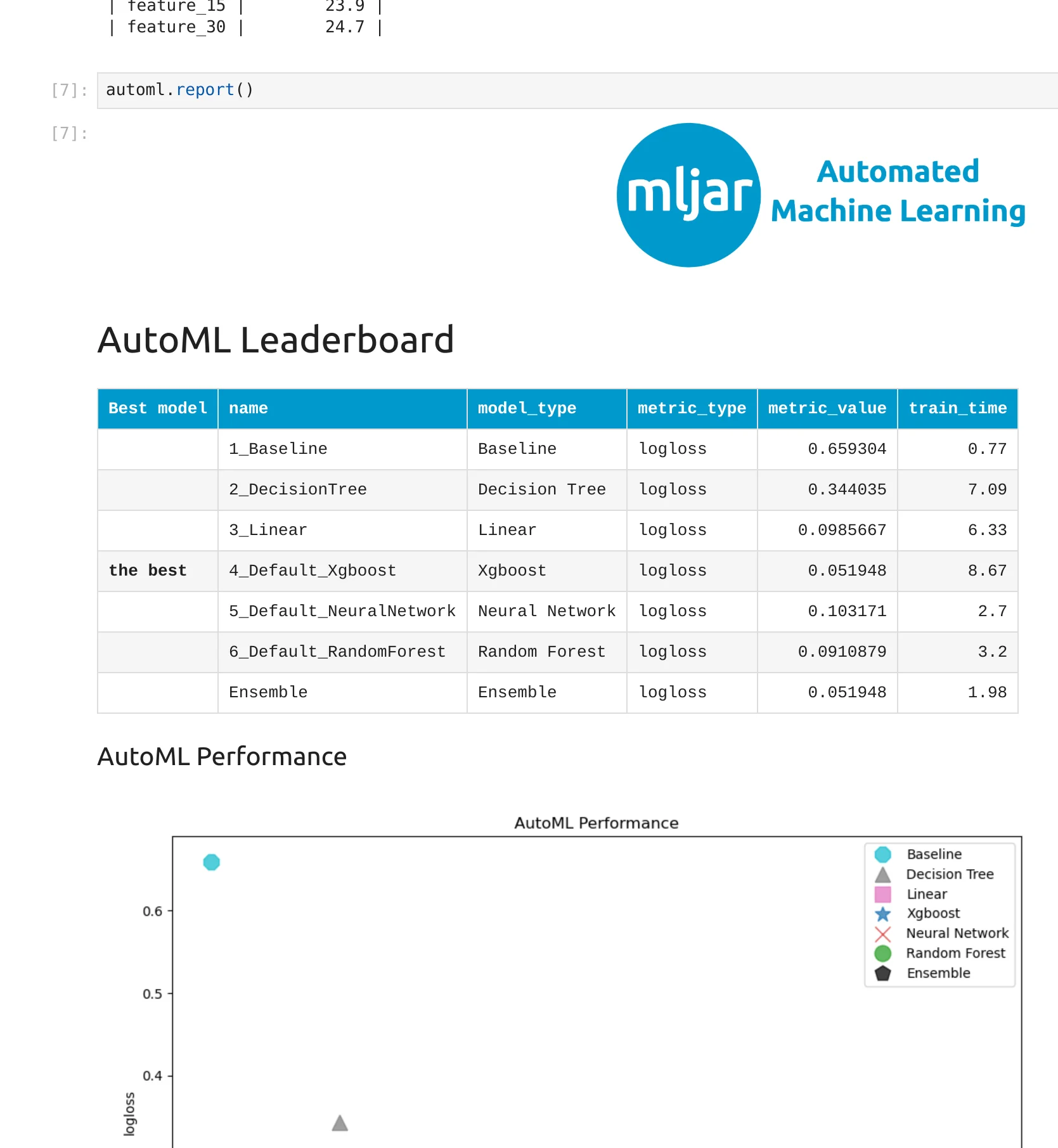
MLJAR AutoML is a bit different from many other AutoML tools. From the beginning, it was designed to automatically create detailed documentation for every experiment. After training, you get a full report with explanations, plots, and model insights. This is a very important part of the package and one of its main advantages.
This works very well when you want to understand your models step by step. You can open the report, explore the results, and learn what happened during training.
But as workflows evolve, new needs appear.
Today, we often work in notebooks, write code to analyze results, or use LLMs like ChatGPT to help us understand models. In these cases, even a very good HTML report can be less convenient.
The report is still spread across files. It includes images and rich formatting. It is designed for reading, not for parsing.
So the challenge is not that the report is missing. The challenge is how to make this already rich documentation easier to use in modern AI workflows.
This is where the structured report comes in.
It does not replace the existing report. It complements it. It gives you a simpler, text-first view of the same information, so you can use it in code, notebooks, and with LLMs.
What is a structured AutoML report
To support these new AI workflows, we introduced a structured AutoML report. It is available from version 1.2.2 in mljar-supervised, it was added in below GitHub issues:
- https://github.com/mljar/mljar-supervised/issues/808
- https://github.com/mljar/mljar-supervised/issues/809
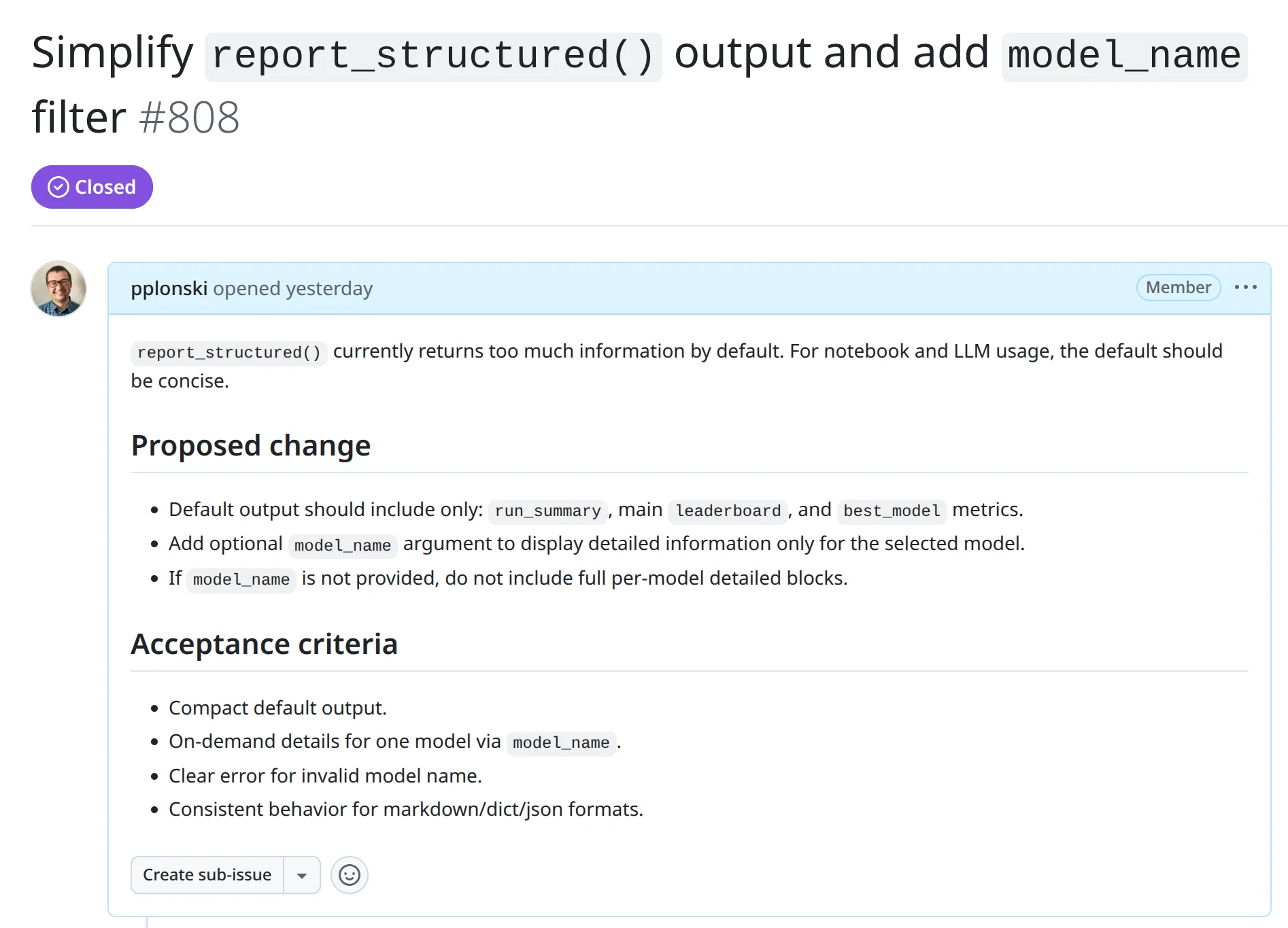
The idea is simple. Instead of focusing on visual exploration, we provide a clean, text-based summary of the most important results. The report contains key information like the task, metric, best model, and leaderboard, but in a format that is easy to read and easy to process.
This report is not meant to replace the standard HTML documentation. That report is still very useful when you want to explore results in detail. The structured report is an additional layer that gives you quick access to the same information in a simpler form. Because the report is text-first, it works very well in notebooks. You can print it and immediately see what happened during training. You can also load it as a Python dictionary and use it in your own logic.
It is also a good fit for LLMs. Since the content does not rely on images or complex formatting, you can pass it directly to a model like ChatGPT or AI Data Analyst and ask questions about your results.
In MLJAR AutoML, this is available with a simple method:
report_md = automl.report_structured()
print(report_md)
This method saves a full structured report to a file called report_structured.json and returns a readable version that you can use right away.
How to use report_structured() in practice
Using the structured report is very simple. After training your AutoML model, you just call one method.
Here is a minimal example:
from supervised import AutoML
from sklearn.datasets import load_breast_cancer

# load data
data = load_breast_cancer()
X, y = data.data, data.target

# train AutoML
automl = AutoML()
automl.fit(X, y)

# generate structured report
report = automl.report_structured()
Running in the notebook:
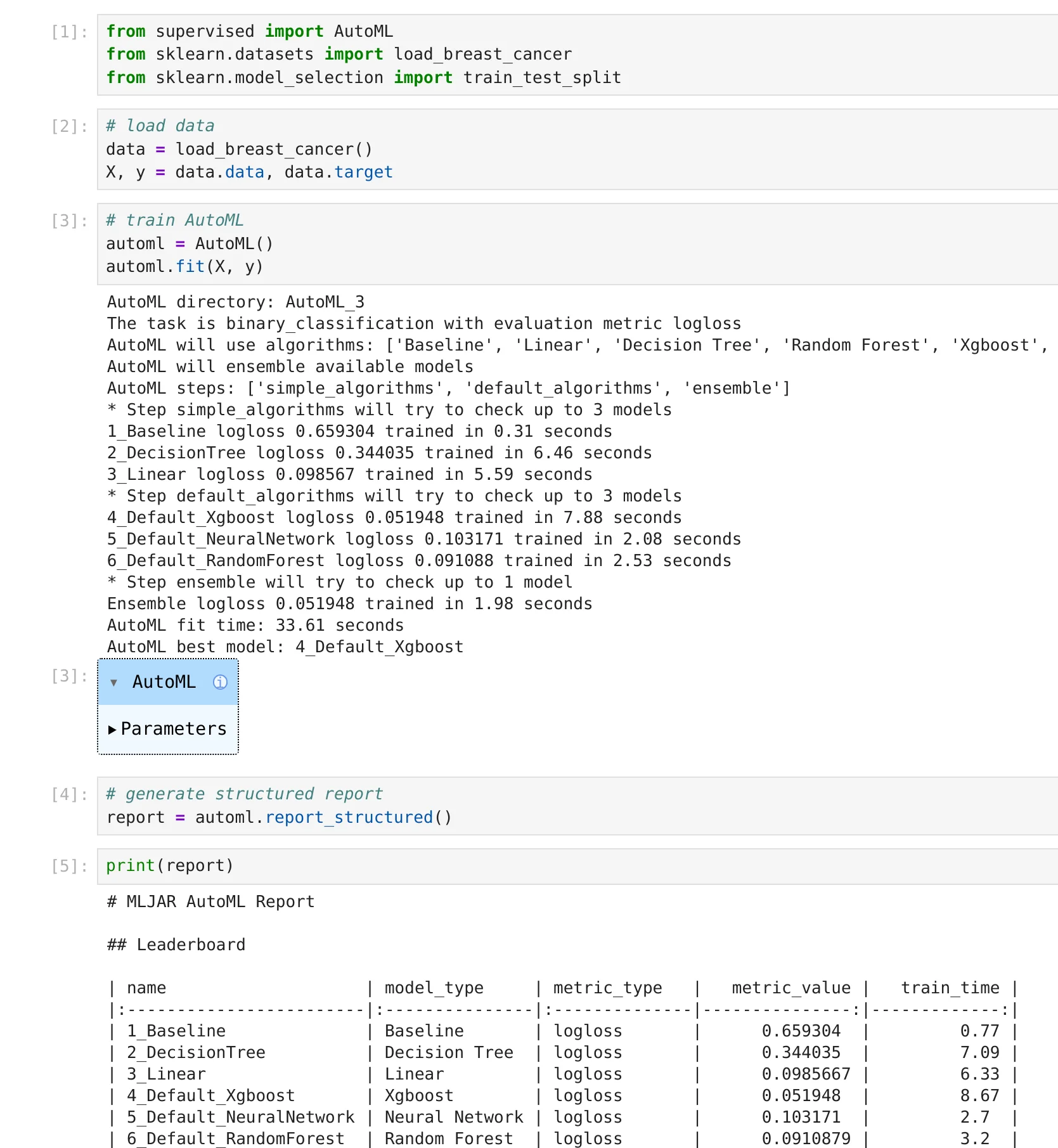
After running this code, a file called report_structured.json is saved in the results directory. This file contains a full, structured summary of the AutoML run.
At the same time, the method returns a readable version of the report. By default, it is in Markdown format, so you can display it directly in a notebook or print it.
print(report)
You will see a clean summary with the most important information, like the task, metric, best model, and leaderboard. It is much easier to read when you just want a quick overview.
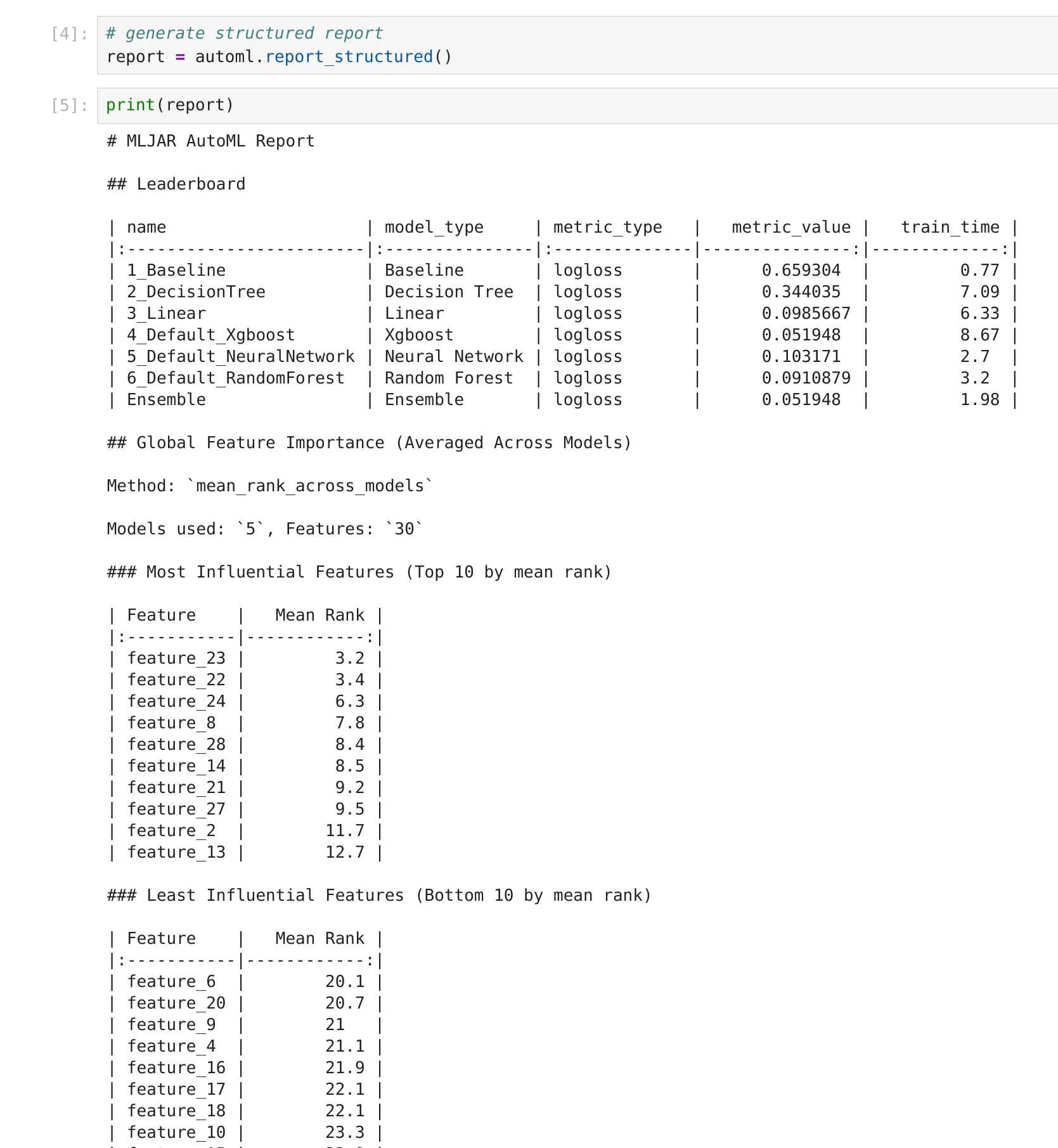
By default, the output is compact. It shows the most important information without too many details.
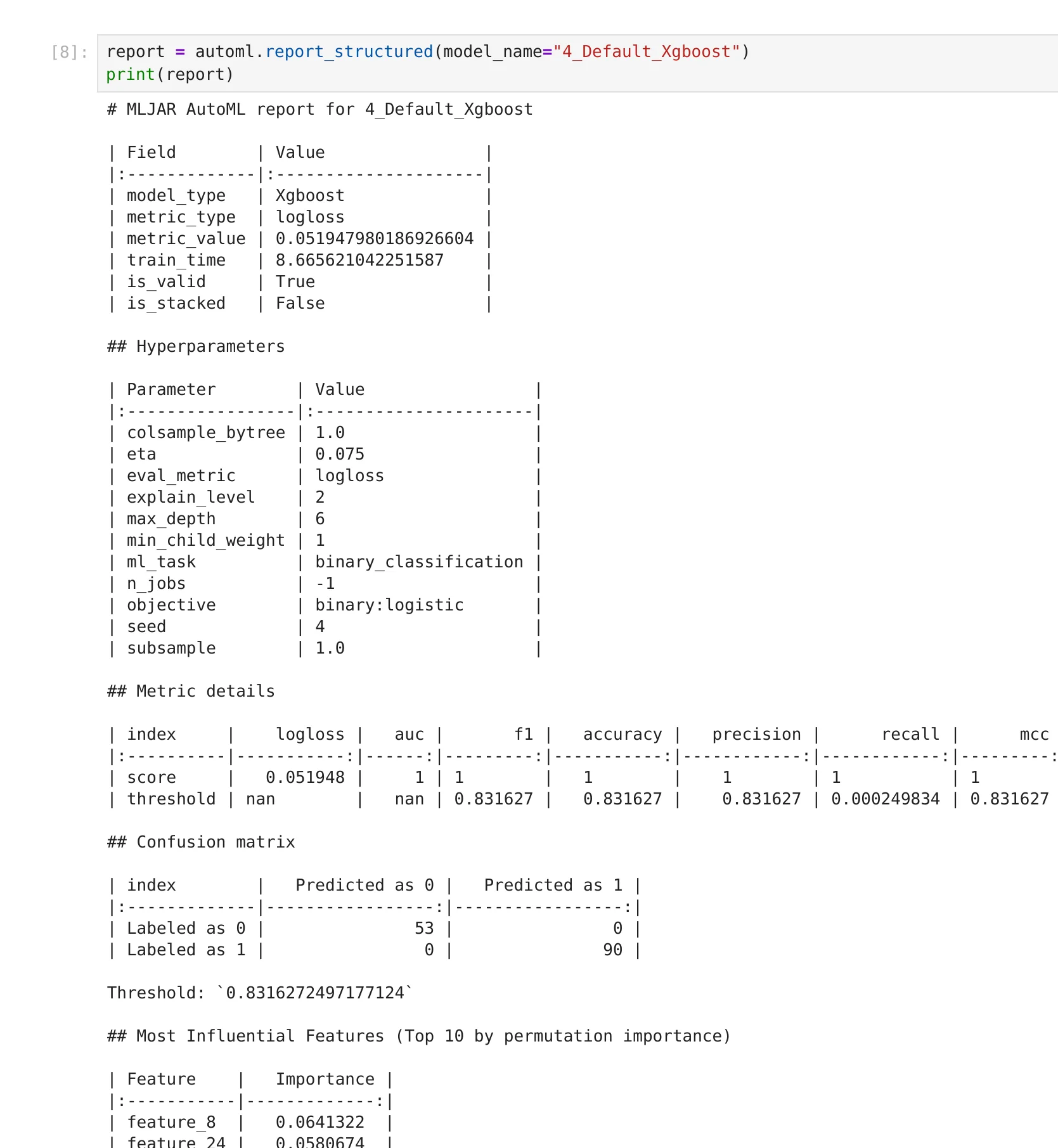
If you want to inspect a specific model more closely, you can request detailed information for that model:
report = automl.report_structured(model_name="4_Default_Xgboost")
print(report)
This will return additional details only for the selected model.
You can also choose a different output format. For example, if you want to work with the data in Python:
report = automl.report_structured(format="dict")
Now you can access values directly:
best_model = report["best_model"]["model_name"]
This makes it easy to build your own tools, compare experiments, or automate decisions based on AutoML results.
Using structured reports with LLMs
One of the main reasons for introducing the structured report is to make AutoML results easier to use with LLMs. When you work with tools like ChatGPT or AI Data Analyst, the input matters a lot. LLMs work best with clean, well-structured text. They do not work well with HTML pages, images, or complex formatting.
The structured report solves this problem.
Because it is text-first and consistent, you can pass it directly to an LLM and ask questions about your models.
For example, you can generate a compact version of the report:
report = automl.report_structured()
print(report)
Then you can use it as input to the LLM:
Analyze this AutoML report:
- Which model is the best and why?
- Are there models with similar performance?
- What should I try next?
The LLM can now read the report and give useful answers, because all important information is available in a simple format.
If you want to go deeper, you can also include details for a specific model:
report = automl.report_structured(model_name="4_Default_Xgboost")
This way, you can ask more detailed questions about one model, without overwhelming the LLM with too much information.
This approach makes it much easier to combine AutoML with modern AI tools. Instead of manually reading reports, you can interact with your results, ask questions, and explore ideas faster.
From prompt to model: using AutoML with AI Data Analyst
The structured report becomes even more powerful when combined with an AI assistant. In MLJAR Studio, you can use the AI Data Analyst to run machine learning tasks using simple natural language.
For example, I just wrote a short prompt:
load breast cancer data from scikit learn and run AutoML
That’s all.
The AI assistant loaded the dataset, prepared the data, and trained AutoML. It selected several algorithms, compared them, and found the best model.
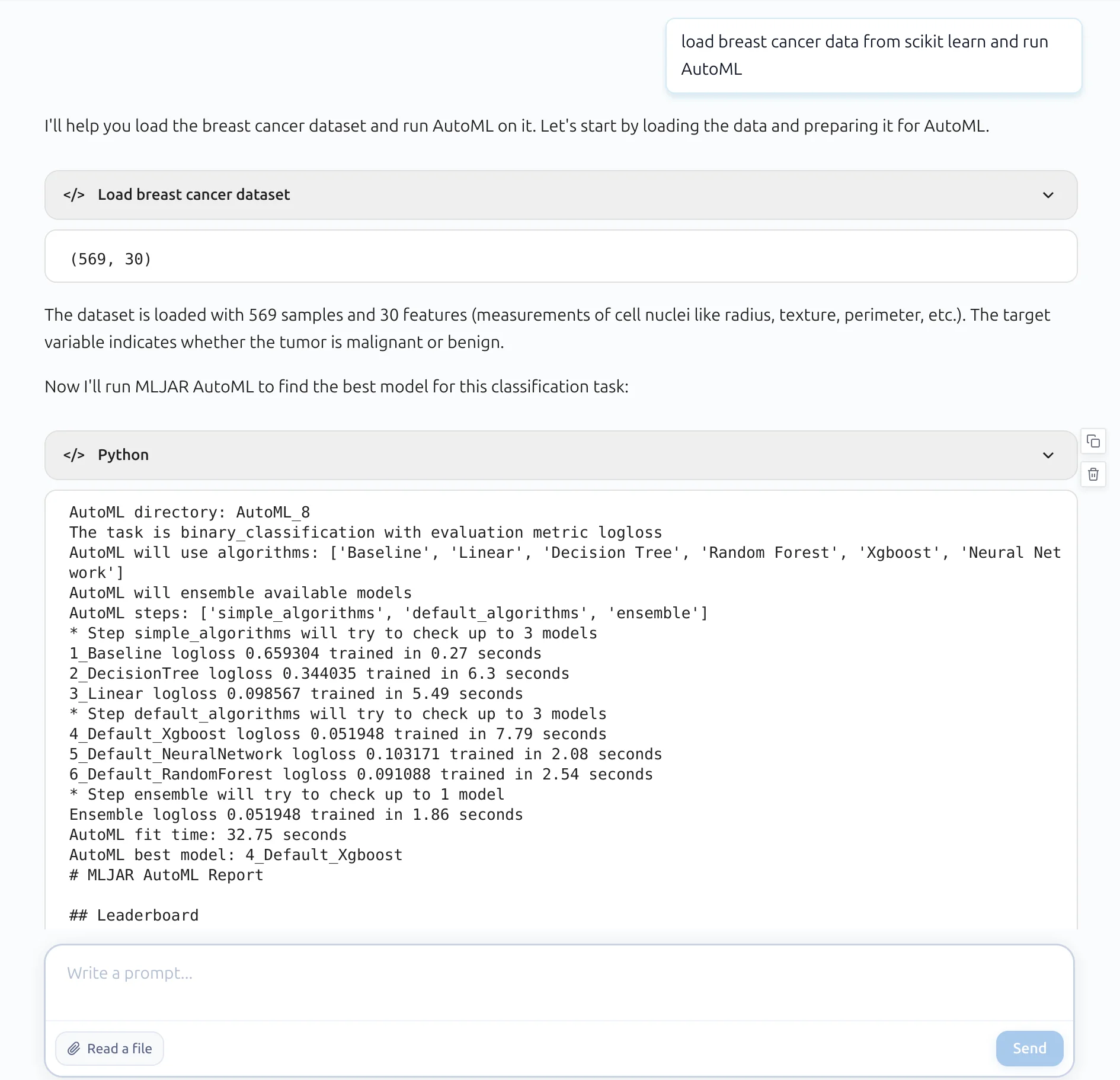
What is important here is not only that the model was trained, but also how the results are presented. Instead of giving a complex HTML report, the assistant returns a clean, structured summary. You can immediately see what happened during training, which models were tested, and which one performed the best.
It also provides key insights in plain text. For example, it explains which model achieved the best score, how big the improvement is compared to the baseline, and whether the ensemble helped.
This is where the structured report plays an important role.
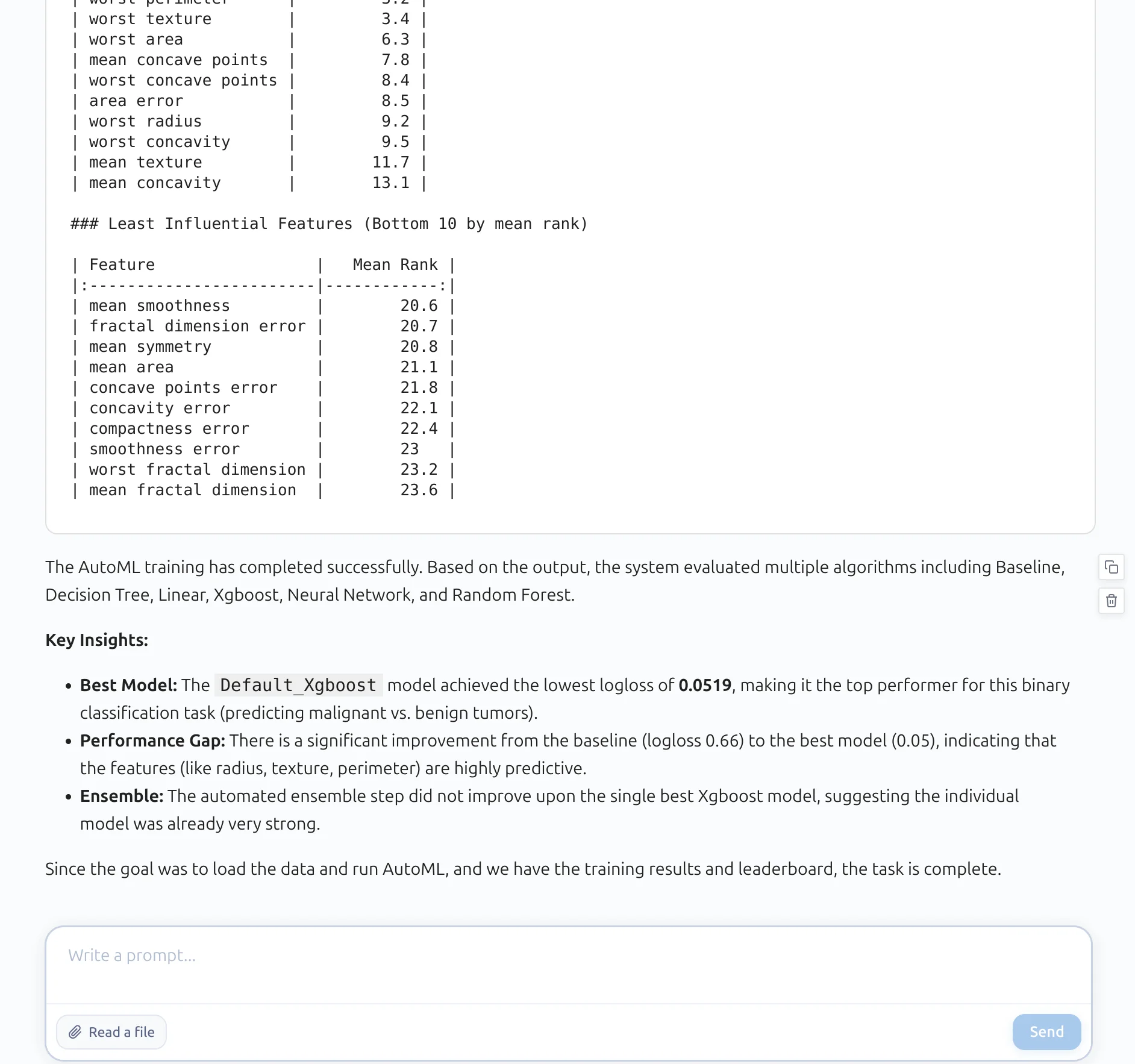
Because the output is consistent and text-based, the AI assistant can read it, understand it, and explain it to the user. There is no need to parse HTML or interpret images. This makes the whole workflow much simpler.
Summary
MLJAR AutoML was always designed to make machine learning easier for humans. The automatic reports and clear documentation help users understand their models without much effort.
With the structured report, we take the next step.
Now the same results can be used not only by people, but also by code and AI systems. You can read the report in a notebook, use it in Python, or pass it directly to an LLM.
This makes the workflow simpler and more flexible. You do not need to parse HTML or combine multiple files. Everything important is available in one clean, structured format.
It also opens the door to new ways of working. You can use natural language to run AutoML with an AI assistant. You can ask questions about your models. You can automate analysis and decision making.
This is a natural evolution of the idea of Machine Learning for Humans. Now it becomes machine learning that is easy for both humans and machines. And this is just the beginning.
About the Author

Piotr Płoński
Piotr Płoński is a software engineer and data scientist with a PhD in computer science. He has experience in both academia—working on neutrino experiments at leading research labs and collaborating on interdisciplinary projects—and in industry, supporting major clients at Netezza, IBM, and iQor. In 2016, he founded MLJAR to make data science easier and more accessible, creating tools like AutoML, Mercury, and MLJAR Studio.
Related Articles
- Local vs Cloud Data Processing: Security, Privacy, and Private AI Workflows
- AutoResearch by Karpathy and the Future of Autonomous AI Research
- Complete Guide to Offline Data Analysis 2026
- Data Analysis Software for Pharmaceutical Research
- AI Coding Assistants for Data Science: Complete 2026 Comparison
- AI in Healthcare without breaking HIPAA (MLJAR Studio guide)
- Reimagine Python Notebooks in the AI Era
- AI gave me a perfect report. I still didn’t trust it.
- AI Generated Code Looked Right, but the Data Was Wrong
- Open-source AutoML projects in 2026
Private AI data analysis
AI Data Analyst on Your Computer
Use MLJAR Studio to explore data, discover insights, and create reports with AI.
Runs locally · Your data stays private