
AI Coding Assistants for Data Science: Complete 2026 Comparison
Quick answer: AI coding assistants for data science vary in notebook support, privacy model, and ML depth. This guide compares top tools and where each one fits.
AI Coding Assistants for Data Science: Complete 2026 Comparison
Most AI coding tools for data science are cloud-only, meaning your code and data leave your machine. MLJAR Studio is the only fully local, offline-capable alternative — with one-time pricing, built-in AutoML, and flexibility to use any LLM including local models via Ollama.
If you are searching for the best AI coding assistant for data science in 2026, you have already discovered the market's core tension: convenience vs. control. Cloud-based tools like Julius.ai, Deepnote, and Hex offer fast collaboration and polished UIs. IDE assistants like GitHub Copilot and Cursor make general Python coding faster. But all of them send your code — and often your data — to external servers.
This guide compares seven tools across privacy architecture, notebook support, AutoML capabilities, offline operation, and real-world data science fit. We include a decision framework for four audience types: data scientists, ML engineers, quant finance professionals, and business analysts.
Tools covered:
- MLJAR Studio — local-first desktop AI data lab
- GitHub Copilot — market-dominant IDE assistant
- Cursor — fast-growing AI-native IDE
- Julius.ai — conversational data analysis
- Deepnote — collaborative cloud notebook
- Hex — full-stack analytics workspace
- ChatGPT Code Interpreter — quick sandbox analysis
1. Why privacy architecture matters before you compare features
Before evaluating any AI coding assistant for data science, you need to understand one architectural fact: every cloud-based AI feature works by sending your code context to a remote server. This includes file contents, variable names, dataframe samples, and sometimes the data itself. This is not a minor concern. Samsung banned ChatGPT internally after engineers pasted confidential source code into it. Pharmaceutical researchers have shared unpublished trial data with consumer AI tools. Quantitative trading firms regularly blacklist tools that cannot guarantee code stays local. Even tools with strong privacy policies — SOC 2 Type II, zero-retention agreements, GDPR compliance — still transmit data over the network. The security guarantee covers storage and training use, not transmission exposure.
The only way to guarantee data never leaves your machine is to run the AI locally. Only one tool in this comparison does that by default: MLJAR Studio.
→ Why local AI matters for data scientists | → MLJAR Studio privacy model
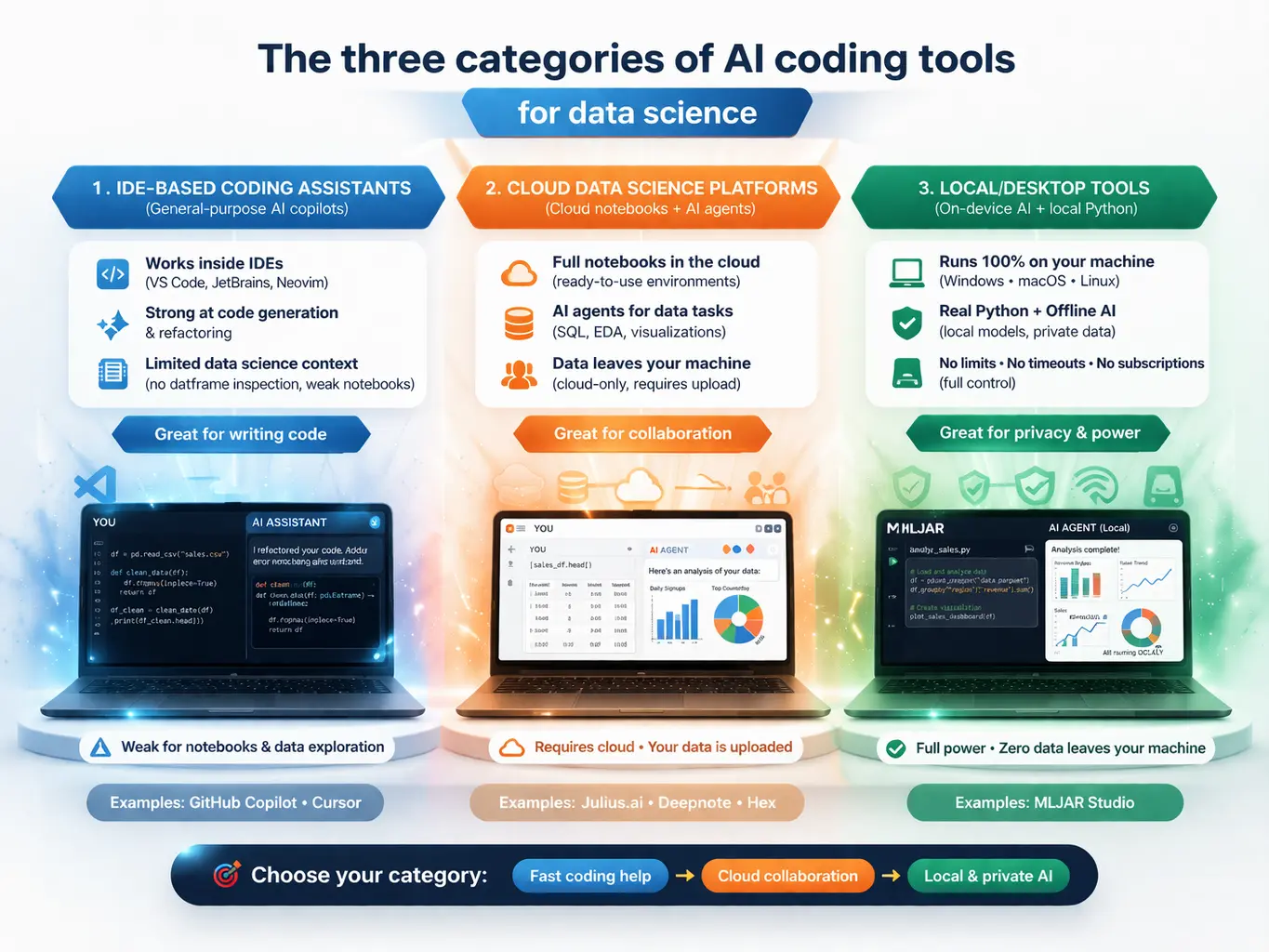
2. The three categories of AI coding tools for data science
Understanding where each tool fits architecturally helps you filter before you dive into features.
Category 1: IDE-based coding assistants (GitHub Copilot, Cursor)
General-purpose developer tools with Python support. Strong for writing functions, refactoring code, and multi-file edits. Weak for data-science-specific workflows: they cannot inspect running dataframes, render visualizations inline, or understand your analytical pipeline holistically. Notebook support ranges from adequate to unreliable.
Category 2: Cloud data science platforms (Julius.ai, Deepnote, Hex)
Purpose-built for data work, with notebook interfaces, database connectors, team collaboration, and AI assistants tuned for analytical queries. All three are fundamentally cloud services — your data is uploaded, processed, and stored on remote infrastructure. Strong for team collaboration and business analyst use cases. Weak for regulated industries, offline work, or large local datasets.
Category 3: Local/desktop tools (MLJAR Studio)
Runs on your machine. Executes real Python locally. Can operate entirely offline with local LLMs. No file size limits imposed by the vendor. No session timeouts. No subscription required to keep using what you paid for. Currently, the smallest category — MLJAR Studio occupies it nearly alone among purpose-built data science tools.
3. MLJAR Studio: the best local AI coding assistant for data science
What it is: A desktop application (Windows, macOS, Linux) that bundles a customized JupyterLab environment with AI agents, AutoML, and Mercury app deployment — all running 100% on your local machine.
Core value proposition: Your data never leaves your computer. You choose your AI provider. You pay once.
First released as v1.0.0 on March 5, 2026. As of March 23, 2026 the current version is v1.0.3.
What makes MLJAR Studio uniquely different
1. True offline capability with local LLMs. Connect Ollama to run open-source models like Llama 3, Mistral, or Qwen completely locally. Zero external network calls. This is the only tool in this comparison that works in air-gapped environments.
2. Flexible AI provider support. Four tiers of AI access:
- MLJAR AI — managed access to frontier models, no API key needed
- Bring Your Own Keys (free) — connect OpenAI
- Ollama (fully local) — run any open-source LLM on your hardware.
No other tool in this comparison offers this spectrum from fully local to fully managed.
3. Two AI agents for different users:
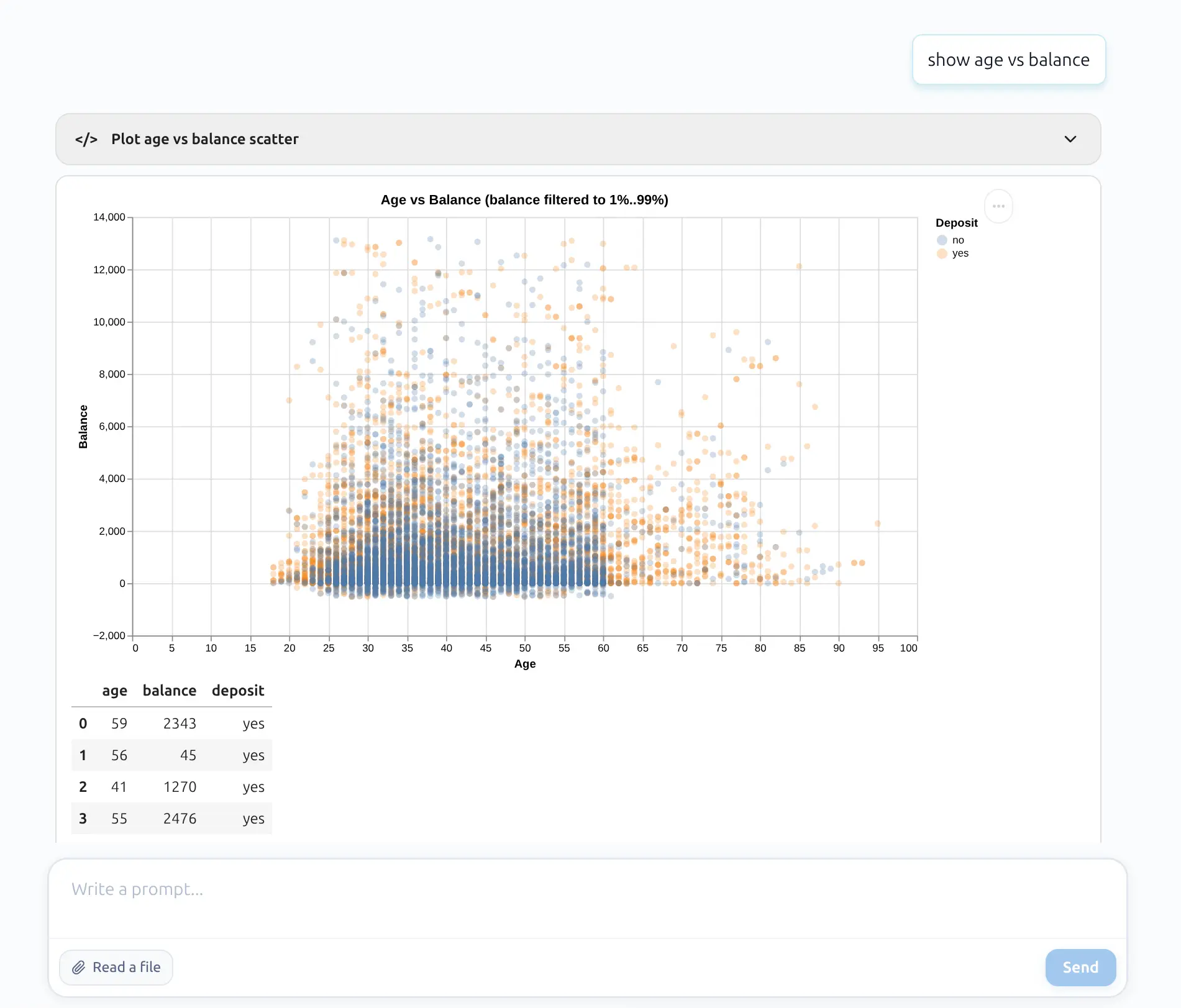
- AI Data Analyst — conversational analysis and visualization without showing code (for analysts)
- AI Code Assistant — shows Python code for review before execution (for data scientists)
4. AutoLab Experiments — autonomous ML experimentation. Define dataset, target, metric, and number of trials. AI agents iteratively build, evaluate, and improve ML solutions. Each trial saves as a reproducible .ipynb notebook. A dashboard tracks progress, best metrics, and run summaries.
5. Built-in AutoML via mljar-supervised. The underlying open-source AutoML library (3,200+ GitHub stars) automates preprocessing, feature engineering, algorithm selection (XGBoost, LightGBM, CatBoost, Random Forest, Neural Networks, and more), hyperparameter tuning, and stacking ensembles. Independent evaluations through 2025 rank mljar-supervised among the top-performing AutoML frameworks for tabular data.
6. Mercury integration — notebooks to web apps. Any MLJAR Studio notebook can be converted to an interactive web application (sliders, dropdowns, file uploads, chat widgets) using Mercury (4,000+ GitHub stars). No frontend coding required, easy deployment.
7. No file size limits. No session timeouts. Because everything runs locally, you are constrained only by your own hardware — not by vendor-imposed plan limits.
8. Standard .ipynb format. No vendor lock-in. Open your notebooks in standard JupyterLab, VS Code, or any Jupyter-compatible environment at any time.
Try MLJAR Studio: Download Studio → | See pricing →
4. GitHub Copilot: broadest reach, weakest data science fit
What it is: The market-dominant AI coding assistant, embedded across VS Code, JetBrains, Neovim, Visual Studio, GitHub.com, and more. Built by GitHub (Microsoft) and powered by a rotating cast of frontier models.
AI models available: GPT-5 family, Claude Sonnet 4/4.5, Gemini 2.5/3 Pro, Grok.
For data science: Copilot provides inline Python completions and chat-based help within Jupyter notebooks via VS Code's Jupyter extension. It generates competent code for pandas, matplotlib, and scikit-learn. However, it cannot inspect running dataframes, understand the analytical flow of a notebook, or render visualizations. Its agent mode targets software engineering workflows — multi-file edits, pull requests — not data exploration.
Privacy: Business/Enterprise plans guarantee code is not used for AI training, with zero-data-retention agreements. Free and Pro users have weaker guarantees. SOC 2 Type II certified. All AI features require internet.
Best for: Python developers who spend most of their time in .py files and need general-purpose AI autocomplete. Not the right primary tool for exploratory data analysis or ML pipeline work.
5. Cursor: the developer darling struggling with notebooks
What it is: A VS Code fork with AI embedded at every level — inline completions (Tab), multi-file Agent mode, and a codebase-aware chat. Backed by $900M at a ~$9B valuation.
For data science: Cursor 1.0 (late 2025) added the ability for its Agent to create and edit Jupyter notebook cells. In practice, many data scientists still report that AI features hang, fail silently, or cannot apply edits reliably on .ipynb files. A common workaround is using .py files with # %% markers. Cursor cannot render charts inline — visualizations open as separate pop-up windows.
Privacy: Code context routes through Cursor's AWS backend even when using your own API keys. Privacy Mode Legacy provides zero data retention. SOC 2 Type II certified. No local LLM support.
Best for: Software engineers who occasionally write data science code and want the strongest general-purpose AI editor. Not recommended as a primary data science workbench.
6. Julius.ai: fast path from CSV to insight
What it is: A cloud-based conversational data analysis tool with 2 million+ users. Upload data, ask questions in plain English, receive charts and written analysis. No coding required.
AI models available: GPT-5.3, Claude Sonnet 4.5, Gemini, Mistral (model picker available on Pro).
For data science: Julius excels at rapid, conversational data exploration with extensive visualization support (Plotly, Bokeh, 20+ chart types). Pro plans connect to Snowflake, BigQuery, PostgreSQL, Google Drive, and SharePoint. Users can view, edit, and export generated Python or R code. The Business plan adds scheduled reports and semantic learning.
Privacy: SOC 2 and GDPR compliant. Data auto-deleted after 1 hour (free) or 7 days (paid). Not used for model training. Security portal: trust.julius.ai.
Limitations: Entirely cloud-based — no offline mode, no desktop client. Analysis-only (cannot take action on insights). No real automation or pipeline scheduling on lower tiers. Limited for power users who need formula control or custom model training. The $45→$450 jump between Pro and Business is steep.
Best for: Business analysts and non-technical users who need fast answers from data without writing code. Poor fit for ML engineers building production pipelines.
7. Deepnote: collaborative notebook
What it is: A collaborative cloud notebook platform used by 500,000+ data professionals. Positions itself as the "successor to Jupyter Notebook." Went open source in 2025, releasing a new .deepnote format with extensions for VS Code, Cursor, and JupyterLab.
For data science: AI features include code completion (Codeium-powered), natural language code generation, an Auto AI agent that writes/runs/debugs autonomously, and a Deepnote Agent for co-authoring notebooks. Supports Python, R, and SQL. 100+ native database integrations. Real-time multiplayer collaboration, version history, and one-click data app deployment. The open-source CLI version supports local notebook execution — but AI features require cloud connectivity.
Privacy: SOC 2 Type II on all plans. AI via OpenAI and Anthropic; data not used for model training. Admins can disable AI data sharing. OpenAI may retain context for up to 30 days for safety monitoring. HIPAA and bring-your-own-LLM on Enterprise.
Limitations: Per-editor pricing escalates quickly — 10 editors = $390-490/month. Free tier is severely limited. AI context awareness across an entire notebook is weak according to user reviews.
Best for: Data teams needing real-time collaboration, version history, and one-click dashboards. Per-editor pricing makes it expensive for larger teams.
8. Hex: complete analytics workspace, premium price
What it is: A full-stack analytics platform combining notebooks, BI dashboards, data apps, and AI agents. Founded by ex-Palantir engineers. $172M in total funding including a $70M Series C (May 2025, a16z + Sequoia + Snowflake Ventures). Used by Reddit, Anthropic, Cisco, Figma, and the NBA.
For data science: Four AI agents: Notebook Agent (generates/edits SQL, Python, chart, pivot cells), Threads (launched Fall 2025 — conversational self-serve analytics via Slack for non-technical users), Chat with App (AI on published dashboards), and Modeling Agent (semantic layer generation). Powered by Claude Sonnet 4.5. Context Studio gives admins control over AI behavior via workspace rules and endorsed data.
Privacy: SOC 2 Type II and HIPAA compliant. AI providers have zero training and zero retention policies. Enterprise BYOK (beta) routes through customer-owned API keys. Single-tenant deployment available. Regular pen testing + HackerOne bug bounty.
Limitations: Cloud-only with no offline capability. Editor-based pricing compounds at scale. Limited R support. Can be slow with very large notebooks. No mobile app.
Best for: Analytics engineering teams that need governed SQL + Python notebooks with embedded BI and AI-powered self-serve analytics for stakeholders. Overkill and overpriced for individual data scientists.
9. ChatGPT Code Interpreter: quick and disposable
What it is: OpenAI's Advanced Data Analysis feature inside ChatGPT. Upload a file, describe what you want, and GPT-5.4 writes and executes Python in an isolated sandbox.
For data science: Excellent for one-shot exploratory analysis and quick visualizations. GPT-5.4's reasoning quality is among the strongest available. But the structural limitations are severe: no internet access in the sandbox, no session persistence (files and variables vanish), no database connections, 512 MB file limit, 50 MB spreadsheet limit, and no collaboration features. Individual plan conversations may be used for model training unless opted out.
Best for: Quick throwaway analysis, prototyping statistical approaches, explaining existing datasets to non-technical stakeholders. Not suitable as a primary data science environment.
10. Complete comparison table: all 7 tools side by side
| Dimension | MLJAR Studio | GitHub Copilot | Cursor | Julius.ai | Deepnote | Hex | ChatGPT Code Interpreter |
|---|---|---|---|---|---|---|---|
| Type | Desktop AI data lab | IDE extension | AI-native IDE | Cloud data analyst | Cloud notebook | Cloud analytics | Chat sandbox |
| Works offline (AI) | Yes — fully local with Ollama | ❌ | ❌ | ❌ | ❌ | ❌ | ❌ |
| Data stays local | Always | ❌ | ❌ | ❌ | ❌ | ❌ | ❌ |
| LLM flexibility | OpenAI, Ollama, Qwen | GPT, Claude, Gemini, Grok | GPT, Claude, Gemini, Grok | GPT, Claude, Gemini, Mistral | GPT, Claude, Codeium | Claude Sonnet 4.5 | GPT-5.4 only |
| Jupyter notebooks | Native .ipynb | Via VS Code | Improving, unreliable | No (proprietary) | Native | Proprietary | No (ephemeral) |
| AutoML | Yes (mljar-supervised + AutoLab) | ❌ | ❌ | Limited | ❌ | ❌ | ❌ |
| Autonomous ML experiments | Yes (AutoLab) | ❌ | ❌ | ❌ | Partial | Partial | ❌ |
| Real-time collaboration | ❌ | Via Live Share | ❌ | Shared sessions | ✅ multiplayer | ✅ multiplayer | ❌ |
| Deploy notebooks as apps | Yes (Mercury) | ❌ | ❌ | ❌ | Yes | Yes | ❌ |
| File size limits | No limits | N/A | N/A | Plan RAM | Plan compute | Plan compute | 512 MB |
| Session persistence | Permanent (local) | N/A | N/A | Session-based | Persistent | Persistent | Lost on session end |
| SOC 2 Type II | N/A (local) | ✅ | ✅ | ✅ | ✅ | ✅ | Aligned |
| HIPAA | N/A (local) | ❌ | ❌ | ❌ | Enterprise only | Enterprise add-on | Enterprise BAA |
11. Who should use what: decision guide by role
For data scientists and ML engineers
MLJAR Studio is the strongest choice if you work with sensitive data, need AutoML, want reproducible experiments, or work offline. Deepnote is the best cloud alternative if you need real-time team collaboration and strong database integrations. Cursor is a viable secondary tool for writing utility scripts and modules outside the notebook environment.
For quant finance professionals
MLJAR Studio is the only defensible choice. Sending trading strategies, factor models, or alpha signals to cloud servers is an unacceptable security risk at most quantitative firms. Full local execution with Ollama allows complete air-gapped operation. The mljar-supervised AutoML works well for time-series feature engineering and tabular prediction tasks common in quantitative strategies.
→ Using MLJAR Studio for stock prediction and quantitative analysis- ready to use prompts
For business analysts
Julius.ai is the most accessible entry point — no coding required, fast visualizations, natural language interface. If your organization already uses Deepnote or Hex for data engineering, their built-in AI features (Auto Agent, Threads) serve this use case well. ChatGPT Code Interpreter works for quick ad-hoc analysis. MLJAR Studio's AI Data Analyst mode covers this use case locally.
12. Frequently asked questions about AI coding assistants for data science
What is the best AI coding assistant for data science in 2026? It depends on your priorities. For privacy, offline work, MLJAR Studio is the strongest choice — it's the only fully local AI data science tool. For team collaboration and database connectivity, Deepnote or Hex are better fits. For non-technical users, Julius.ai offers the lowest barrier to entry.
Which AI data science tools work offline without an internet connection? MLJAR Studio is the only tool in this comparison that can operate fully offline. When configured with a local LLM via Ollama or Qwen, it requires no internet connection for any feature. All other tools — GitHub Copilot, Cursor, Julius.ai, Deepnote, Hex, and ChatGPT — require internet access for AI functionality.
What is a good Julius.ai alternative for local or private data analysis? MLJAR Studio is the closest feature-equivalent with full local execution. It offers a conversational AI Data Analyst mode similar to Julius.ai, plus Python notebook access, AutoML, and the ability to run completely offline. For teams that need collaboration features, Deepnote offers similar analytical capabilities with stronger privacy controls than Julius.
How does MLJAR Studio protect my data? MLJAR Studio is a desktop application that runs all computations locally on your machine. No data is uploaded to MLJAR servers. When using bring-your-own API keys, requests are sent directly to those providers under your own account's privacy terms. When using Ollama or local LLMs, zero network requests are made — a complete air-gapped operation.
What AI models does MLJAR Studio support? MLJAR Studio supports OpenAI, Ollama (Llama 3, Mistral, Qwen, and 100+ open-source models). The MLJAR AI add-on ($49/month) provides managed access to frontier models without requiring individual API key configuration.
How does MLJAR Studio compare to Deepnote for a solo data scientist? For a solo data scientist, MLJAR Studio wins on privacy (fully local), offline capability, and AutoML. Deepnote wins on collaboration features. If you work alone with sensitive data or need to control costs, MLJAR Studio is the better fit. If you need to share notebooks with teammates, Deepnote is more practical.
The verdict
The AI coding assistant market for data science has matured rapidly through 2025-2026. Tools have added multi-model support, agentic capabilities, and increasingly autonomous workflows. But a fundamental architectural divide has emerged:
Cloud-first tools (Julius.ai, Deepnote, Hex) offer convenience, collaboration, and database connectivity. IDE assistants (GitHub Copilot, Cursor) accelerate Python coding but were not designed for the notebook-centric, exploratory nature of data science work. ChatGPT Code Interpreter is the fastest way to get a quick answer from a CSV, but cannot support professional workflows.
MLJAR Studio occupies a category of one: a desktop-native, privacy-first AI data lab with genuine offline capability, flexible LLM support from fully local to fully managed, built-in AutoML. It’s built for modern data professionals who want the best of both worlds: advanced AI assistance and complete ownership of their data, workflows, and costs.
Ready to try the only local AI data science tool? Download MLJAR Studio → Compare plans and pricing →
About the Author

Related Articles
- AI Ethics and Responsible Data Science: Building Fair and Private Machine Learning Systems
- Local vs Cloud Data Processing: Security, Privacy, and Private AI Workflows
- AutoResearch by Karpathy and the Future of Autonomous AI Research
- Complete Guide to Offline Data Analysis 2026
- Data Analysis Software for Pharmaceutical Research
- Machine Learning for Humans and LLMs: Structured AutoML Reports in Python
- AI in Healthcare without breaking HIPAA (MLJAR Studio guide)
- Reimagine Python Notebooks in the AI Era
- AI gave me a perfect report. I still didn’t trust it.
- AI Generated Code Looked Right, but the Data Was Wrong
Private AI data analysis
AI Data Analyst on Your Computer
Use MLJAR Studio to explore data, discover insights, and create reports with AI.
Runs locally · Your data stays private